The Analytics Replica Pattern: The Shortest Path to Data-Grounded AI
Spice AI
Engineering
Analytics

Ben Chambers
Member of Technical StaffJuly 29, 2026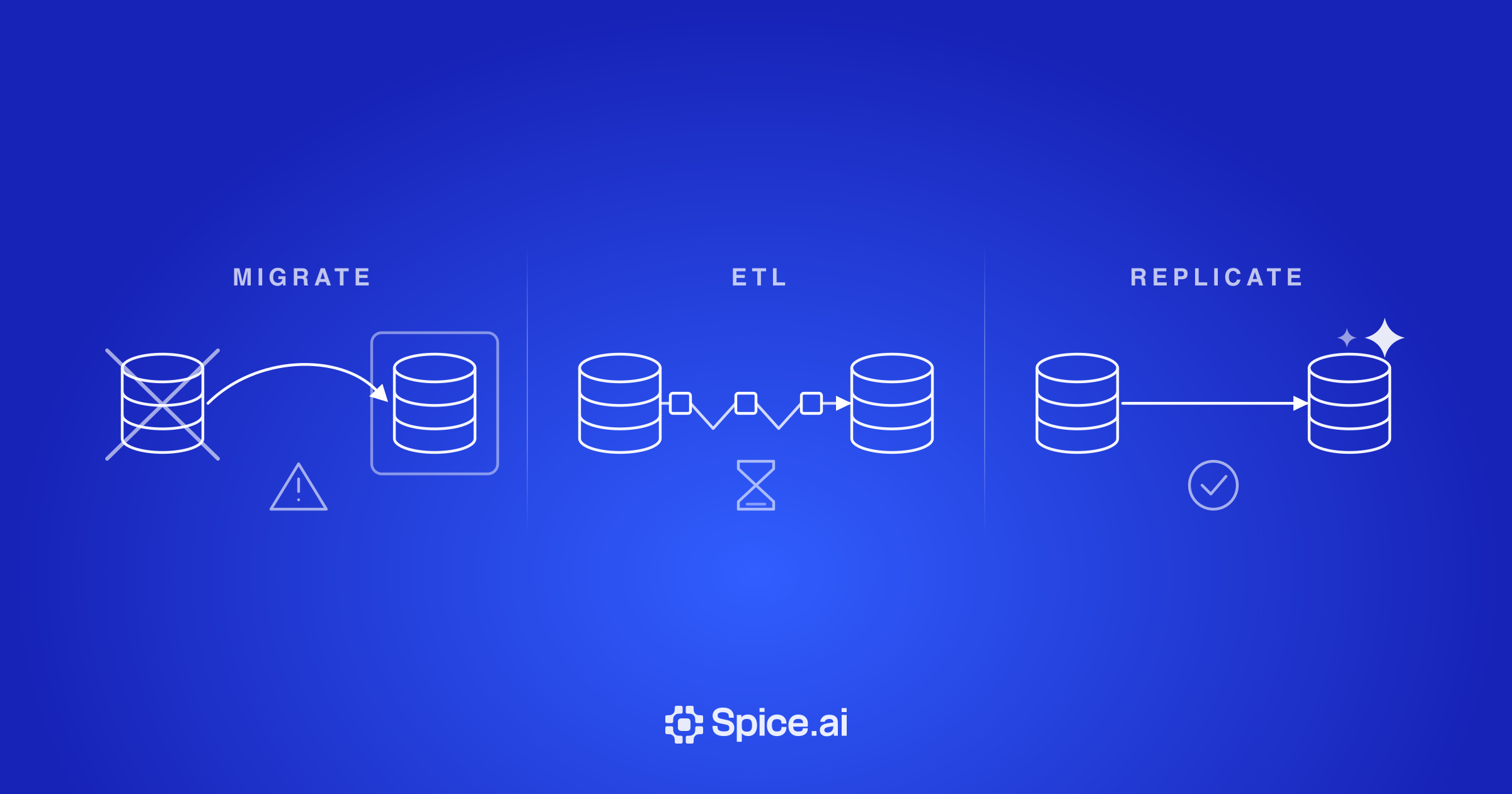
TL;DR: An analytics replica is a columnar copy of an operational database that serves analytical queries from AI agents and dashboards, so the production database keeps serving transactions without the extra load. Spice attaches to existing PostgreSQL, MySQL, and MongoDB databases, replicates committed changes from the native changelog within seconds, and enforces row- and column-level access policies at query time. In the demo in this post, a million-row aggregation that takes Postgres one minute runs on the replica in three seconds.
Introduction
Your operational database is essential to your business. It has been battle-tested and hardened over time to meet your needs. Now, you want to enable AI to answer questions over your operational data. Questions like: Which customers churned today? Which orders are delayed? What inventory is available right now? These analytical queries scan many rows at once, but cause issues when directed at operational databases optimized for the opposite - updating individual records quickly. Running analytical queries directly on production databases is a liability.
The analytics replica pattern deploys a logical replica alongside your operational database that absorbs the analytical load, so mission-critical operational databases keep serving transactions without being impacted by analytical queries. Analytics replicas can be deployed in minutes and are incrementally adoptable, a table or database at a time.
Real-time analytics on operational data
ETL pipelines have been traditionally used to export data from operational stores and load it into a data warehouse or data lake for analytical queries. This is costly to build, deploy and operate. And even when running, ETL often introduces significant latency between when transactions happen and when they are available to query.
Hybrid stores, like Databricks' LTAP, attempt to unify transactions and analytics in one platform, but require often costly migrations of your operational data to them. And using a single system for both operational data and analytics means coupling scaling, failure-domains, and tuning.
The analytics replica pattern is the fastest, incrementally adoptable path to analytical queries on your operational data.
What use cases does the analytics replica pattern enable?
An analytics replica is useful whenever an application, dashboard, or AI agent needs to query the current state of the business without impacting the production database.
These workloads need faster access to operational data than an ETL pipeline provides, and their access patterns (e.g. scan-heavy queries, joins, or aggregations) are too heavy to run on a production database. And agents that run in loops 24/7 introduce new demanding workloads far beyond the scale of the app and dashboard era.
Examples include:
- Customer-facing agents: Agents answering analytical queries like 'What invoices are overdue?' require governed and sandboxed access to real-time operational data.
- Fraud and anomaly detection: Fraud detection in financial services comparing transactions against recent customer behavior, merchant activity, or historical baselines.
- Real-time dashboards: Business teams monitoring real-time operational analytics like today's revenue or open orders, without competing with production traffic.
- Inventory and supply-chain tracking: Applications rolling up stock and in-flight shipments across locations while transactions continue in the system of record.
- IoT and device monitoring: Field operators assessing variance between live readings and per-device baselines to catch drift or outages.
In each case, the analytics replica pattern gives applications and agents isolated query into live operational state without production databases in the query path.
Why use Spice as an analytics replica?
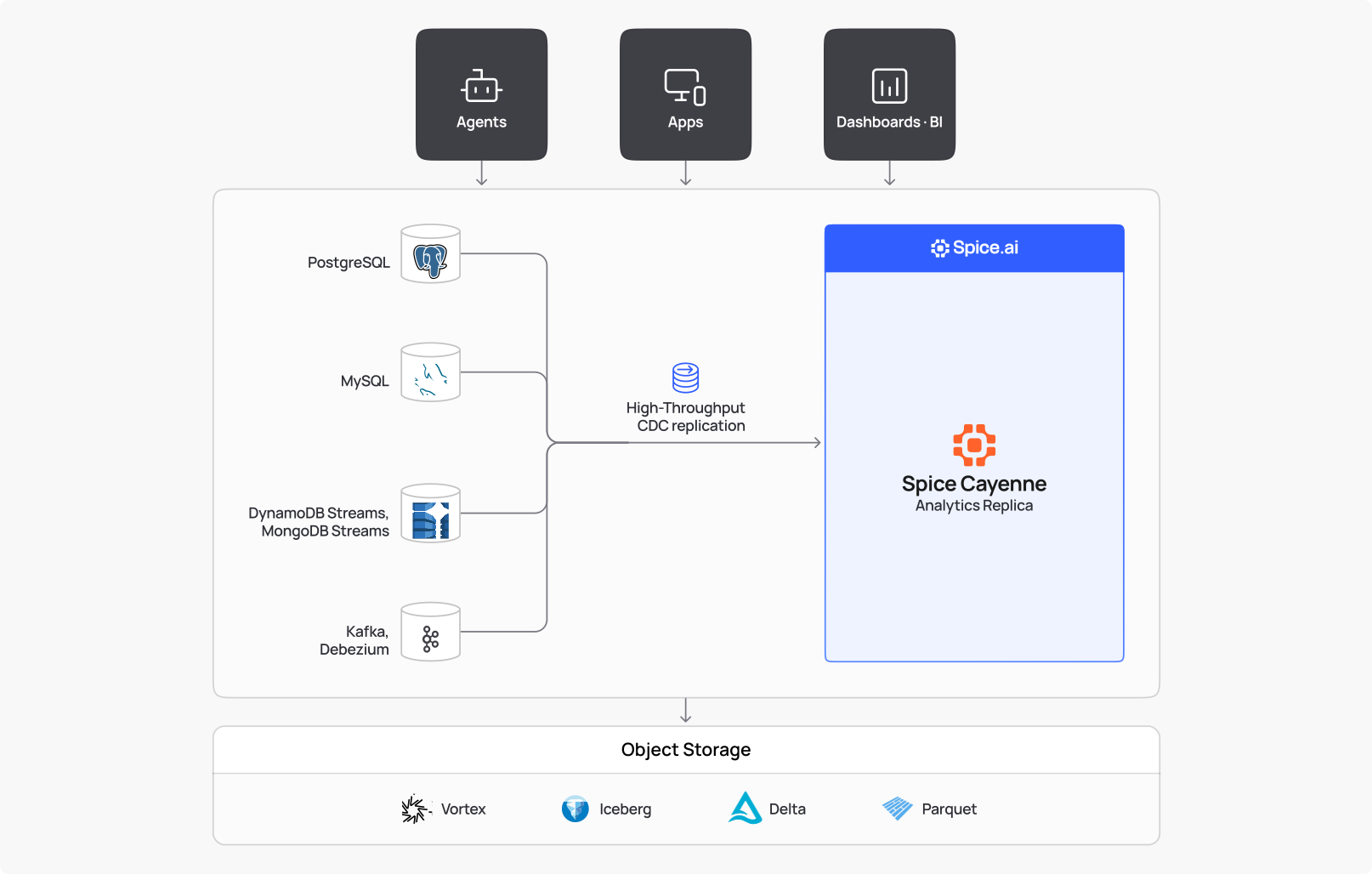
Figure 1: Analytics replica with Spice.
Spice makes it easy to implement this pattern: attach a replicating analytics node to your existing operational databases including PostgreSQL, MySQL, and MongoDB without ETL or migration.
High-throughput Replication. When Spice starts, it loads a snapshot of the source and then continuously replicates changes from the database's native changelog (e.g. PostgreSQL's write-ahead log, MySQL binlog, etc.) and applies changes as they are committed. There's no batch interval; a committed change is replicated within seconds. Spice Cayenne, the premier ingestion and acceleration engine in the Spice runtime, makes this replication fast - providing up-to-the-second freshness.
Optimized for analytics. Spice is built on Apache DataFusion and Vortex for high-performance execution of analytical queries. Spice Cayenne ensures query execution is fast even over rapidly changing datasets.
Policy-enforced, isolated, and auditable. Row and column-level filtering is enforced at query time, in the replica. Each agent or user sees only the tables, rows, and columns it is permitted to see, and clients authenticate with a Spice token rather than the credentials to the underlying database. Every query is traced making it easy to audit what agents are doing with your data. The replica runs on its own storage and compute. An agent can issue concurrent aggregations without producing load on production databases.
Figure 2: One committed update reaches the Cayenne table through logical replication, and the agent's aggregate runs on the replica, so Postgres serves only its transactions and the replication stream.
The demo below deploys an analytics replica against Postgres in under two minutes, and then runs a million-row aggregation that takes Postgres one minute, and the replica three seconds:
Spice Cayenne: Analytical query built for fast ingest
Row-based stores like PostgreSQL and MySQL are optimized for small writes and column-based stores for analytical scans. Analytics replicas have to do both - ingest a continuous change stream and serve fast analytical queries over the same data.
Spice Cayenne does this by a tiered write path built on sequence-ordered visibility, pushed-down deletion vectors, and merge-on-read (like Iceberg or Delta Lake), optimized for high-throughput ingestion, even for small writes.
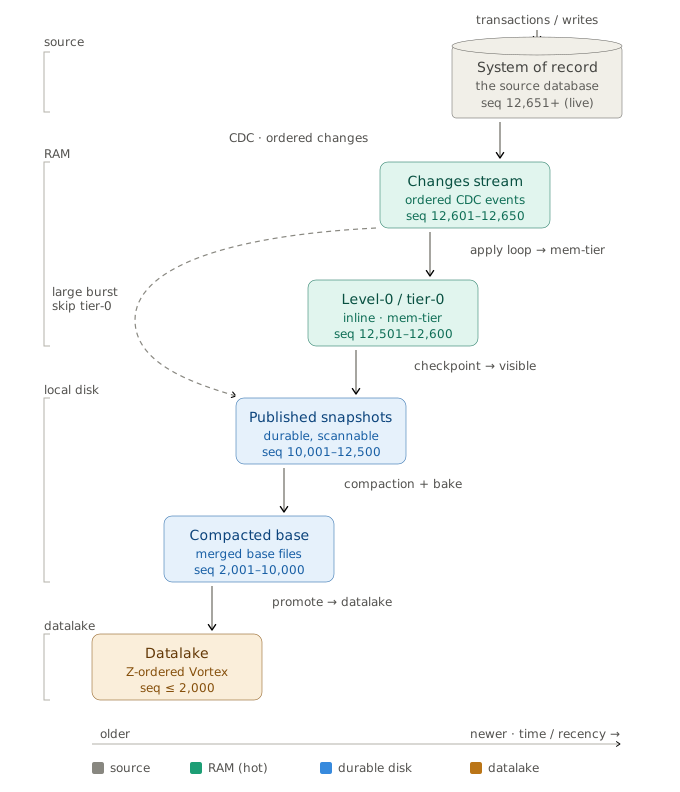
Figure 3: Replication lifecycle in Spice.
Fast query with constant writes. Cayenne uses a tiered write path: changes land in an in-memory tier, compact into warm Vortex files locally, and eventually land in object storage. Queries span all tiers, so data is visible in seconds while scaling to petabytes.
Ingestion without impacting query performance. Queries stay fast and correct under frequent writes because incoming data is first ingested, then made visible by a single atomic pointer flip.
Compaction for read performance. As data accumulates in tiers, it is compacted - rewritten into larger files with deletions applied and statistics recomputed. Spice stages these changes and commits them atomically, so every query sees consistent versions of the data.
Cayenne is the secret sauce behind the pattern. In a follow-up post, we'll take a look under the hood in a technical deep dive on Cayenne ingestion - including decoupled read and write paths, in-memory ingestion tier, compaction model, and update/delete handling.
Availability and Pricing
Support for PostgreSQL, MongoDB, and DynamoDB is available today, with MySQL shipping in August. If there's a specific database you'd like to see supported, please reach out. We're adding sources regularly and prioritize based on customer demand.
Analytics replicas follow the same billing model as the rest of Spice Cloud: you pay for the vCPUs your workload consumes. See Spice Cloud pricing for what's included for each plan.
Try It
Deploy a replica in less than 5 minutes:
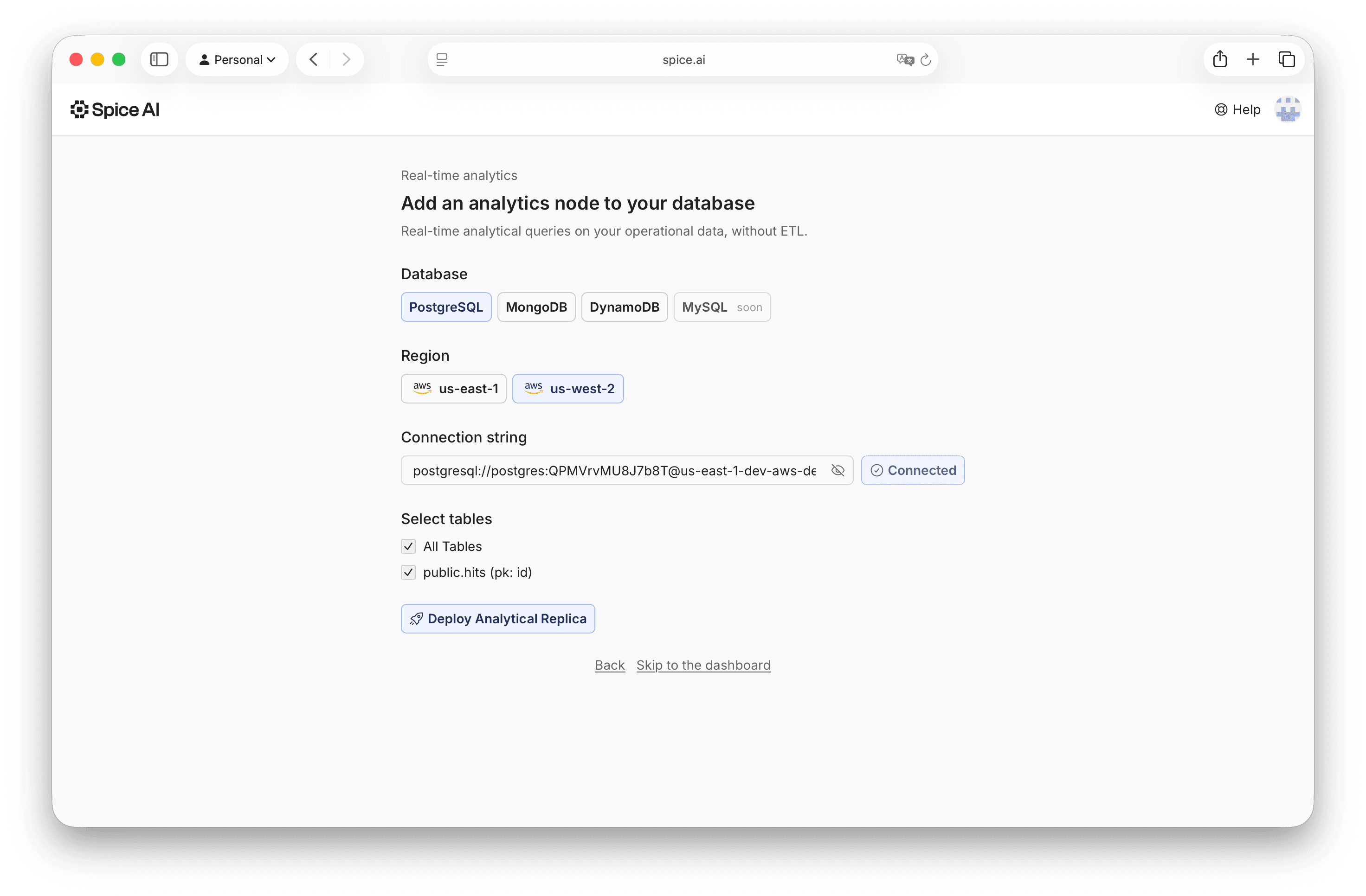
Figure 4: Add an analytics node in Spice Cloud.
- Select an operational database to replicate.
- Select a region to deploy to.
- Add your database connection string.
- Select the tables to replicate.
That's it!
Don't just take our word for it. Give it a try in Spice Cloud, and reach out with any questions in the Spice Community Slack.
Frequently Asked Questions
How is an analytics replica different from a read replica?
A read replica runs the same row-oriented engine as the primary, so it has the same limits on scan-heavy analytical queries. An analytics replica stores the replicated data in a columnar engine built for aggregations, joins, and large scans. Spice uses Apache DataFusion and Vortex for analytical execution. Both offload work from the primary, but only the analytics replica changes the storage and execution model to fit analytical workloads.
How is the analytics replica pattern different from ETL into a data warehouse?
ETL exports data on a schedule into a separate warehouse. This adds a pipeline to build and operate, and it delays when a transaction becomes queryable. An analytics replica replicates directly from the database's changelog, so committed changes are queryable within seconds and there is no pipeline to maintain. It is also incrementally adoptable: start with one table rather than migrating a whole schema.
How is an analytics replica different from an HTAP database?
Hybrid (HTAP) stores unify transactions and analytics in one platform, but they typically require migrating operational data to them. A single system also couples scaling, failure domains, and tuning for both workloads. An analytics replica attaches to the operational database you already run, keeping the two workloads on separate storage and compute with independent failure domains.
Do I have to replicate the entire database?
No. The pattern is incrementally adoptable: replicate a single table, a set of tables, or a whole database, and expand as needs grow. In Spice Cloud you select the tables to replicate when adding an analytics node.
Can AI agents safely query an analytics replica?
Yes. The replica is the isolation boundary. Spice enforces row- and column-level filtering at query time, and agents authenticate with a Spice token rather than database credentials. Spice traces every query for audit, which gives agents sandboxed access to operational data. Because the replica runs on its own storage and compute, agent query loops never add load to the production database.
How fresh is the data in an analytics replica?
Committed changes are replicated within seconds; Spice applies changes continuously from the database's native changelog with no batch interval. See change data capture for how log-based replication achieves this freshness without polling the source.


