MCP gateway for AI agents, tools, and live data
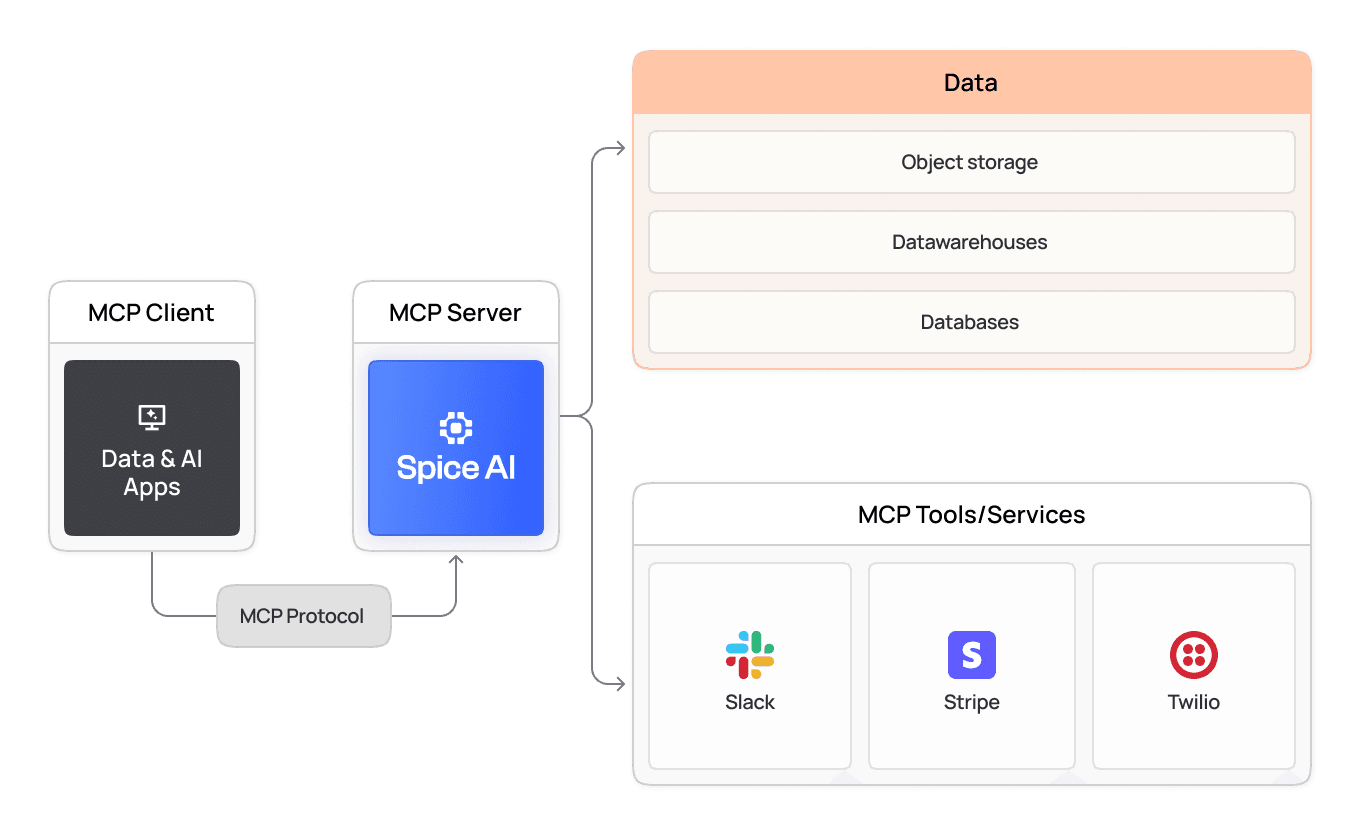
Spice is an MCP gateway: it connects to Model Context Protocol (MCP) servers over stdio or Streamable HTTP and serves their tools, plus SQL and search over your datasets, through one authenticated /v1/mcp endpoint. The gateway is part of the open-source Spice runtime.
Do more with your data
Increase the reliability, performance, and security of data-driven AI workflows.
100x
up to 100x faster queries
80%
up to 80% cost savings on data lakehouse spend
2x
increase in data reliability for critical workloads
Local and remote MCP servers
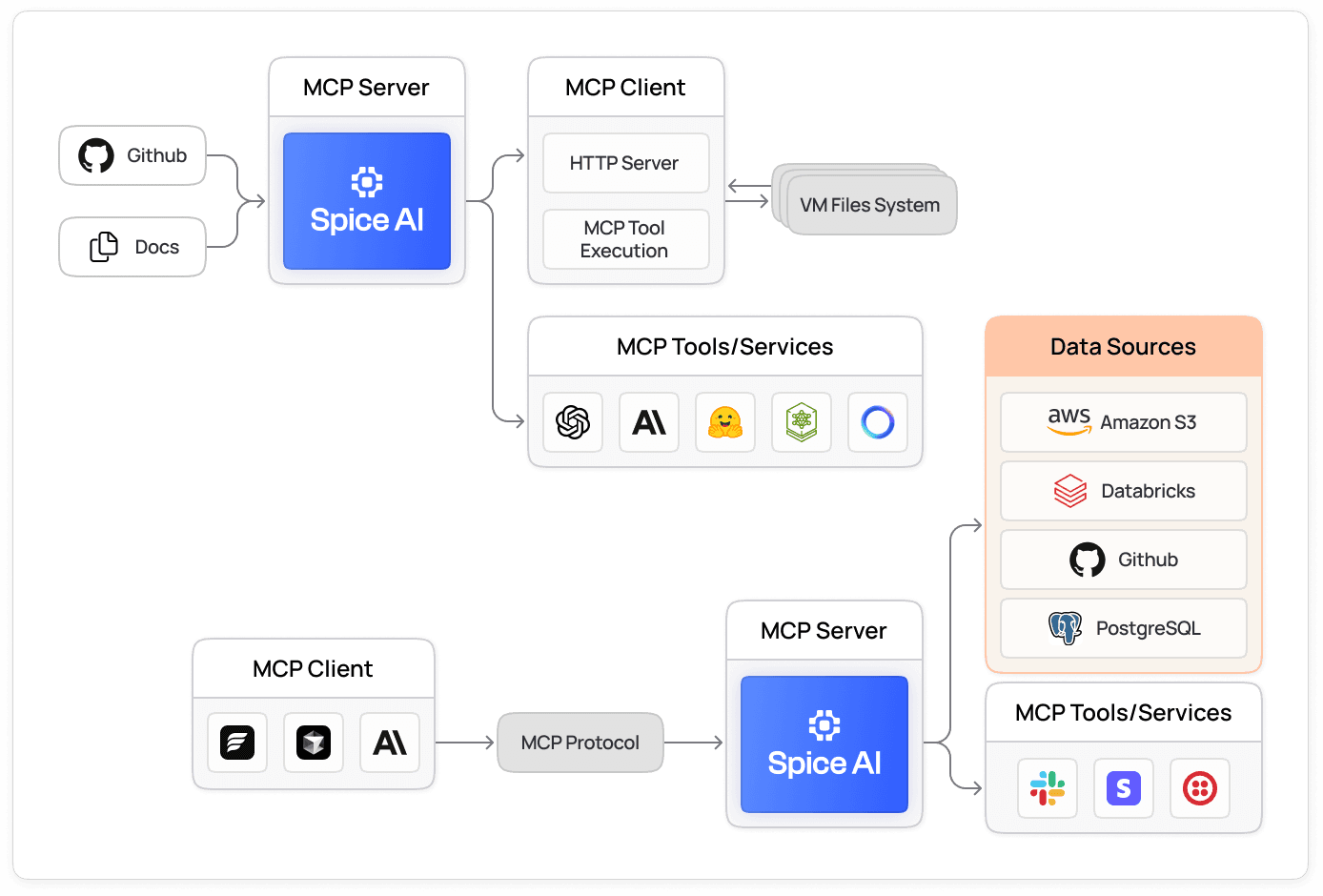
Run stdio MCP servers as Spice subprocesses with mcp:npx, mcp:uvx, or mcp:docker, or connect to remote MCP servers over Streamable HTTP with a bearer token or custom headers resolved from a secret store.
View the docs
One catalog from many MCP servers
Spice merges every configured MCP server into one tool catalog and prefixes each proxied tool with its server name, such as github__search_code. A server that fails to start does not stop the runtime: Spice logs a warning, retries in the background, and leaves that server out of the catalog until it connects.
View the docs
Tools and data in one endpoint
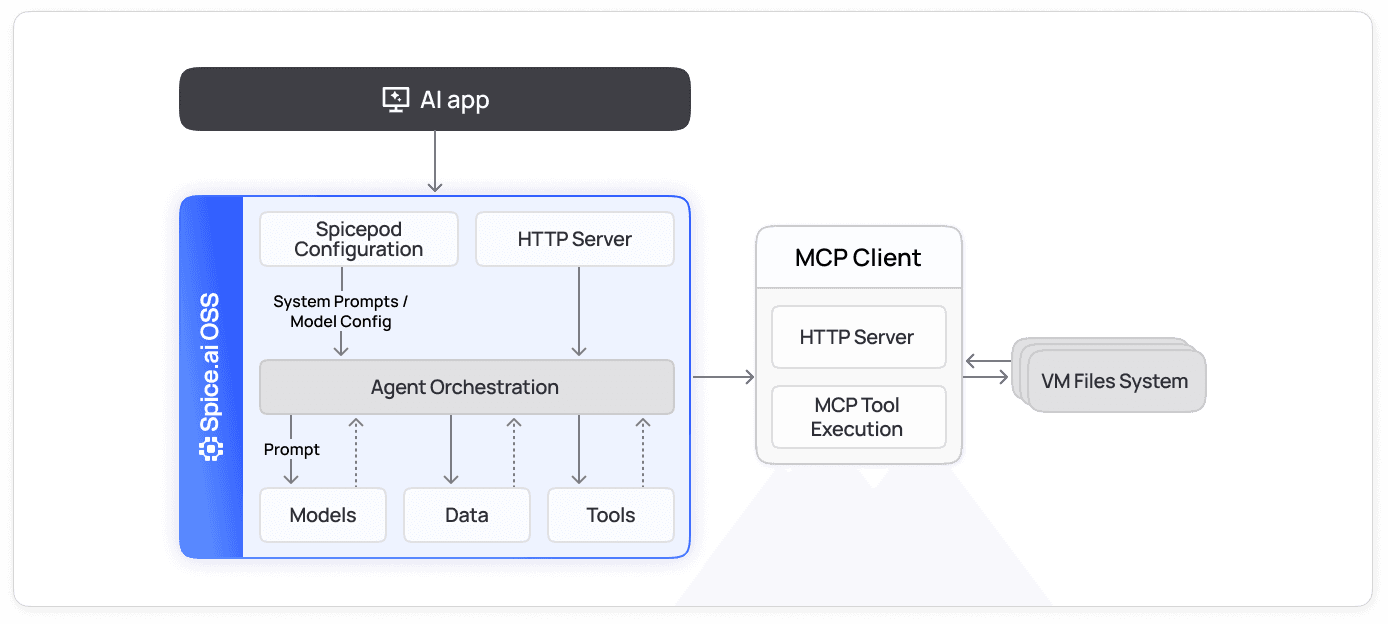
The catalog includes the built-in sql, list_datasets, table_schema, and search tools, so an agent can call an MCP tool and query federated or accelerated data in the same session. Other Spice instances and MCP clients such as Claude Code and Cursor connect to /v1/mcp.
View the docs
Per-model tool access and tracing
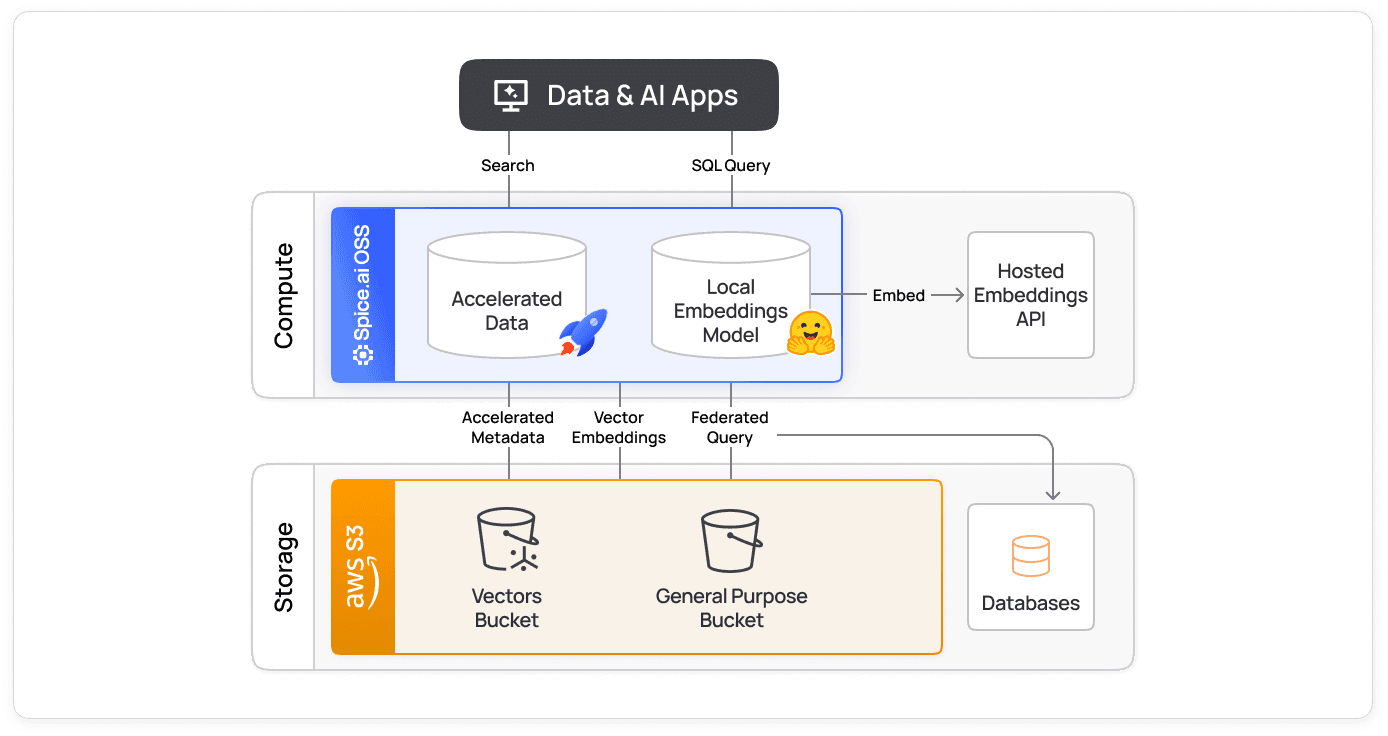
Each model gets only the tools or tool groups named in its tools parameter. Each tool call a model makes in Spice is recorded in the spice.runtime.task_history table as a task named after the tool, such as tool_use::github__search_code, under the trace ID of the chat request, so an agent run can be traced from prompt to tool result.
View the docs
Integrations across all your data sources
The sql tool reaches any dataset Spice connects to through its 40+ prebuilt connectors for databases, warehouses, and object stores, from Databricks and S3 to MySQL and PostgreSQL. The search tool covers the datasets configured with embeddings or a full-text index.

How does Spice work as an MCP gateway?
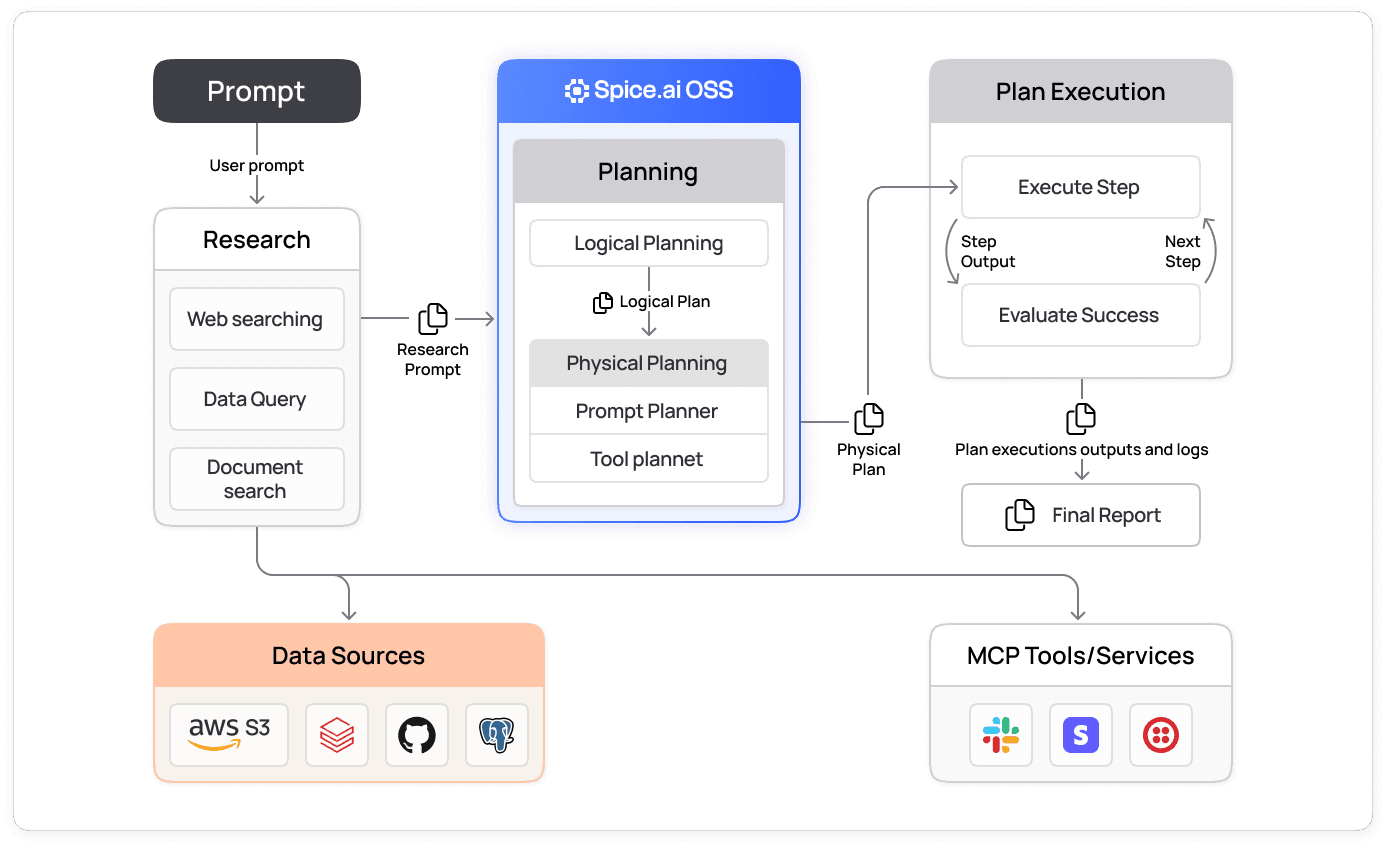
An MCP gateway sits between AI clients and the MCP servers that provide their tools. Clients connect to one endpoint instead of to each server. Spice fills this role with the same runtime that federates and accelerates SQL queries, so the gateway also serves data. The Model Context Protocol guide explains the protocol itself. In Spice, a request moves through four steps:
- Declare: the
toolssection ofspicepod.yamllists each upstream MCP server.from: mcp:npx,mcp:uvx, ormcp:dockerruns a stdio server as a subprocess, andfrom: mcp:https://...connects to a remote server over Streamable HTTP. - Connect: at startup, Spice connects to each server, lists its tools, and names each proxied tool
<tool-name>__<upstream-tool-name>. A double underscore separates the parts because MCP clients reject tool names with a/. - Serve: Spice exposes the combined catalog, plus its built-in
sql,list_datasets,table_schema, andsearchtools, at/v1/mcpover Streamable HTTP. - Call: a model running in Spice calls the tools named in its
toolsparameter. An external MCP client calls the tools at/v1/mcpwith an API key.
The following Spicepod proxies GitHub's maintained GitHub MCP server in Docker, accelerates the repository's issues for SQL, and gives one model access to both:
version: v1
kind: Spicepod
name: mcp-gateway

runtime:
  auth:
    api_key:
      enabled: true
      keys:
        - ${secrets:SPICE_API_KEY}

datasets:
  - from: github:github.com/your-org/your-repo/issues
    name: github_issues
    params:
      github_token: ${secrets:GITHUB_PERSONAL_ACCESS_TOKEN}
    acceleration:
      enabled: true

tools:
  - name: github
    from: mcp:docker
    description: GitHub tools to manage issues, review PRs, and search code
    params:
      mcp_args: run -i --rm -e GITHUB_PERSONAL_ACCESS_TOKEN ghcr.io/github/github-mcp-server
    env:
      GITHUB_PERSONAL_ACCESS_TOKEN: ${secrets:GITHUB_PERSONAL_ACCESS_TOKEN}

models:
  - name: triage
    from: openai:gpt-4o
    params:
      openai_api_key: ${secrets:OPENAI_API_KEY}
      tools: github, sql, table_schema, list_datasets
To connect Claude Code to the same gateway, pass a key from runtime.auth:
claude mcp add --transport http spice http://localhost:8090/v1/mcp --header "X-API-KEY: <key>"The MCP documentation has the full configuration reference, and the Spice as MCP Server cookbook recipe is a runnable version of the same pattern.
Which MCP connection types does Spice support?
Spice supports two transports when it connects to an MCP server, and one when it serves tools. The three roles compare as follows:
| Role | Configuration | Transport | Authentication |
|---|---|---|---|
| Run a local MCP server | from: mcp:npx, mcp:uvx, or mcp:docker, with mcp_args | stdio | Credentials passed to the subprocess through env |
| Connect to a remote MCP server | from: mcp:https://<host>/<path> | Streamable HTTP | mcp_auth_token (bearer token) or mcp_headers |
| Serve tools to MCP clients | Built in at /v1/mcp | Streamable HTTP | API key from runtime.auth, sent in the X-API-KEY header |
Spice v2.0 and later use Streamable HTTP for remote connections. Spice v1.11 and earlier used the older HTTP with Server-Sent Events (SSE) transport. Because /v1/mcp is itself an MCP server, one Spice instance can proxy another by setting from: mcp:https://<other-instance>/v1/mcp. The other instance requires an API key, so pass it with mcp_headers: 'X-API-KEY: ${secrets:SPICE_API_KEY}' or as a bearer token with mcp_auth_token.
How does Spice control which tools a model can call?
A model can call only the tools in its tools parameter, and that parameter accepts tool names, tool groups, or both. Tool access is set per model in the Spicepod, so two models in the same runtime can see different tools:
tools value | What the model receives |
|---|---|
github, sql | Only the named tools |
nsql | The built-in text-to-SQL tools: sql, table_schema, list_datasets, get_current_datetime, and the sampling tools |
all | Every built-in and Spicepod-configured tool, passed directly |
auto (default) | Tools passed directly, or the tool registry when there are more than 20 tools and an embedding model is configured |
search_registry | Two meta-tools, tool_search and tool_invoke, backed by a search index over the catalog. Requires an embedding model |
disabled | No tools |
The tool registry matters for gateways with many MCP servers. A typical tool definition is 200 to 500 tokens, so 50 tools add 10,000 to 25,000 tokens to every chat turn. With the registry, the model searches for tools and sees only the schemas it asks for, which the docs measure at about one-tenth of the tool-definition tokens for a 50-tool catalog. tool_recursion_limit in a model's params, 10 by default, limits how deep a chain of tool calls can recurse within one request. For the wider set of agent controls, see secure AI agents.
What does exposing /v1/mcp require?
Four settings control who can reach /v1/mcp and what its tools can do. Plan for each one before other systems connect to the endpoint:
- API key authentication:
/v1/mcpreturns401 Unauthorizedto every request, including local ones, untilruntime.authis configured. This requirement applies from Spice v2.2. - An allowed host list: by default,
/v1/mcpaccepts only requests whoseHostheader islocalhost,127.0.0.1, or::1, which blocks DNS rebinding attacks. Requests to any other host name return403 Forbiddenuntil that host is added toruntime.mcp.allowed_hosts. This applies to self-hosted runtimes: a Spice Cloud project allow-lists its own hostname when it deploys. - Secrets from a secret store:
${secrets:...}references resolve tokens for upstream servers from a secret store instead of plain text in the Spicepod. - Read-only SQL by default: the
sqltool accepts write statements only when the request uses a ReadWrite API key and the target dataset setsaccess: read_write. Otherwise, it runs as read-only.
To run the gateway as a managed service, compare Spice Cloud and Enterprise plans.
Deployed in production
Teams trust Spice to bring inference closer to their data, enabling low-latency, enterprise-grade AI.

“Partnering with Spice AI has transformed how NRC Health delivers AI-driven insights. By unifying siloed data across systems, we accelerated AI feature development, reducing time-to-market from months to weeks - and sometimes days. With predictable costs and faster innovation, Spice isn't just solving some of our data and AI challenges - it's helping us redefine personalized healthcare.”
Tim Ottersburg
VP of Technology, NRC Health

“Spice AI grounds AI in our actual data, using SQL queries across many data sources. This brings accuracy to probabilistic AI systems, which are very prone to hallucinations.”
Rachel Wong
CTO, Basis Set
FAQs
Answers to common questions about the Spice MCP server and gateway
Yes. The MCP gateway is part of the Spice runtime, which is open source under the Apache 2.0 license. The same configuration runs on a laptop, in a container, or as a sidecar. Spice Cloud and Enterprise add managed hosting and support.
Any MCP client that supports the Streamable HTTP transport and custom request headers can connect to the Spice /v1/mcp endpoint. Examples are Claude Code, Claude Desktop, Cursor, and other Spice instances. Each client sends an API key from runtime.auth in the X-API-KEY header.
Yes. The Spice tool catalog includes the sql and search tools next to the proxied MCP tools. An agent can read a ticket through an MCP tool and then query the related records in one session. The queries run on SQL federation and acceleration, and hybrid SQL search covers vector and full-text retrieval.
The Spice runtime keeps running, and /health returns ok. /v1/ready reports not ready while that server cannot connect. A readiness probe on /v1/ready holds back traffic until then. Spice logs an Unable to load tool warning and retries the connection in the background. The tools from that server are missing from tools/list until the connection succeeds. A server that starts with invalid credentials can register zero tools without that warning, so also check the log for runtime_secrets errors.
Query the spice.runtime.task_history table. Spice records each model tool call as a task named after the tool, such as tool_use::github__search_code, with its duration, error message, and trace ID. Send a spice-trace-id or traceparent header with a chat completion request to find its tool calls later. Task history is on by default and keeps records for 8 hours. Set runtime.task_history.retention_period to change it.
An API gateway routes HTTP requests to backend services. An MCP gateway speaks the Model Context Protocol, so it merges tool catalogs and returns tool schemas that a model can read. Spice runs its built-in tools, such as sql, inside the runtime for LLM tool calling. Tools from a configured MCP server still run in its subprocess or on its remote host.
See Spice in action
Walk through your use case with an engineer and see how Spice handles federation, acceleration, and AI integration for production workloads.
Talk to an engineer (opens in a new tab)