






















Federate and accelerate in one file
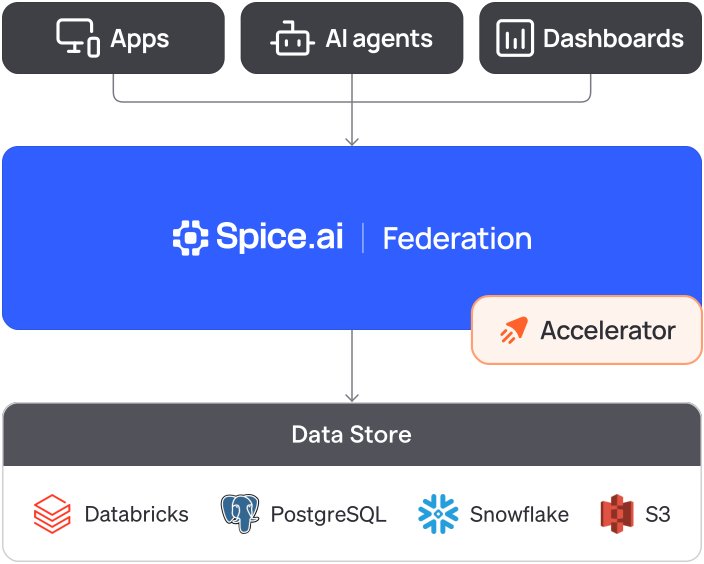
# spicepod.yamldatasets: - from: s3://spiceai-demo-datasets/taxi_trips/2024/ name: taxi_trips params: { file_format: parquet, s3_auth: public } - from: postgres:taxi_zones name: taxi_zones params: pg_host: localhost pg_port: 15432 pg_db: taxi pg_user: postgres pg_pass: ${secrets:SPICE_PG_PASS} pg_sslmode: disablesql> SELECT z.zone, COUNT(*) AS trips FROM taxi_trips t -- S3 JOIN taxi_zones z -- PostgreSQL ON t."PULocationID" = z.location_id GROUP BY z.zone ORDER BY trips DESC LIMIT 3;JFK Airport 145240Midtown Center 143471Upper East Side South 142708Time: 2.705 seconds# spicepod.yaml: add to each datasetacceleration: enabled: true engine: cayenne mode: file$ spice runLoaded 265 rows (30.46 kiB) for dataset taxi_zonesLoaded 2,964,624 rows (399.38 MiB) for dataset taxi_tripssql> -- same query, served from the local copy SELECT z.zone, COUNT(*) AS trips FROM taxi_trips t JOIN taxi_zones z ON t."PULocationID" = z.location_id GROUP BY z.zone ORDER BY trips DESC LIMIT 3;JFK Airport 145240Midtown Center 143471Upper East Side South 142708Time: 0.026 secondsConnect your sources
In
spicepod.yaml, add a dataset for each table. Each dataset names its source infrom, such as PostgreSQL or Amazon S3.Accelerate the tables you read most
Add an
accelerationblock withengine: cayenneto a dataset. Spice keeps a local copy in Spice Cayenne and refreshes it.Query everything in one SQL statement
Start Spice with
spice run. One query joins the local copy and the source, with no ETL pipeline.