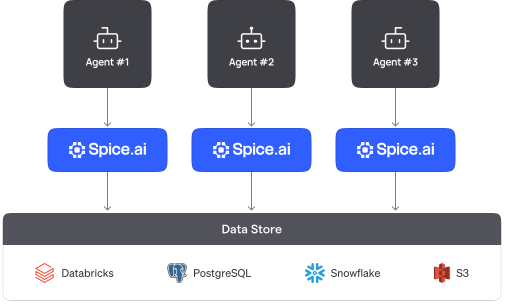
Connect an agent to your data
MCP example
# spicepod.yamlruntime: auth: api_key: enabled: true # /v1/mcp requires auth keys: - ${secrets:SPICE_API_KEY}datasets: - from: postgres:public.orders name: orders params: pg_host: db.example.com pg_pass: ${secrets:PG_PASS} acceleration: enabled: true # A local, accelerated copy for agents - from: snowflake:DB.SALES.DEALS name: deals # A warehouse table, credentials omitted for simplicity$ claude mcp add --transport http spice \ http://localhost:8090/v1/mcp \ --header "X-API-KEY: <key>"sql> -- the agent calls the sql tool over MCP SELECT o.status, COUNT(*) AS orders, d.stage AS deal_stage FROM orders o -- Postgres JOIN deals d -- Snowflake ON d.customer_id = o.customer_id WHERE o.customer_id = 42 GROUP BY o.status, d.stage;# example outputshipped 18 negotiationpending 3 negotiationConnect and accelerate your data
Define each dataset in spicepod.yaml and set acceleration to enabled.
Run Spice next to your agents
Start Spice with spice run, or deploy it as a sidecar, in your cluster, or on Spice Cloud.
Query from any client
Agents call Spice over MCP, SQL over HTTP, Arrow Flight, JDBC, ODBC, or the OpenAI-compatible API.