Edge to cloud deployments: sidecar, microservice, and cluster
Spice runs as a single binary, a container, a Kubernetes workload, or a managed service on the Spice Cloud Platform. Every option runs the same runtime and reads the same Spicepod format, so teams pick the architecture that matches their latency, scale, and governance needs.
Do more with your data
Consolidate operational, analytical, and object store data into a governed and accelerated SQL query engine.
100x
up to 100x faster queries
80%
up to 80% cost savings on data lakehouse spend
2x
increase in data reliability for critical workloads
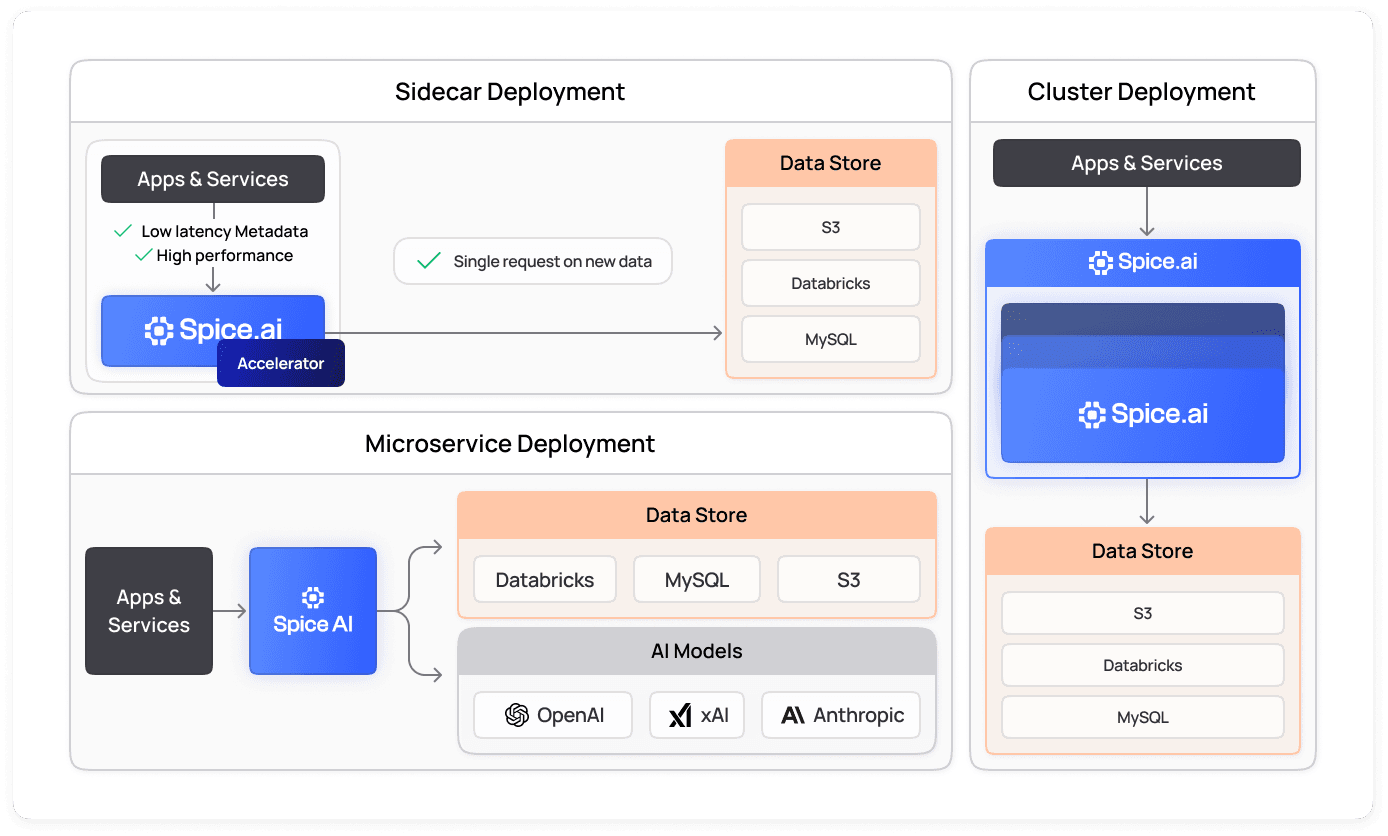
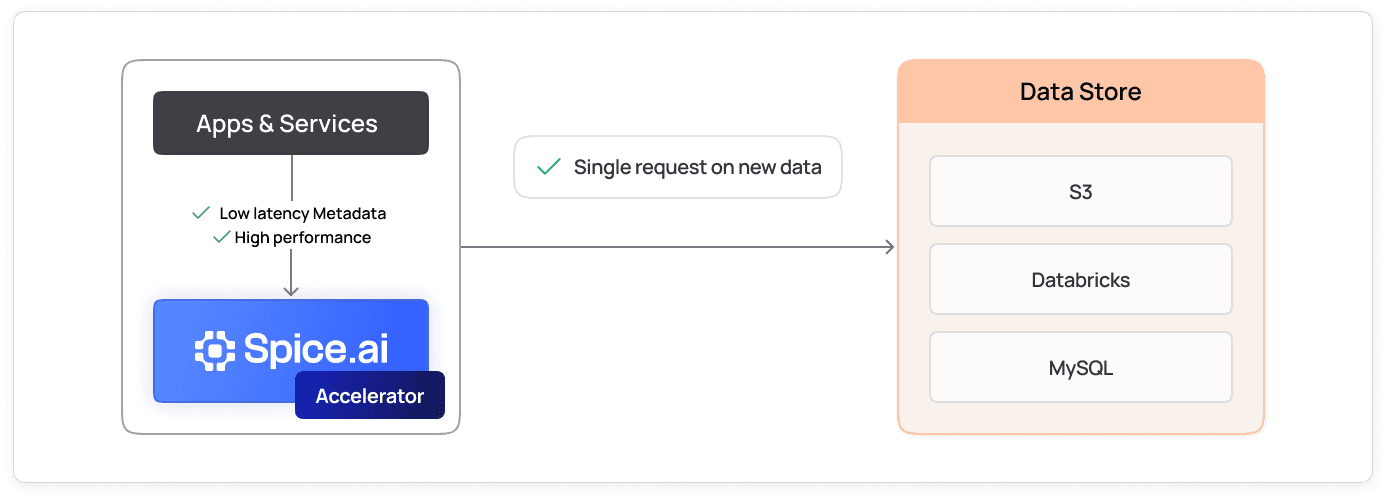
Sidecar deployments
Deploy Spice as a sidecar next to your application, in the same Kubernetes pod or on the same host. When the two share a network namespace, as containers in one pod do, the application queries Spice over localhost and reads of accelerated data skip the network hop. Separate containers on a Docker bridge network connect through container networking instead. Sidecars fit real-time decision-making and embedded AI workloads, and a sidecar with a populated local store can keep serving reads if a source becomes unreachable.
View the docs
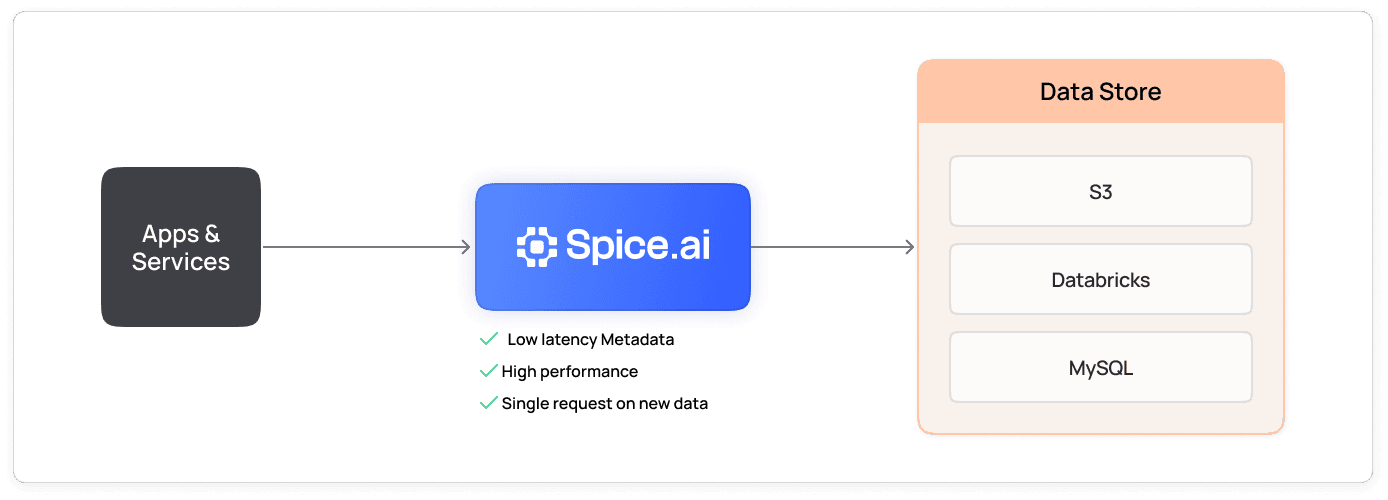
Microservice deployments
Run Spice as an independent service, with one or more replicas behind a load balancer. Many applications query the same accelerated datasets through one endpoint, and the service scales separately from the applications that call it. Each replica holds its own accelerated copy.
View the docs
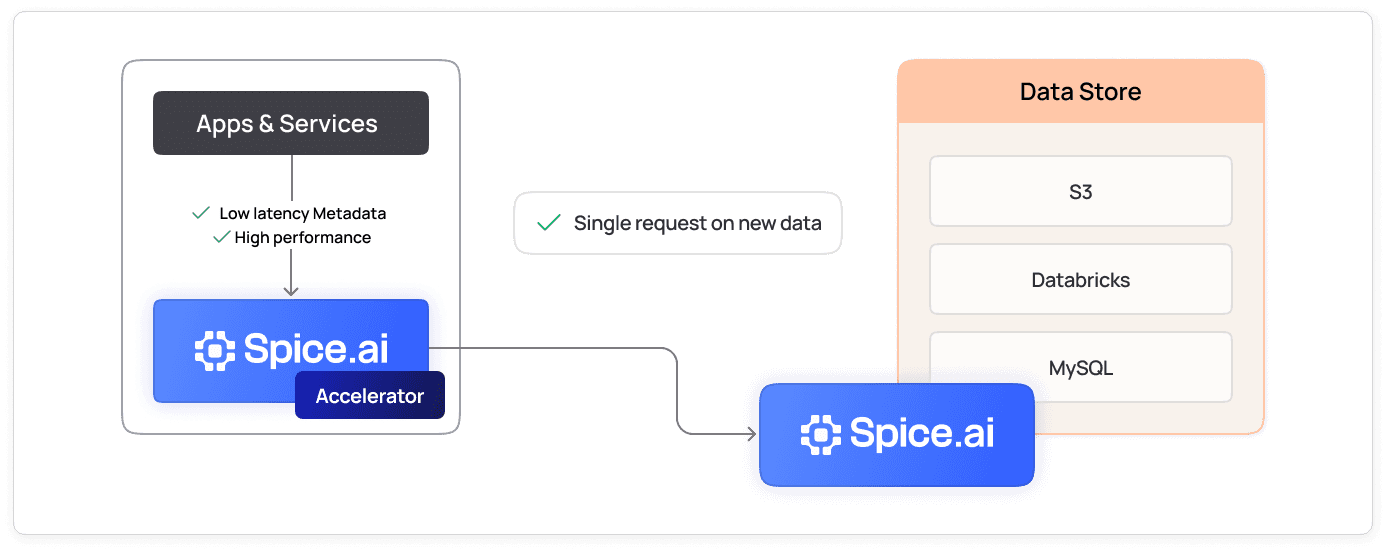
Tiered deployments
Combine sidecar and microservice patterns to support mixed access patterns. Separate critical-path workloads from less performance-sensitive tasks and optimize for both real-time responses and scalability across separate tiers.
View the docs
Managed cloud deployments
Deploy a Spicepod to the fully managed Spice Cloud Platform and connect a GitHub repository for continuous delivery. Spice Cloud runs and scales the infrastructure, so your team does not operate servers or clusters.
View the docs
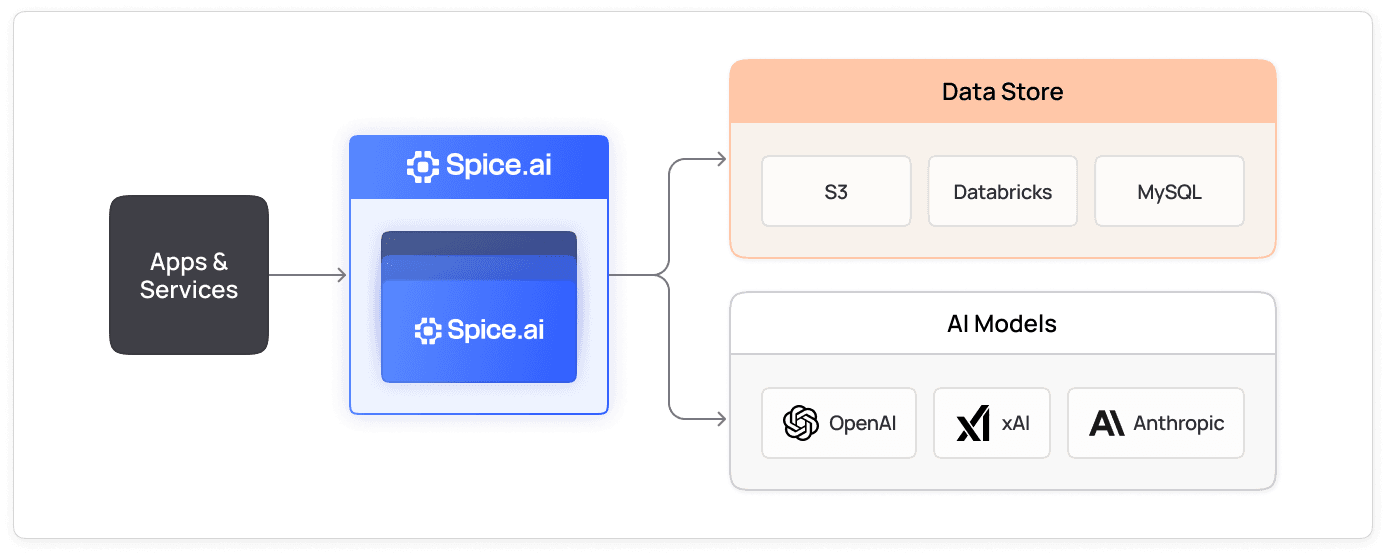
Enterprise deployments
Spice.ai Enterprise runs clustered deployments on Kubernetes, with distributed query execution across nodes. The Spice.ai Enterprise Kubernetes Operator manages per-replica StatefulSets, automatic volume resizing, update strategies, and crashloop protection.
View the docs
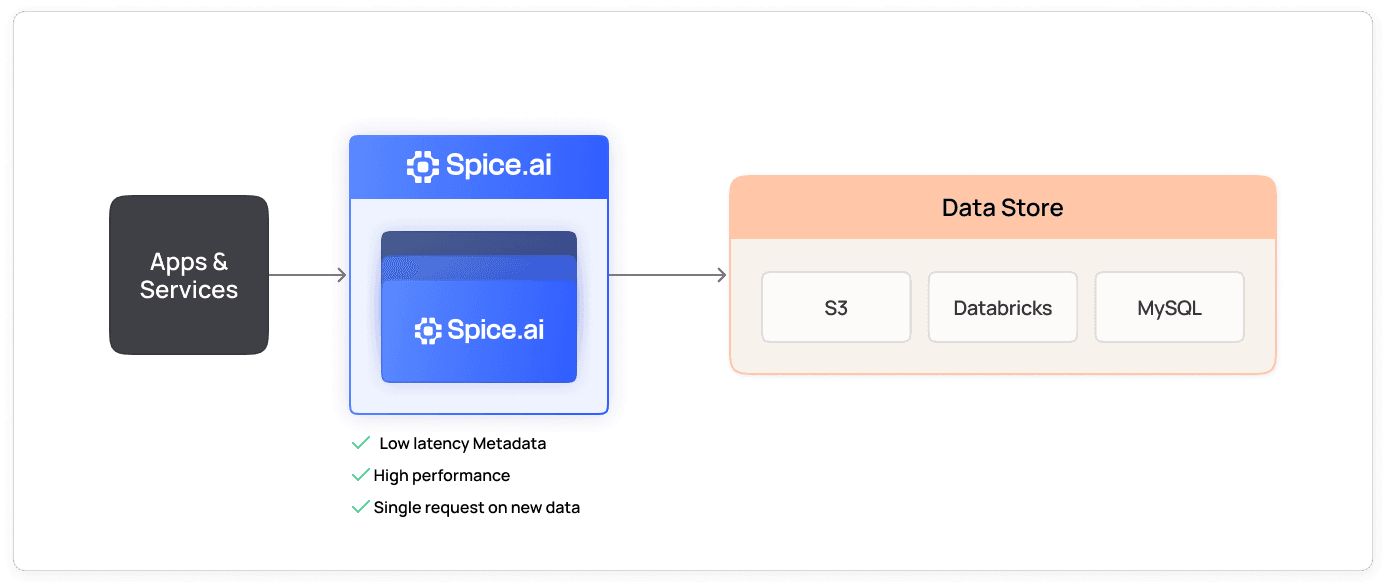
Which Spice deployment architecture fits your workload?
Choose a Spice deployment architecture by where the query must run: next to the application, in a shared service, or across a cluster. Each option runs the same Spice runtime with SQL federation and acceleration, so the choice changes latency, resource use, and operations, not application code.
| Architecture | Where Spice runs | Query path | Best fit |
|---|---|---|---|
| Sidecar | Same pod or host as each application instance | localhost when sharing a network namespace | Latency-critical reads, edge sites, per-instance isolation |
| Microservice | One or more replicas behind a load balancer | Network call inside the cluster or VPC | Many applications querying the same accelerated datasets |
| Tiered | Separate tiers for critical-path and shared workloads | localhost for hot paths, network for the rest | Mixed workloads with different latency and throughput targets |
| Cluster-sidecar | Sidecars next to applications, backed by a Spice cluster | localhost, with delegation to the cluster | Large fleets that need local reads and distributed compute |
| Managed | Spice Cloud Platform | Network call to a managed endpoint | Teams that do not want to operate infrastructure |
| Enterprise | Clustered Spice.ai Enterprise on Kubernetes | Distributed query across nodes | Large datasets, high availability, and centralized governance |
The tradeoff between the first two rows is the core decision. A sidecar removes the network hop but duplicates the runtime and its accelerated data in every pod. A microservice keeps one copy per replica, shared by every application, but adds a network call to every query. The sidecar vs microservice comparison covers this tradeoff in depth, and the sidecar pattern guide covers Kubernetes startup, readiness, and failure behavior.
Where can Spice run?
Spice runs from a laptop to a data center to any public cloud. The Spice deployment documentation has a guide for each target:
- Binary or Docker container for local development, single hosts, and container pipelines.
- Kubernetes with the Spice Helm chart, including GitOps rollouts through Argo CD or Flux.
- AWS, Azure, and Google Cloud through a CloudFormation template, ARM and Bicep templates, or GKE, Cloud Run, and Compute Engine.
- Spice Cloud Platform for fully managed deployments.
How does the cluster-sidecar architecture combine edge and cloud?
The cluster-sidecar architecture places a lightweight Spice sidecar next to each application and a distributed Spice cluster behind them. The cluster ingests each source once and runs large scans and joins with distributed query. Each sidecar serves its local working set over localhost and forwards other queries to the cluster over Arrow Flight. Source systems see traffic from the cluster only, not from every application instance. The cluster-sidecar architecture post walks through the design, including bootstrap from acceleration snapshots.
Integrations across all of your data sources
Accelerate your data stack with a library of 40+ prebuilt connectors for the most common databases, warehouses, and file stores, from Databricks and S3 to MySQL and PostgreSQL.

Deployed in production
Run data-intensive workloads on a high-performance engine trusted by teams building real-time systems at scale.

“Spice opened the door to take these critical control-plane datasets and move them next to our services in the runtime path.”
Peter Janovsky
Software Architect, Twilio

100x
Faster queries
“It just spins up and works, which is really nice. The responsiveness is amazing, which is a huge gain for the customer.”
Darin Douglass
Principal Software Engineer, Barracuda
Learn how Barracuda gained 100x faster query responses and reduced costs 50% with Spice

“What I like the most about Spice is that it's very easy to collect data from different data sources, and I'm able to interact with this data and do everything in one place.”
Dustin Warner
Director of Software Engineering, NRC Health
FAQs
Answers to common questions about deploying Spice
Deploy Spice as a sidecar when your application needs the lowest data access latency, such as real-time decisions or embedded AI workloads. Run it as a microservice when many applications query the same accelerated datasets. A microservice scales separately and replicates for high availability. Tiered deployments combine both patterns.
Yes. Spice OSS deploys on Kubernetes with the Spice Helm chart, and teams can roll it out through Argo CD or Flux. Spice.ai Enterprise adds a Kubernetes Operator for clustered deployments with distributed query execution.
Yes. The Spice Cloud Platform runs Spice as a managed service with automatic scaling. You deploy a Spicepod and can connect a GitHub repository for continuous delivery. See Spice Cloud pricing for plan details.
Yes. Every deployment option runs the same Spice engine with SQL federation and acceleration and 40+ prebuilt connectors. Applications behave the same way whether Spice runs as a sidecar, a microservice, or a managed cluster.
Yes. Sidecars and the cluster read Spicepod manifests in the same format. Teams move ingestion, acceleration, and distributed query to the cluster one dataset at a time. The application keeps querying its local sidecar, and the sidecar forwards queries it cannot serve to the cluster.
Yes, for data that is already accelerated locally. A sidecar with a populated local store can serve reads during a network outage. Queries for data outside the local store still depend on the source connection. Define which datasets must stay usable offline and how much staleness is acceptable.
Spice deploys on AWS, Azure, and Google Cloud, and on on-premises infrastructure. AWS deployments use a published CloudFormation template, and Azure deployments use ARM or Bicep templates. Google Cloud deployments use GKE, Cloud Run, or Compute Engine.
See Spice in action
Walk through your use case with an engineer and see how Spice handles federation, acceleration, and AI integration for production workloads.
Talk to an engineer (opens in a new tab)