Invoke and run AI models anywhere
Spice serves hosted and local AI models from the same runtime that queries your data. Call any model through an OpenAI-compatible API or from SQL, without separate orchestration.
Do more with your data
Increase the reliability, performance, and security of data-driven AI workflows.
100x
up to 100x faster queries
80%
up to 80% cost savings on data lakehouse spend
2x
increase in data reliability for critical workloads
AI grounded in your data
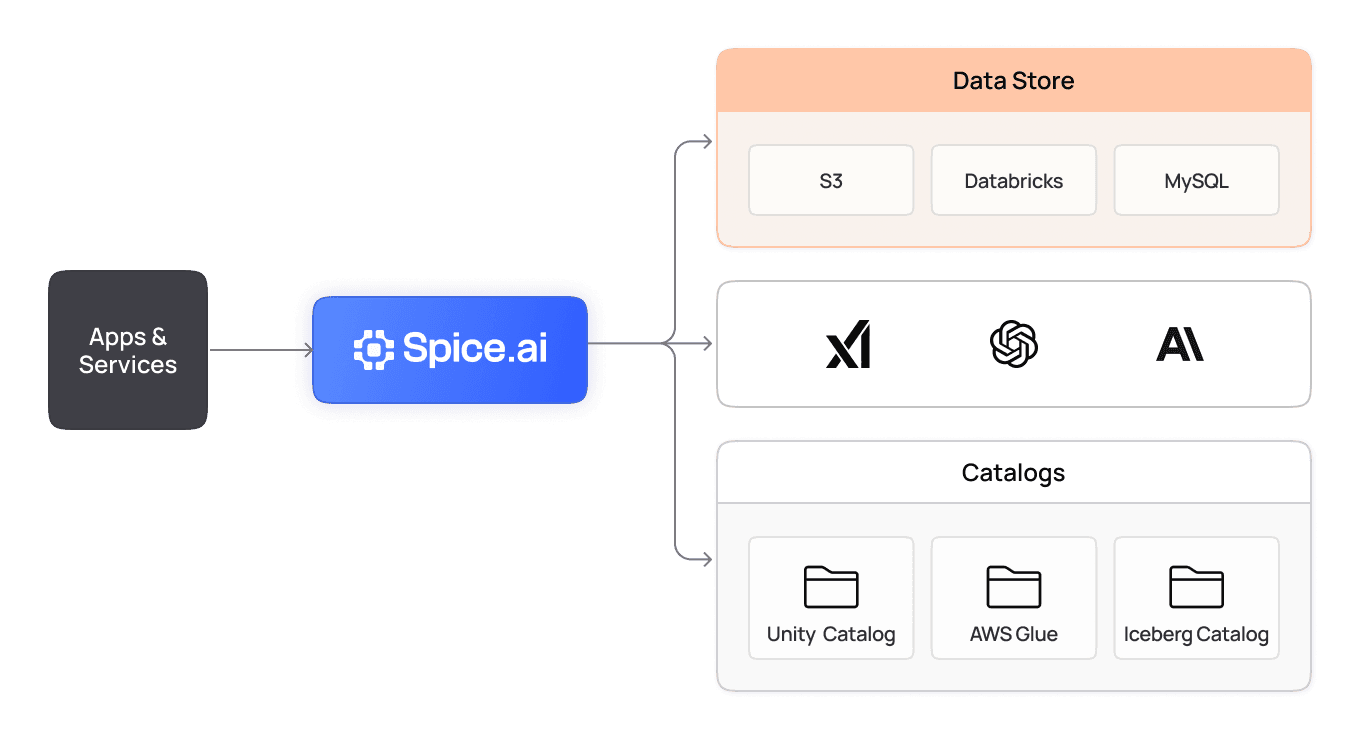
Run local models where your data lives. Spice colocates data, local models, and compute in a single engine, and it calls hosted models from that same engine. Reduce latency and hallucinations by grounding every model in federated and accelerated datasets.
View the docs
Flexible models and deployments
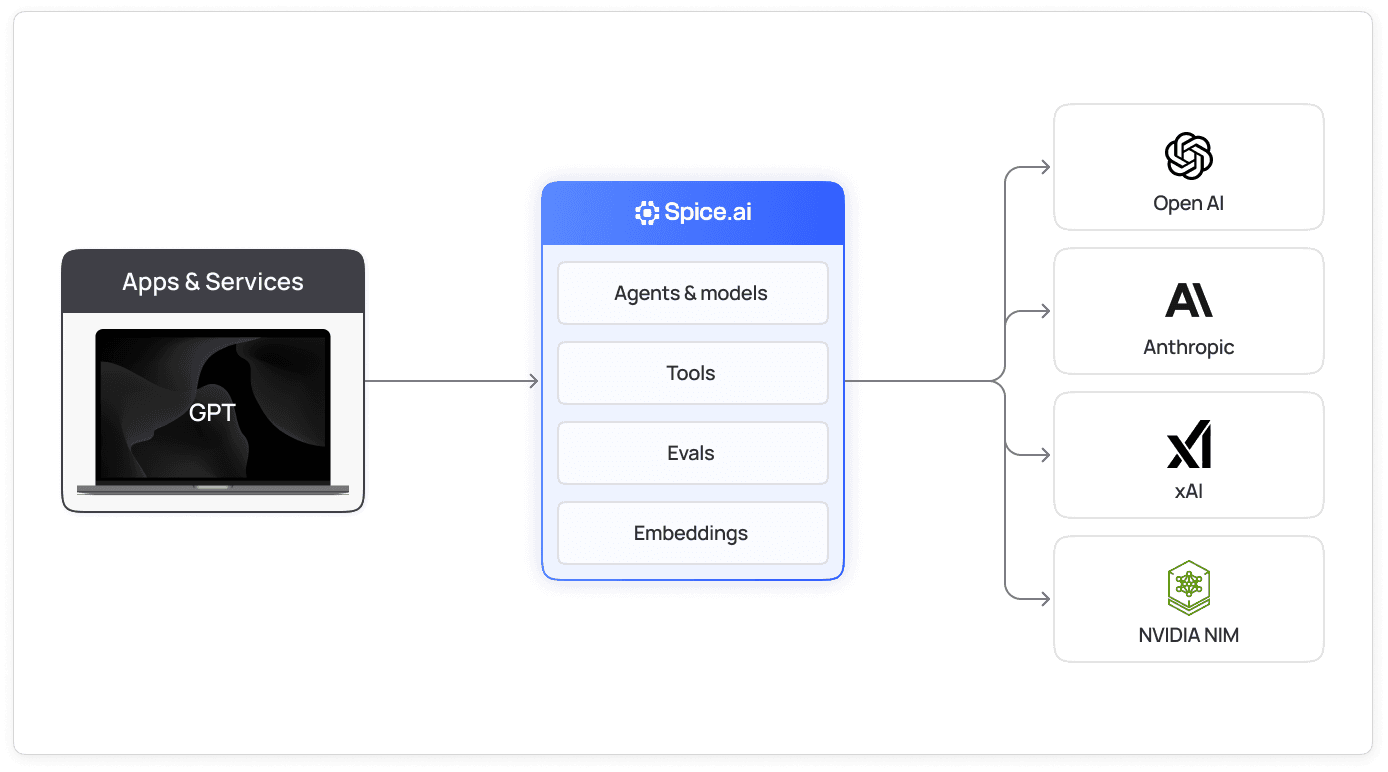
Spice supports custom, open-source, and commercial models, adapting to your workload and regulatory requirements. Deploy and scale models anywhere: locally, in the cloud, or at the edge.
View the docs
Built-in tooling and memory
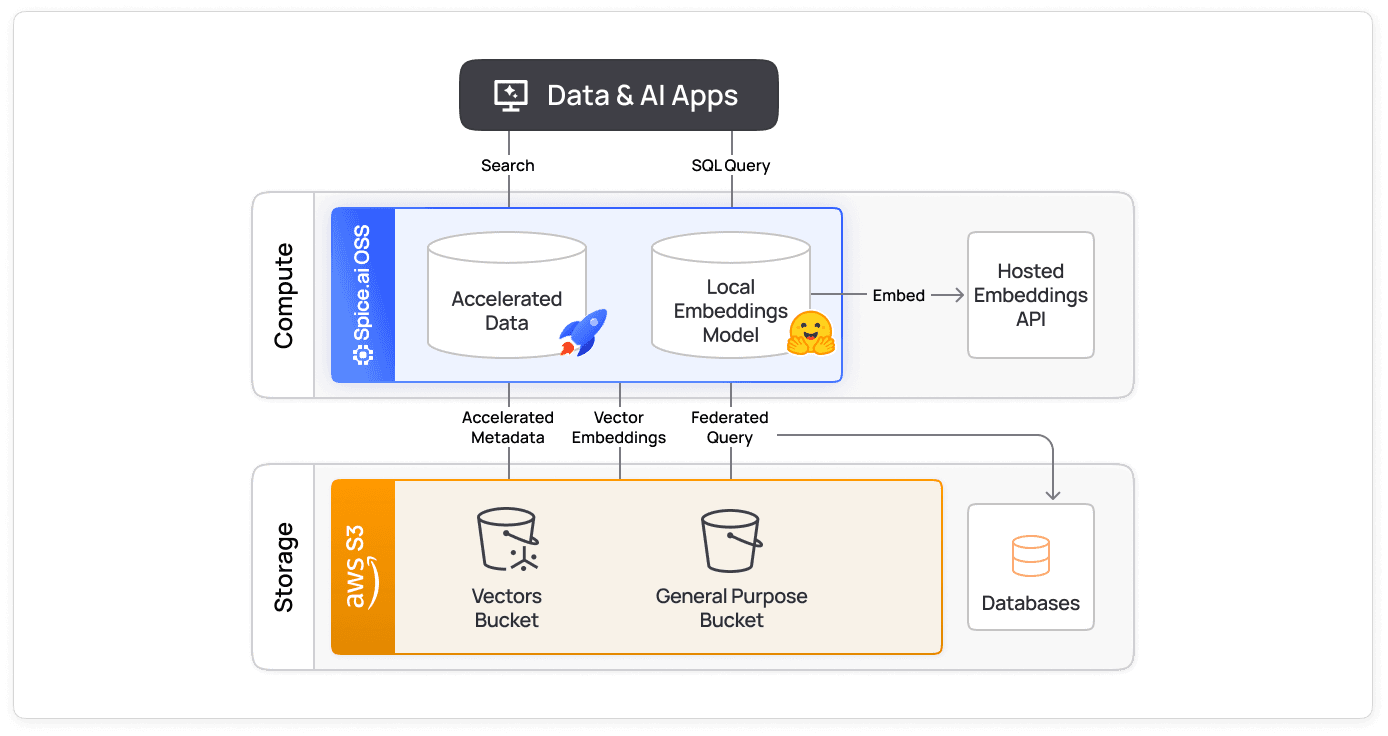
Augment models with native federation, search, and retrieval for more robust AI workflows. Enable long-term memory through persistent datasets so models can recall and learn across interactions.
View the docs
AI sandboxing
Isolate, monitor, and control AI execution. Prevent unwanted model outputs and data leakage with sandbox environments for model inference and tool usage.
View the docs
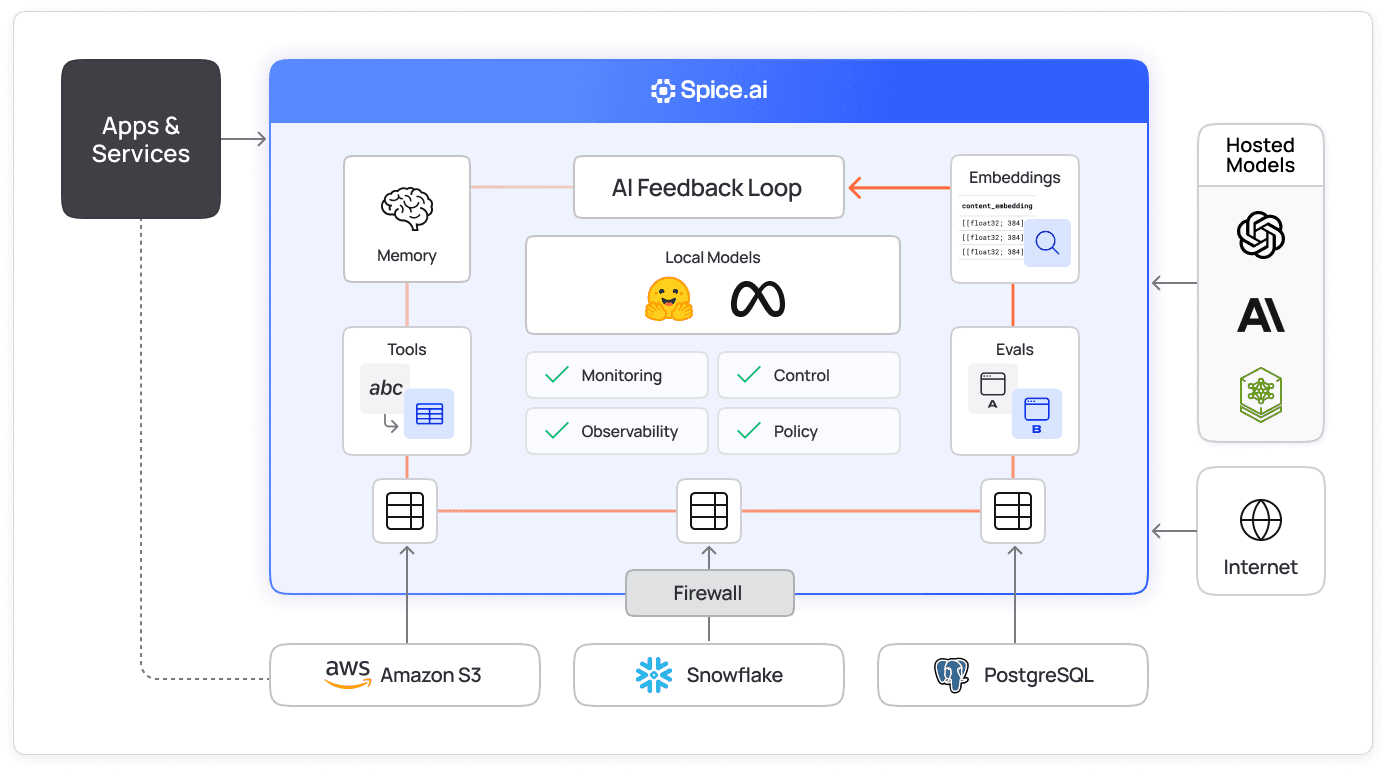
Integrations across all your data sources
Spice connects to OpenAI, Anthropic, xAI, Azure OpenAI, Google Vertex AI, Amazon Bedrock, Databricks, and OpenAI-compatible endpoints such as NVIDIA NIM. It also runs Hugging Face and local models. Every model shares one runtime for API access, tools, and observability.

How does Spice serve AI models?
Spice serves AI models from the same runtime that federates and accelerates SQL queries. Local models run inside that runtime, in the same process as the accelerated data they read. Hosted models stay with their provider, and Spice sends each call to the provider's API. Applications reach both kinds through one OpenAI-compatible HTTP API and the ai() SQL function. A model call moves through four steps:
- Declare: the
modelssection ofspicepod.yamlnames each model. Thefromprefix selects the provider, such asopenai:gpt-4o-minifor a hosted model orhuggingface:huggingface.co/<org>/<repo>for a local one. - Load: at startup, Spice resolves any
${secrets:...}references in model parameters from a secret store. Some providers also read cloud credentials, such as IAM roles or application default credentials. Spice downloads a Hugging Face model's weights, or reads afile:model from disk, and loads local weights with the mistral.rs inference engine. - Ground: the tools in a model's
toolsparameter, such assql,search, andtable_schema, let the model query federated and accelerated datasets while it answers. - Serve: applications call the model at
/v1/chat/completions, or from a SQL query withai(). Task history, which is on by default, records each call in thespice.runtime.task_historytable.
The following Spicepod defines one hosted model and one local model:
version: v1
kind: Spicepod
name: model-serving

models:
  - name: hosted
    from: openai:gpt-4o-mini
    params:
      openai_api_key: ${secrets:OPENAI_API_KEY}
      system_prompt: Answer questions about the sales datasets.
      tools: auto

  - name: local
    from: huggingface:huggingface.co/lmstudio-community/Qwen2.5-Coder-3B-Instruct-GGUF
    files:
      - path: Qwen2.5-Coder-3B-Instruct-Q3_K_L.gguf
Any OpenAI-compatible client can then call either model by its Spice name:
curl http://localhost:8090/v1/chat/completions \
  -H 'Content-Type: application/json' \
  -d '{"model": "local", "messages": [{"role": "user", "content": "What is a Spicepod?"}], "stream": true}'
The models documentation has the full configuration reference for each provider.
Which providers and model formats can Spice run?
Spice calls hosted models through each provider's API and runs local models in the runtime. The from prefix sets the provider:
| Provider | from prefix | Where the model runs | Credentials |
|---|---|---|---|
| OpenAI and compatible endpoints, such as NVIDIA NIM | openai: | Hosted | openai_api_key, plus endpoint for a compatible API |
| Anthropic | anthropic: | Hosted | anthropic_api_key |
| xAI | xai: | Hosted | xai_api_key |
| Azure OpenAI | azure: | Hosted | azure_api_key or azure_entra_token |
| Google Vertex AI | google: | Hosted | google_project and google_location, plus google_service_account_path, google_service_account_key, or google_application_default_credentials |
| Amazon Bedrock | bedrock: | Hosted | aws_region, plus aws_access_key_id and aws_secret_access_key or an IAM role through aws_iam_role_source |
| Databricks | databricks: | Hosted | databricks_token, or databricks_client_id and databricks_client_secret |
| Spice Cloud | spiceai: | Hosted | spiceai_api_key |
| Hugging Face | huggingface: | Local, after download | hf_token for gated models |
| Local file | file: | Local | None |
Local models load from GGUF, GGML, or SafeTensors files. Spice rejects pickle-format weights (.pt, .pth, .bin, .ckpt) unless the model sets trust_pickle: true, because loading a pickle file can run code. Release builds of the open-source runtime run local models on the CPU. CUDA and Metal GPU builds compile from source with make install-cuda or make install-metal, and Spice Cloud and Enterprise ship prebuilt CUDA images. See the distributions reference for the build matrix.
How do applications call a model served by Spice?
Spice exposes each model through several interfaces, so one model can serve a chat application and a batch SQL job at the same time:
| Interface | Endpoint or function | Use it for |
|---|---|---|
| Chat Completions | POST /v1/chat/completions | OpenAI SDK clients, streamed chat, and tool calls |
| Responses | POST /v1/responses | OpenAI Responses API clients, for models whose provider offers that API |
| SQL | ai(message) or ai(message, model_name) | Summarizing, classifying, or generating text for each row in a query |
| Text-to-SQL | POST /v1/nsql | Natural-language questions that Spice answers with generated SQL |
| Embeddings | POST /v1/embeddings | Vectors from the models in the embeddings section |
| Model list | GET /v1/models | Discovering the models a runtime serves |
The ai() function sends one model call per row and runs the calls in parallel. It splits large inputs into batches of up to 1,000 rows, and each message can be up to 1 MB. LLM inference from SQL shows the function in larger workloads.
What controls does Spice apply to model calls?
Spice applies the same runtime controls to every model, hosted or local. Configure them per model in the Spicepod:
- Tool access: a model calls only the tools in its
toolsparameter. The MCP server gateway adds tools from external MCP servers to the same list. - Rate limits:
max_concurrencyandrequests_per_minute_limitcap the calls Spice sends to a model. Defaults follow the provider's published limits, and the cap also applies to the parallel calls fromai(). - Tool recursion:
tool_recursion_limit, 10 by default, stops a chain of tool calls inside one request from looping. - Secrets:
${secrets:...}references resolve API keys at startup, so keys stay out of the Spicepod file. - Observability: Spice records chat and completion calls as
ai_chatandai_completiontasks with their token counts. It also exportsllm_prompt_tokens_totalandllm_completion_tokens_totalmetrics and accepts atraceparentheader.
For isolation beyond these controls, see secure AI sandboxing. To run model serving as a managed service, compare Spice Cloud and Enterprise plans.
Deployed in production
Teams trust Spice to bring inference closer to their data, enabling low-latency, enterprise-grade AI across industries.

“Partnering with Spice AI has transformed how NRC Health delivers AI-driven insights. By unifying siloed data across systems, we accelerated AI feature development, reducing time-to-market from months to weeks - and sometimes days. With predictable costs and faster innovation, Spice isn't just solving some of our data and AI challenges - it's helping us redefine personalized healthcare.”
Tim Ottersburg
VP of Technology, NRC Health

“Spice AI grounds AI in our actual data, using SQL queries across many data sources. This brings accuracy to probabilistic AI systems, which are very prone to hallucinations.”
Rachel Wong
CTO, Basis Set
FAQs
Answers to common questions about serving AI models in Spice
Yes. Model serving is part of the Spice runtime, which is open source under the Apache 2.0 license. The same Spicepod runs on a laptop, in a container, or on Kubernetes. Spice Cloud and Enterprise add managed hosting, prebuilt GPU images, and support.
Yes. Set the SDK base URL to the Spice /v1 endpoint, such as http://localhost:8090/v1. Pass the model name from the Spicepod as the model value. The same client code then calls hosted and local models.
Yes. Release builds of the open-source runtime run local models on the CPU. Small quantized GGUF models give the best CPU latency. For larger models, build Spice with CUDA or Metal, or use a prebuilt CUDA image from Spice Cloud or Enterprise.
Yes. The ai() SQL function sends a prompt to a configured model and returns the text response for each row. Use it to summarize, translate, or classify text next to your data. See LLM inference from SQL for examples.
Spice gives models tools that read your data, such as sql and search. The model can then answer from current records instead of from its training data alone. Grounding reduces hallucinations but does not remove them. Retrieval-augmented generation applies the same pattern to documents.
Query the spice.runtime.task_history table. Task history is on by default, and it records each chat and completion call with its token counts. The llm_prompt_tokens_total and llm_completion_tokens_total metrics give the same totals for dashboards.
No. Spice v2.0 removed the evals feature and the /v1/evals endpoint. To score model output, run an external evaluation framework against the Spice chat endpoint. When task history is on, it keeps the input of each call. Set runtime.task_history.captured_output to truncated to keep the output too.
Spice runs as one binary or container, so models deploy wherever the runtime runs. Options are a laptop, a Kubernetes cluster, an edge device, or Spice Cloud. See edge-to-cloud deployments for the architecture of each option.
See Spice in action
Walk through your use case with an engineer and see how Spice handles federation, acceleration, and AI integration for production workloads.
Talk to an engineer (opens in a new tab)