Safely connect AI to your enterprise data
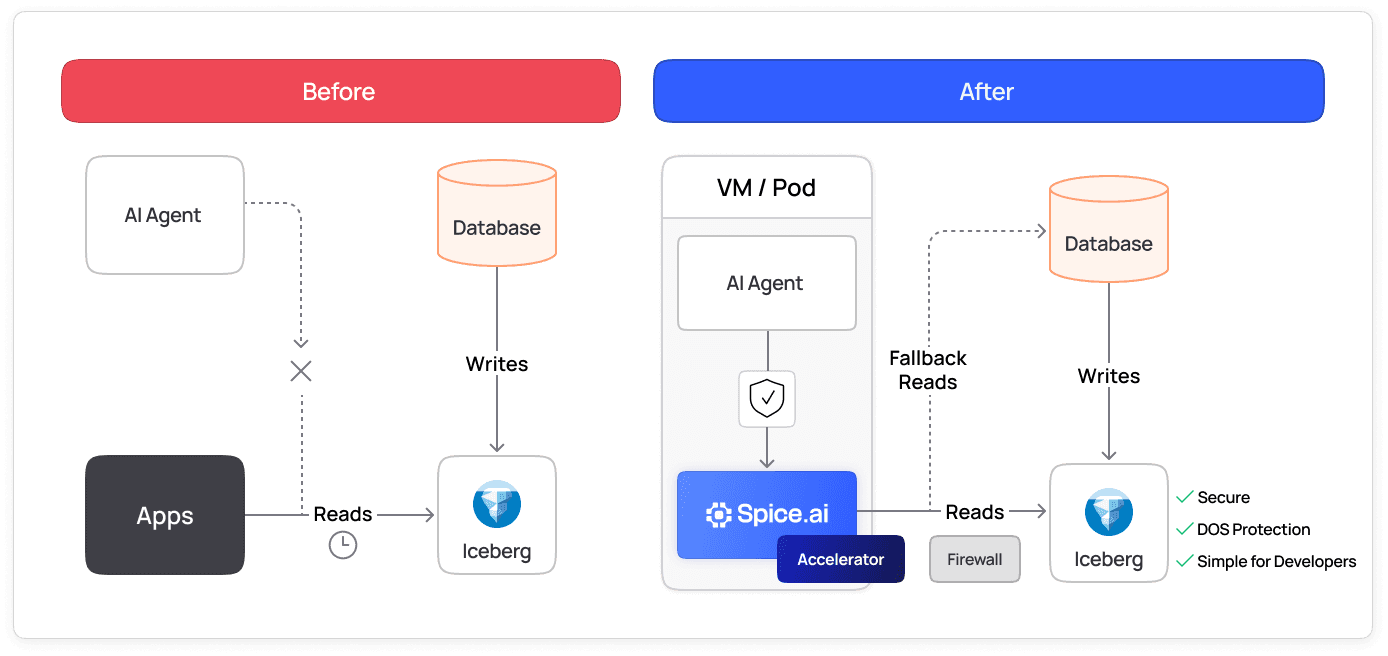
Spice gives each AI agent its own runtime with a filtered, read-only copy of the data it needs. Production databases stay behind your firewall, and task history traces each query and tool call.
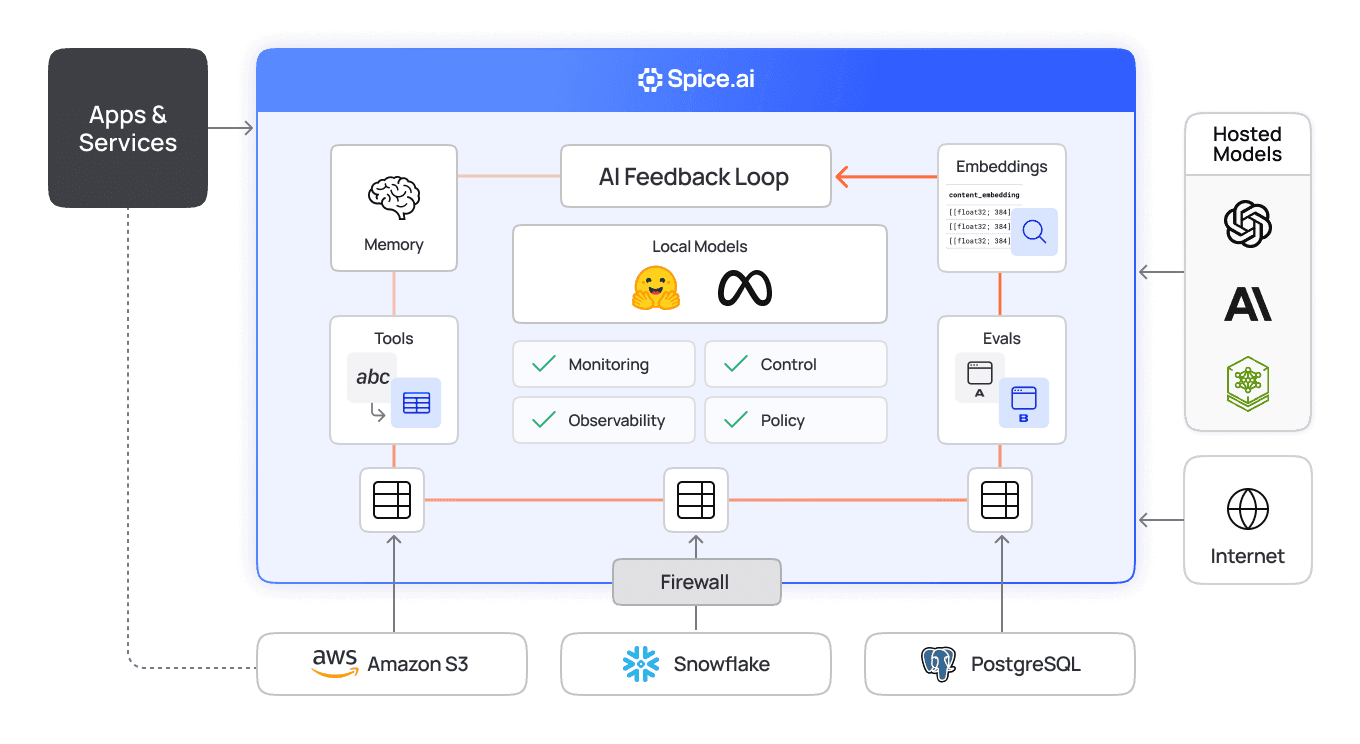
Do more with your data
Spice limits what each agent can read and records what it does, from data refresh to model call.
100x
Up to 100x faster queries
80%
Up to 80% cost savings on data lakehouse spend
2x
increase in data reliability for critical workloads
Data-centric isolation
Each agent queries a Spice runtime that holds only the datasets its Spicepod declares. Acceleration copies a filtered subset of each source table into a local engine, so the agent does not query the production database.
View the docs
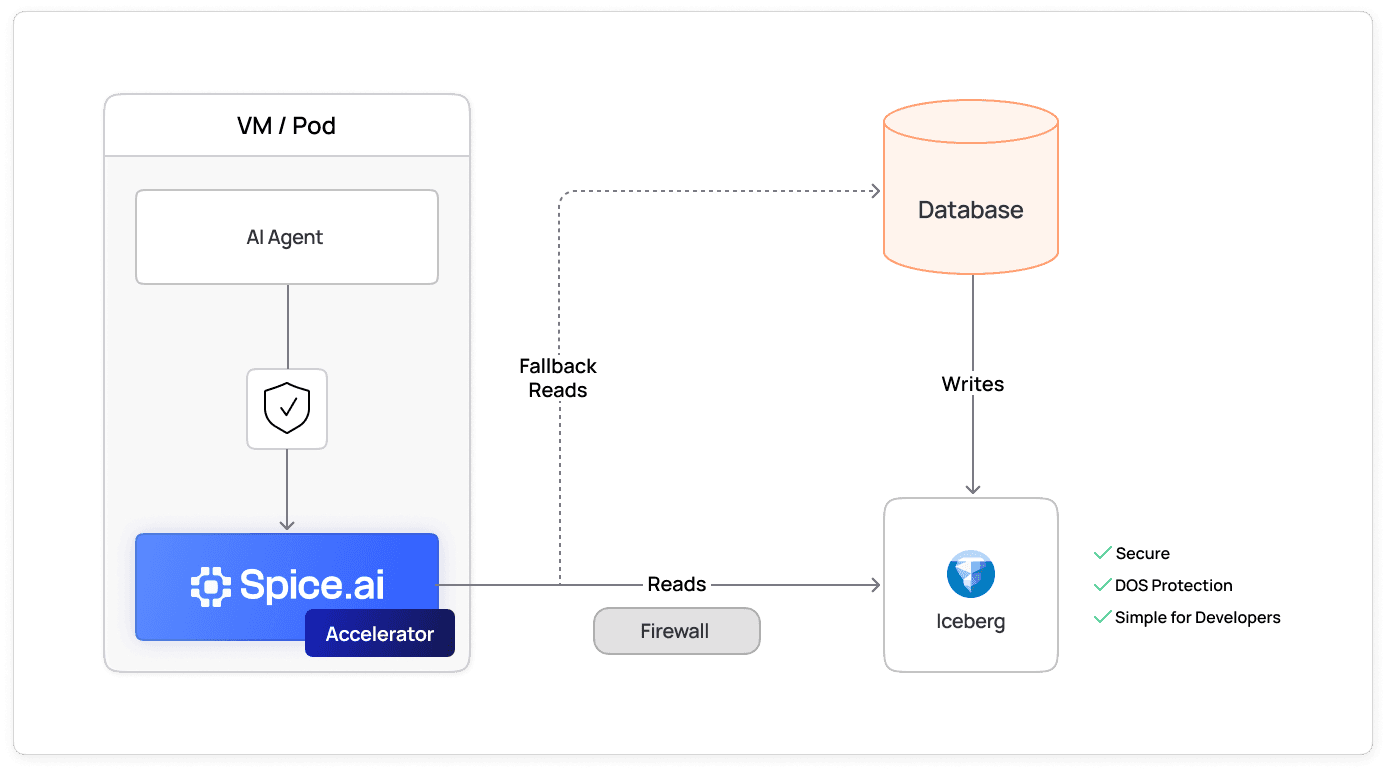
Principle of least privilege
Datasets are read-only by default, and API keys are read-only unless they end in :rw. A model gets only the tools in its tools parameter and sees only the datasets in its datasets list.
View the docs
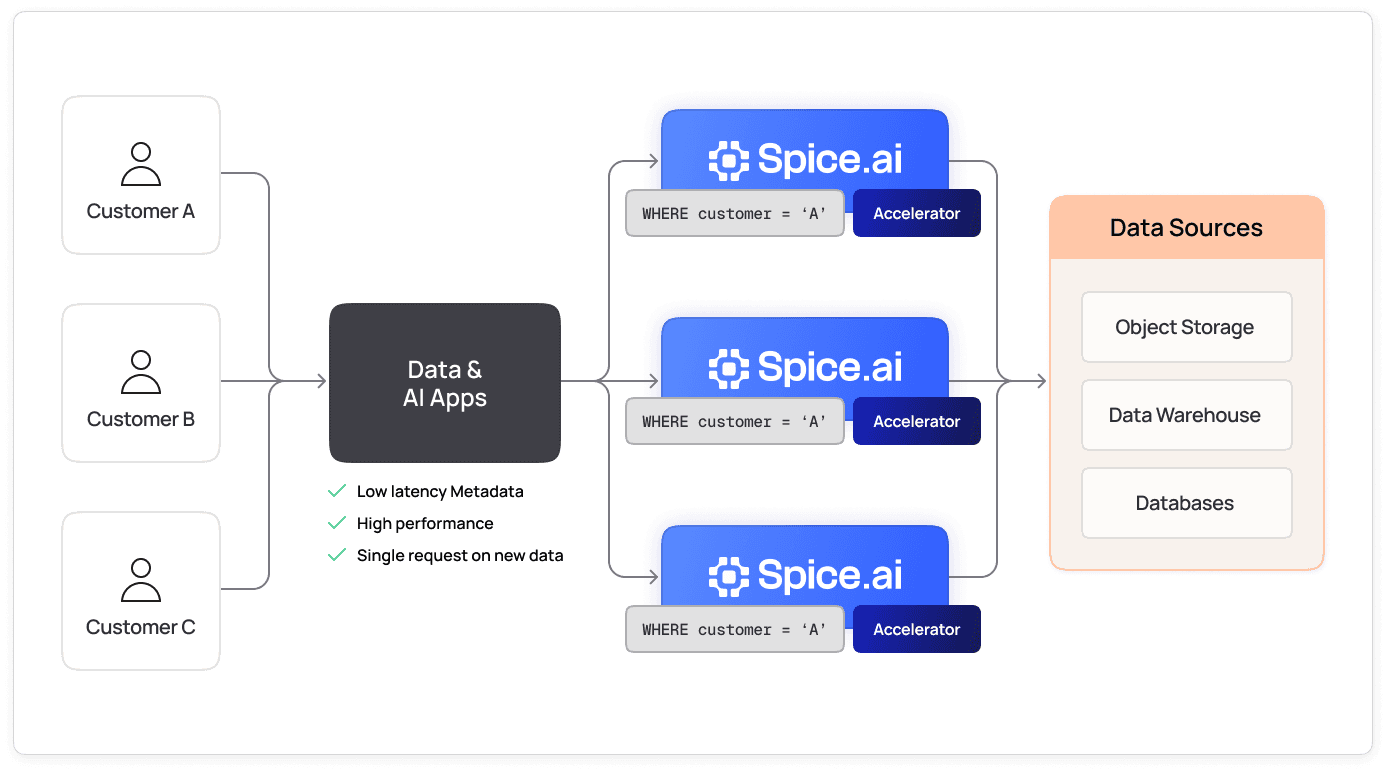
Governed runtime access
Task history records each SQL query, model call, and tool call in the spice.runtime.task_history table. OpenTelemetry exports the same traces and metrics. Spice.ai Enterprise adds Cedar policies for row filters, column masks, and roles.
View the docs
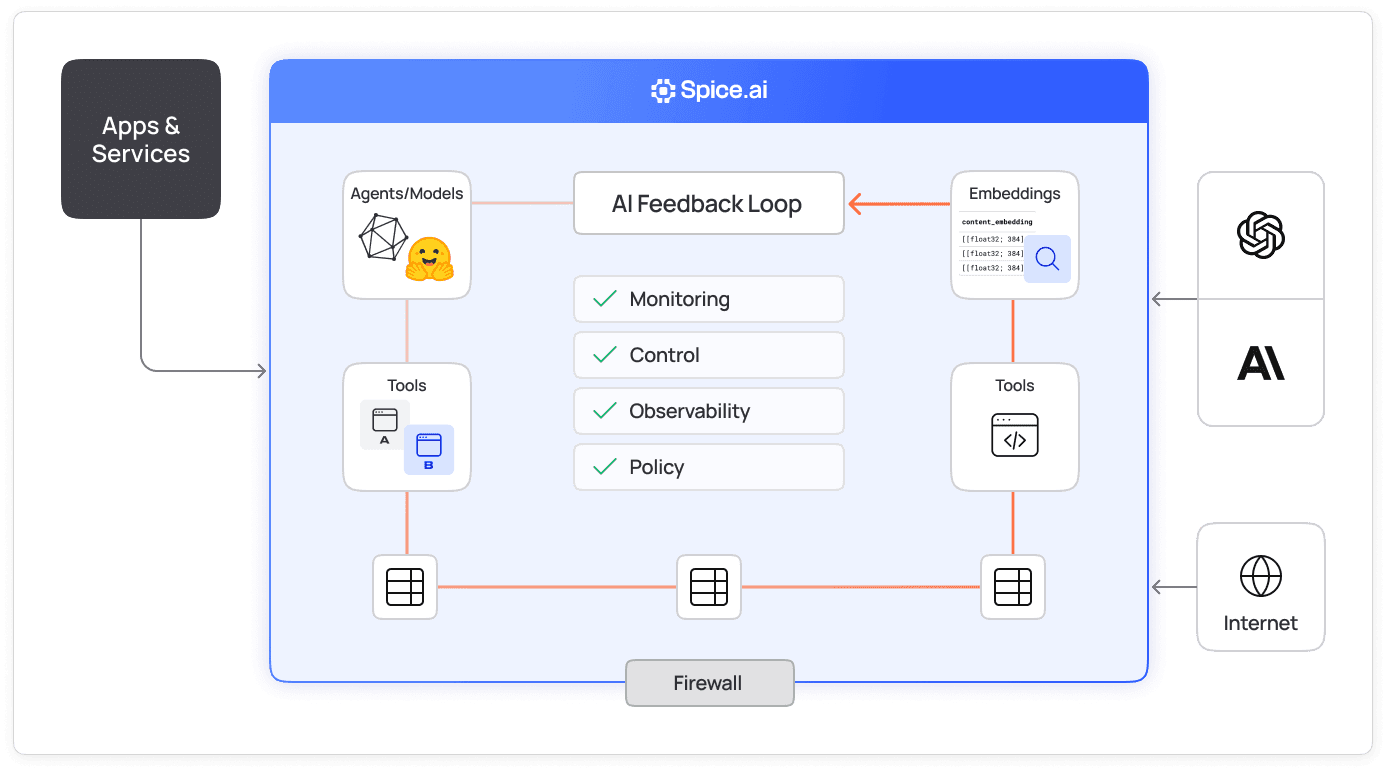
No database credentials in the agent
Spice runs next to your agents as a sidecar. The agent holds a Spice API key, not database credentials, and reads pre-materialized datasets. Sensitive tables stay behind your firewall, and frequent queries read from local memory or disk.
View the docs
Integrations across all of your data sources
Spice has about 40 prebuilt connectors for databases, warehouses, and file stores, from Databricks and Amazon S3 to MySQL and PostgreSQL. Apply the same isolation pattern to every source an agent reads.

How does Spice sandbox AI agents?
Spice sandboxes the data an AI agent can reach, not the code the agent runs. Each agent, or each tenant, gets its own Spice runtime. That runtime holds a filtered, read-only copy of the data the agent needs, so the agent never connects to the production database. Spice builds the sandbox in four steps:
- Declare: the agent's
spicepod.yamllists the datasets, models, and tools that the agent can use. A dataset that the Spicepod does not declare is not in the runtime catalog. - Filter: the
refresh_sqlsetting on each accelerated dataset selects the rows and columns that Spice copies from the source. Spice sends the filter to the source, so other rows stay in the source database. With the default settings, the agent reads only this local copy. - Scope: a model gets only the tools in its
toolsparameter, and its tools query only the datasets in itsdatasetslist. A model with notoolsparameter gets no Spice tools. - Trace: task history records each SQL query, model call, and tool call in the
spice.runtime.task_historytable.
The following Spicepod gives one tenant's agent a read-only copy of that tenant's orders:
version: v1
kind: Spicepod
name: tenant-acme-agent

datasets:
  - from: postgres:public.orders
    name: orders
    params:
      pg_host: ${secrets:PG_HOST}
      pg_db: app
      pg_user: ${secrets:PG_USER}
      pg_pass: ${secrets:PG_PASS}
      pg_sslmode: verify-full
    acceleration:
      enabled: true
      engine: duckdb
      mode: file
      refresh_check_interval: 10m
      refresh_sql: |
        SELECT order_id, status, total, created_at
        FROM orders
        WHERE tenant_id = 'acme'

models:
  - name: agent
    from: openai:gpt-4o-mini
    datasets:
      - orders
    params:
      openai_api_key: ${secrets:OPENAI_API_KEY}
      tools: list_datasets, table_schema, sql
To require an API key, set runtime.auth.api_key.enabled: true and list the key under runtime.auth.api_key.keys in the same Spicepod, as the authentication docs show. A key is read-only unless it ends in :rw. The agent then calls Spice with that key instead of database credentials:
curl http://localhost:8090/v1/chat/completions \
  -H 'Content-Type: application/json' \
  -H "X-API-Key: $SPICE_AGENT_API_KEY" \
  -d '{"model": "agent", "messages": [{"role": "user", "content": "How many orders are still open?"}]}'
The multi-tenant agents guide compares this pattern with the other isolation options. For a step-by-step walkthrough, read how to sandbox data access for AI agents.
What does each sandbox control limit?
Each control is a Spicepod setting. The defaults below apply when the setting is not present:
| Control | Spicepod setting | Default | What it limits |
|---|---|---|---|
| Dataset catalog | datasets | Empty | The tables that exist in the runtime |
| Row and column scope | acceleration.refresh_sql | All rows and columns | The data that Spice copies from the source |
| Row deletion | acceleration.retention_sql | Off | Removes the rows that match a DELETE statement |
| Time window | acceleration.retention_period, with time_column | Off | Removes the rows older than the window |
| Write access | dataset access | read | Inserts, updates, deletes, and schema changes |
| API keys | runtime.auth.api_key.keys | No authentication | Who can call the runtime. Keys are read-only unless they end in :rw |
| Model tools | model params.tools | No tools | The tools that a model can call |
| Model datasets | model datasets | All datasets in the runtime | The datasets that a model's tools can query |
| Text-to-SQL | /v1/nsql endpoint | Always read-only | Generated SQL that writes data or changes the schema |
| Transport security | runtime.tls.enabled and runtime.tls.client_auth_mode | Off | Plain-text traffic, and clients without a certificate (mTLS) |
| Audit trail | runtime.task_history | On, 8 hours in memory | Nothing. It records each query, model call, and tool call |
The refresh_sql filter is a boundary only while queries stay on the local copy. These settings send queries to the source table instead: ready_state: on_registration or on_schema_resolved before the first load, on_zero_results: use_source when the local copy returns no rows, and refresh_mode: caching on a cache miss. Keep the defaults (on_load and return_empty) for a sandbox. For a hard boundary, also connect Spice with a database user or view that can read only the tenant's rows. The two retention rows run only when acceleration.retention_check_enabled is true and retention_check_interval is set. TLS is off by default. Set runtime.tls.enabled: true before an agent connects to Spice over a network. Spice does not encrypt accelerated data at rest, so put file-mode accelerators on an encrypted volume. To keep the audit trail longer than 8 hours, set runtime.task_history.retention_period or export traces with OpenTelemetry.
How is a Spice sandbox different from a code sandbox?
A code sandbox, such as a container, a microVM, or a WebAssembly runtime, limits what an agent's code can do on a host. A Spice sandbox limits the data an agent can read and the tools it can call. Most production agents need both. Run the agent's code in a code sandbox, and send its data access through a Spice runtime. The Spice Docker image runs as a non-root user, which also limits the runtime itself.
What does Spice.ai Enterprise add to the sandbox?
The open-source runtime scopes access with dataset lists, read-only keys, and model allowlists. It has no row-level or role-based policy engine. Spice.ai Enterprise adds:
- Policies: Cedar authorization policies apply row filters, column masks, and roles to datasets, models, tools, and endpoints.
- Identity: OIDC authentication, in preview, maps each caller to a principal that the policies evaluate.
For agents that reach external systems, the MCP server gateway puts MCP tools under the same model tools list. To run the sandbox as a managed service, compare Spice Cloud and Enterprise plans.
Deployed in production
Teams run Spice in production to give AI agents governed access to enterprise data.

“Spice opened the door to take these critical control-plane datasets and move them next to our services in the runtime path.”
Peter Janovsky
Software Architect, Twilio

100x
Faster queries
“It just spins up and works, which is really nice. The responsiveness is amazing, which is a huge gain for the customer.”
Darin Douglass
Principal Software Engineer, Barracuda
Learn how Barracuda gained 100x faster query responses and reduced costs 50% with Spice

“Partnering with Spice AI has transformed how NRC Health delivers AI-driven insights. By unifying siloed data across systems, we accelerated AI feature development, reducing time-to-market from months to weeks - and sometimes days. With predictable costs and faster innovation, Spice isn't just solving some of our data and AI challenges - it's helping us redefine personalized healthcare.”
Tim Ottersburg
VP of Technology, NRC Health

“Spice AI grounds AI in our actual data, using SQL queries across many data sources. This brings accuracy to probabilistic AI systems, which are very prone to hallucinations.”
Rachel Wong
CTO, Basis Set
FAQs
Answers to common questions about secure AI sandboxing in Spice
An AI sandbox in Spice is a Spice runtime that serves one agent or one tenant. It holds a filtered, read-only copy of the data that the agent needs, and it gives the agent only the tools in its Spicepod. The agent queries the sandbox and never connects to the production database.
No. Spice has no API that creates short-lived sandboxes. A sandbox is a Spice runtime that you deploy with its own Spicepod, such as a sidecar next to each agent or one runtime for each tenant. Your orchestrator, such as Kubernetes, starts and stops these runtimes.
Add a WHERE filter to the dataset's refresh_sql, such as WHERE tenant_id = 'acme'. Spice sends the filter to the source and copies only the matching rows into the accelerator. The same statement can select a subset of columns. Keep the default ready_state and on_zero_results settings, because other values send queries to the source table. For a hard boundary, also give Spice a database user that can read only that tenant's rows. See data refresh for the rules.
Not by default. Datasets are read-only unless their access parameter is read_write, and API keys are read-only unless they end in :rw. Spice always runs SQL from the /v1/nsql text-to-SQL endpoint in read-only mode, and it rejects writes and schema changes.
A model can use only the tools in its tools parameter, such as sql, search, and table_schema. A model with no tools parameter gets no Spice tools. The model's datasets list limits the tables that those tools can query.
Yes. Task history is on by default. It records each SQL query, model call, and tool call in the spice.runtime.task_history table for 8 hours. Set runtime.task_history.retention_period to keep records longer, or export traces and metrics with OpenTelemetry.
Spice encrypts traffic when you turn on TLS. TLS is off by default, so set runtime.tls.enabled: true for any network connection. Set runtime.tls.client_auth_mode to required for mTLS. Spice does not encrypt accelerated data at rest. Store file-mode accelerators on an encrypted volume.
Agents query accelerated datasets from local memory or disk, not from the source database. This removes the network round trip to the source for each query. Serving LLM inference in Spice from the same runtime keeps models next to the data they are permitted to use.
See Spice in action
Walk through your use case with an engineer and see how Spice handles federation, acceleration, and AI integration for production workloads.
Talk to an engineer (opens in a new tab)