Bring AI to your SQL queries
Spice makes SQL your interface to AI. Call OpenAI, Anthropic, Amazon Bedrock, and other models from SQL. The ai() function returns text. Decision functions such as ai_if and ai_classify return a boolean or a label.
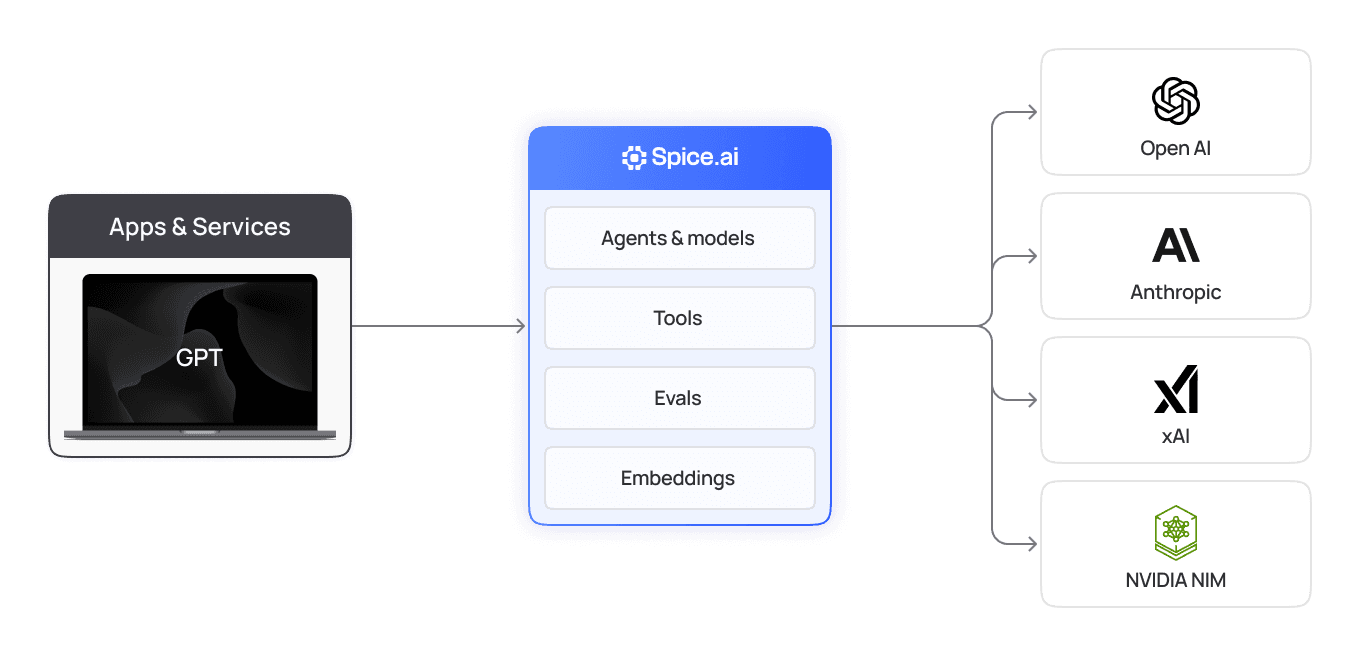
AI where your data lives
Use LLMs from the SQL tools and workflows that you already use. Spice sends the prompt, calls the model, and returns the answer as a column.

Accelerate data analysis
Summarize or translate text with ai(). Filter, label, and score rows with ai_if, ai_classify, and ai_score. You do not write API clients or glue code.
Explore SQL AI functions

Combine data and AI
in one workflow
Use model output in the same query as filters, joins, and aggregations. Add vector or full-text search to build a RAG pipeline in SQL.
Explore SQL AI functions

Maintain data governance
& security
The model sees only the data that your query sends to it. Text-to-SQL runs read-only, and Spice records each model call in its task history.
Explore secure AI sandboxing
AI engine designed for developers
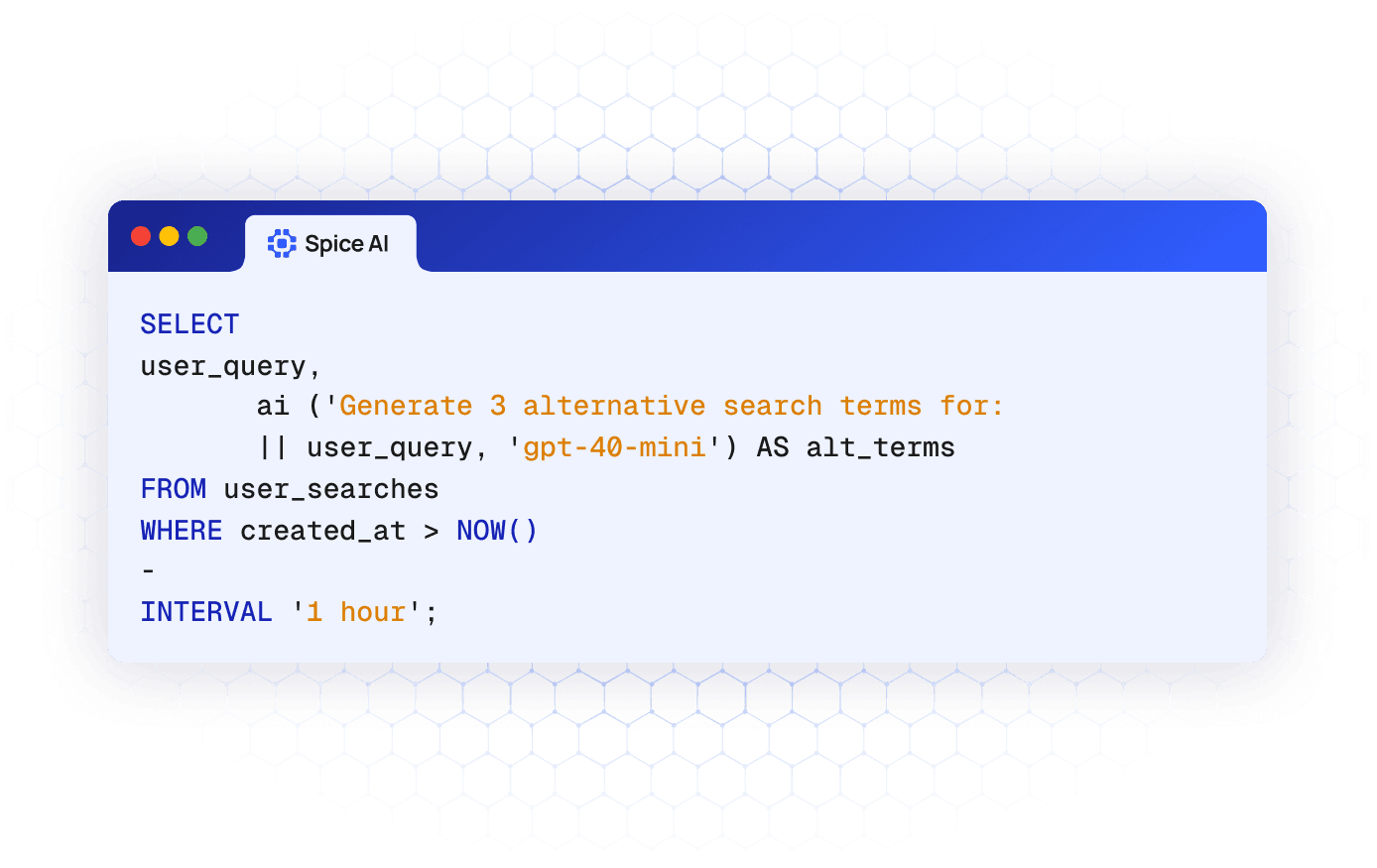
Spice adds LLM calls to SQL with ai(), decision functions such as ai_classify, a text-to-SQL API, and one way to configure models from each provider.
ai(): the SQL function for LLMs
Call the ai() function with a prompt and, optionally, a model name. Spice calls the model once for each row, runs the calls in parallel, and returns the text.
Explore the AI() function
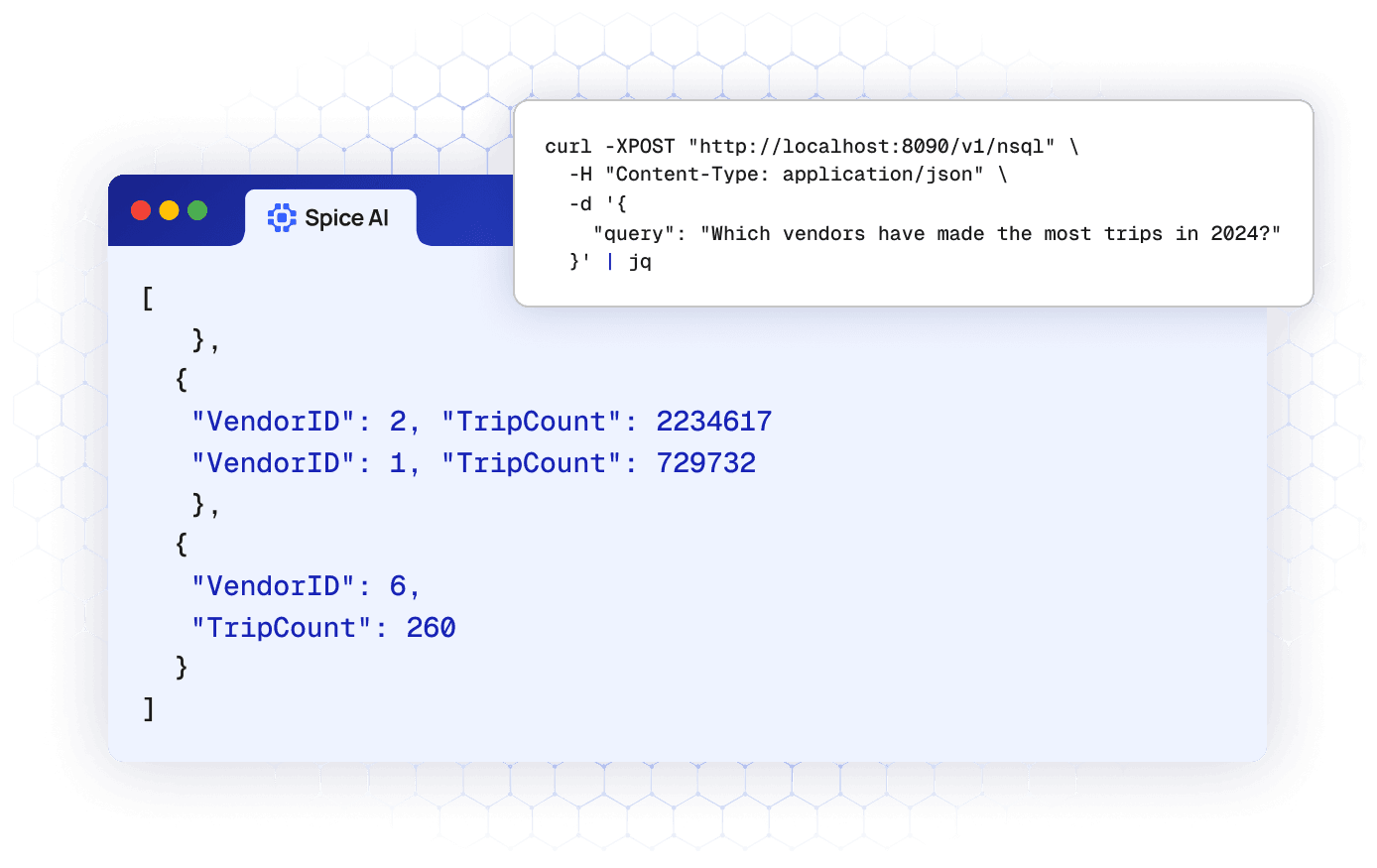
Native Text-to-SQL generation
Send a question in plain language to the /v1/nsql API. An LLM writes SQL for your datasets, and Spice runs it read-only and returns the rows.
Explore the text-to-SQL API
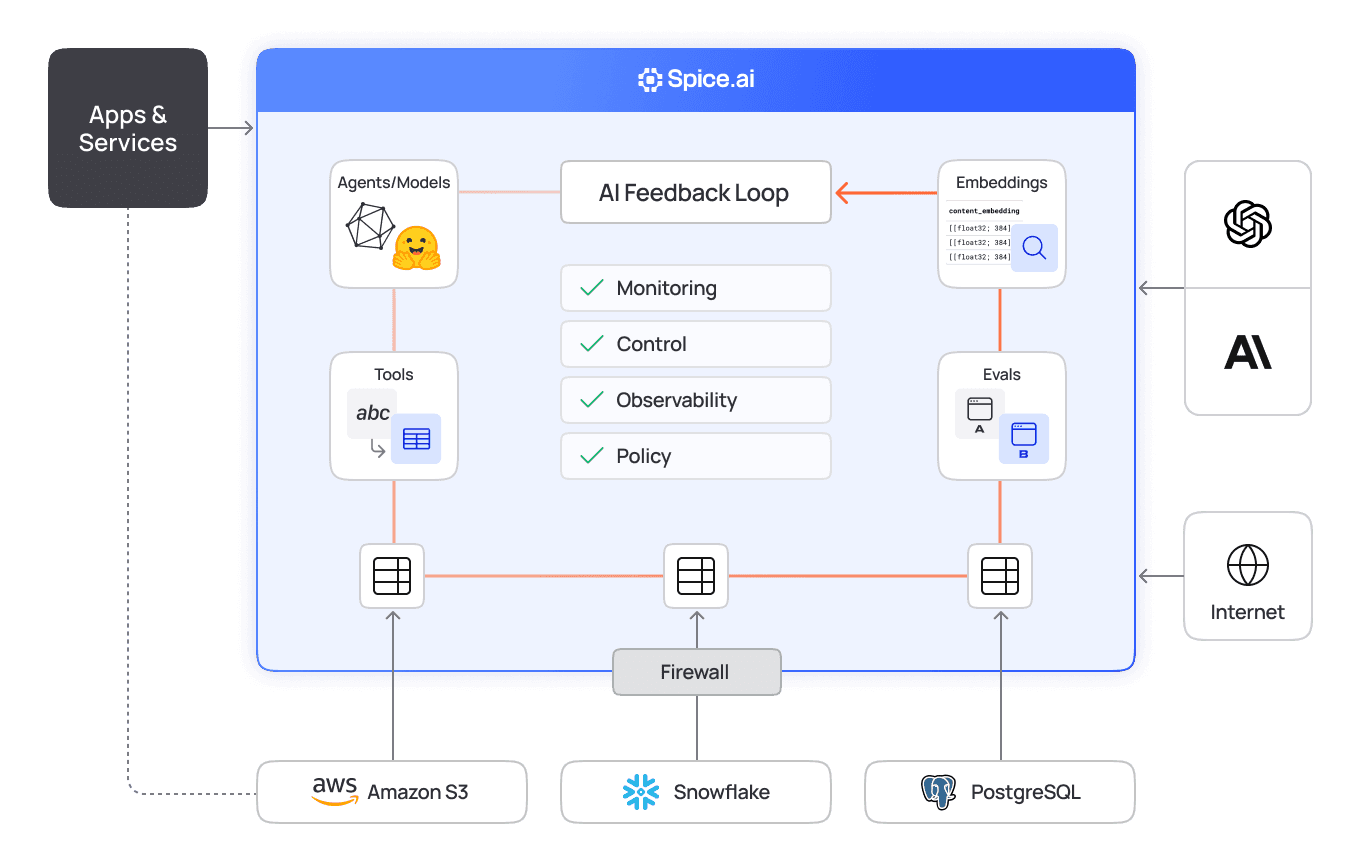
AI sandboxing for least-privilege access
Run Spice between your models and your production databases. A model can query only the datasets and views that you define in the Spicepod.
Explore secure AI sandboxing
Trusted by developers building production AI
Teams use Spice to add AI to their SQL workflows. They ship faster and run fewer pipelines.

“Partnering with Spice AI has transformed how NRC Health delivers AI-driven insights. By unifying siloed data across systems, we accelerated AI feature development, reducing time-to-market from months to weeks - and sometimes days. With predictable costs and faster innovation, Spice isn't just solving some of our data and AI challenges - it's helping us redefine personalized healthcare.”
Tim Ottersburg
VP of Technology, NRC Health

“Spice AI grounds AI in our actual data, using SQL queries across many data sources. This brings accuracy to probabilistic AI systems, which are very prone to hallucinations.”
Rachel Wong
CTO, Basis Set
Integrations across all of your data sources
Spice has about 40 data connectors, such as Databricks, Amazon S3, MySQL, and PostgreSQL. It also connects to the major LLM providers.

FAQs
Answers to common questions about calling LLMs from SQL
The ai() function is a built-in Spice SQL function that sends a prompt to a chat model and returns the answer as text. Give a model name from your Spicepod as the second argument, such as ai(body, 'gpt-4o-mini'). You can omit the name only when the Spicepod has one chat model. To change the provider, change the model in the Spicepod, and your SQL stays the same. Read the ai() function reference.
Use the decision functions, which return typed values instead of free text. The ai_if function returns a boolean, ai_classify returns one of your labels, and ai_score returns a level on your scale. The ai_probability function returns a probability, and ai_decide answers several questions in one call. Any chat model can answer, but only a decision model such as TypeSafe Jev returns calibrated probabilities. Read the decisions guide.
Send a question in plain language to the /v1/nsql HTTP API. Spice gives the model the schemas of your datasets, and the model writes a SQL query. Spice runs the query read-only, so the generated SQL cannot change data. The response has the query rows. Send the header Accept: application/sql to get only the SQL.
No. With ai() and the decision functions, the model gets only the input that your query sends. With text-to-SQL, the model gets the schemas of your datasets. It gets sample rows only when you set sample_data_enabled to true. Add only the datasets that a model needs to the Spicepod. Read about secure AI sandboxing.
Spice gives you two ways to use an LLM with your data. The ai() SQL function sends text to a model and returns the answer as a column. The /v1/nsql API turns a question in plain language into SQL and runs it. Both use the models in your spicepod.yaml file:
- Add a model: list a chat model under
models. Thefromvalue names the provider and the model, such asopenai:gpt-4o-mini. - Add data: list the datasets that the model can use under
datasets. - Call the model: use
ai()or a decision function in a SQL query, or send a question to/v1/nsql.
The following Spicepod adds an OpenAI model and a table of support tickets from PostgreSQL:
version: v1
kind: Spicepod
name: support-insights

models:
  - from: openai:gpt-4o-mini
    name: gpt-4o-mini
    params:
      openai_api_key: ${secrets:OPENAI_API_KEY}

datasets:
  - from: postgres:public.tickets
    name: tickets
    params:
      pg_host: ${secrets:PG_HOST}
      pg_db: support
      pg_user: ${secrets:PG_USER}
      pg_pass: ${secrets:PG_PASS}
Start the runtime with spice run. Then summarize and label each new ticket in one query:
SELECT id,
       ai('Summarize this ticket in one sentence: ' || body) AS summary,
       ai_classify(body, ['billing', 'bug', 'question']) AS category
FROM tickets
WHERE created_at > now() - INTERVAL '1 day';
Or ask a question in plain language:
curl http://localhost:8090/v1/nsql \
  -H 'Content-Type: application/json' \
  -d '{"query": "How many tickets were opened each day last week?"}'
Read the ai() function reference and the /v1/nsql API reference for all options.
| Question | ai() SQL function | Text-to-SQL (/v1/nsql) |
|---|---|---|
| What is the input? | A SQL query that calls ai(prompt) or ai(prompt, model) | A question in plain language |
| What does the model do? | Answers the prompt for each row | Writes one SQL query |
| What do you get back? | A text column in the query result | The query rows, or the SQL only |
| Where do you call it? | Any Spice SQL interface, such as HTTP, Arrow Flight SQL, or ADBC | The HTTP API on port 8090 |
| When do you use it? | Summaries, labels, translations, and extraction | Questions from people who do not write SQL |
To get only the generated SQL from /v1/nsql, send the header Accept: application/sql.
You can call any model that you add to the models section of your Spicepod. The ai() function needs a chat model, and the decision functions take a chat model or a TypeSafe decision model. Set the provider with the prefix of the from value in each model:
| Prefix | Provider |
|---|---|
openai | OpenAI, or an OpenAI-compatible API such as NVIDIA NIM |
azure | Azure OpenAI |
anthropic | Anthropic |
bedrock | Amazon Bedrock |
google | Google Gemini |
xai | xAI |
databricks | Databricks model serving |
spice.ai | Models on the Spice.ai Cloud Platform |
huggingface | Models from Hugging Face that run in the Spice runtime |
file | Model files on local disk that run in the Spice runtime |
typesafe | TypeSafe decision models, such as Jev |
To use an OpenAI-compatible API, set the endpoint parameter of an openai model to that API. Read the models guide for the parameters of each provider, and the AI model serving page.
Spice calls the model one time for each row that ai() gets with a prompt that is not NULL. It runs the calls in parallel and returns the answers in row order. Know these limits before you run ai() on a large table:
- Batches: Spice splits the input into batches of up to 1,000 rows, so a query can process any number of rows. A
LIMITstops model calls only between batches, so use a filter to limit the rows that a query sends. - Message size: one message can be a maximum of 1 MB.
- NULL input: a NULL prompt returns NULL, and Spice does not call the model.
- Errors: if one model call fails, the full query fails. The decision functions accept
on_error => 'null'to return NULL for that row instead.
A hosted provider, such as OpenAI, can charge for the tokens of each call. A local Hugging Face or file model uses the compute of the Spice runtime. Test a prompt on a small, filtered set of rows before you run it on a full table.
See Spice in action
Walk through your use case with an engineer and see how Spice handles federation, acceleration, and AI integration for production workloads.
Talk to an engineer (opens in a new tab)