
Give every agent its own
isolated data stack

Build secure, multi-tenant agentic systems for your customers. Each tenant's agent gets its own stack: a standard data lakehouse from one Spicepod, with its own runtime, sources, and keys.

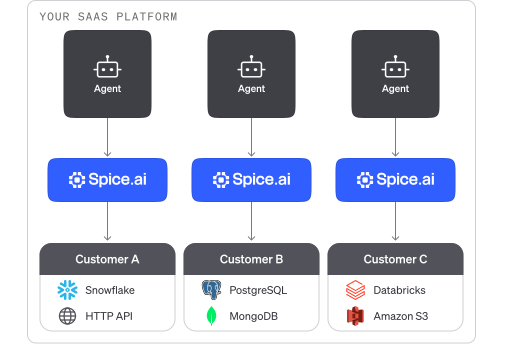
Diagram of a SaaS platform that serves three customers. Inside the platform, each customer's agent has its own Spice.ai instance, connected only to that customer's data sources: Snowflake and an HTTP API, PostgreSQL and MongoDB, and Databricks and Amazon S3.

In a shared multi-tenant backend, one missing filter exposes another tenant's data

Customers keep their data in different systems with unique credentials, network rules, and isolation requirements. When every customer's agent queries one shared backend, tenant isolation depends on filters in every query and tool. Building and managing connectors, pipelines, and access controls for each customer expands the security and operations surface.

One lakehouse template, deployed for every tenant

Define datasets, acceleration, and API keys once in a Spicepod. Spice deploys that lakehouse as a separate stack for each agent, and your agent sends the same SQL to every stack.

Isolated stacks

A separate data stack for each agent

Each agent queries its own Spice runtime, which holds only one customer's datasets and credentials. No query can reach another customer's data. Datasets are read-only by default, and the agent has only a Spice API key, not database credentials.

Read the authentication docs (opens in a new tab)

A separate data stack for each agent: each customer has its own agent, its own key, and its own Spice runtime. Customer A's agent sends a request with Customer A's key, and its Spice runtime reads Snowflake and an HTTP API and returns Customer A's rows. Customer B's agent does the same with Customer B's key, PostgreSQL, and MongoDB. No wire joins the two stacks, so neither agent can reach the other customer's dataCustomer ASnowflakeHTTP APICustomer BPostgreSQLMongoDBAgentCustomer A keyCustomer A keyRows from AAgentCustomer B keyCustomer B keyRows from BEach agent holds the key to its own stackCustomer A's agent reads only A's dataCustomer B's agent reads only B's dataNo path between customer stacks
Enterprise controls

Cedar policies on every request

Spice.ai Enterprise checks each query, model call, and tool call against Cedar authorization policies. A policy can filter rows and mask columns based on the caller's role or org. Task history records each call for auditing.

Read the policy docs

Portable agents

One SQL interface for every customer

Spice turns every customer's sources into one SQL and search surface. A Snowflake table, a PostgreSQL table, and an HTTP API look the same to your agent. Your prompts, tools, and queries do not change from one customer to the next.

Read the federation docs (opens in a new tab)

Onboarding by API

Onboard customers without building pipelines

Give every customer a project from your standard Spicepod template. Point the project at a customer's sources and store their credentials as secrets. Create and deploy each project through the Management API, with no per-customer ETL.

Read the Management API docs

Flexible deployment

Run where your customer needs it

Run each customer's data lakehouse on Spice Cloud, in a BYOC cluster, or in the customer's own environment, from the same Spicepod. Data stays in the customer's sources, and Spice queries it in place.

Read the deployment docs (opens in a new tab)

Deploy a standard data lakehouse for each customer

Onboarding example

An example of onboarding a customer through the Management API.

# spicepod.yaml: one template for every customerversion: v1kind: Spicepodname: customer-dataruntime:  auth:    api_key:      enabled: true      keys:        - ${secrets:SPICE_API_KEY}datasets:  - from: postgres:public.accounts    name: accounts    params:      pg_host: ${secrets:PG_HOST}  # Set for each customer      pg_db: ${secrets:PG_DB}      pg_user: ${secrets:PG_USER}      pg_pass: ${secrets:PG_PASS}    acceleration:      enabled: true$ PROJECT=$(curl -s -X POST https://api.spice.ai/v1/projects \    -H "Authorization: Bearer $SPICE_TOKEN" \    -H "Content-Type: application/json" \    -d '{"name": "customer-a", "region": "us-west-2"}' | jq -r .id)# The PG_* variables and SPICE_API_KEY hold customer-a values$ for name in PG_HOST PG_DB PG_USER PG_PASS SPICE_API_KEY; do    curl -X POST https://api.spice.ai/v1/projects/$PROJECT/secrets \      -H "Authorization: Bearer $SPICE_TOKEN" \      -H "Content-Type: application/json" \      -d "$(jq -n --arg name "$name" --arg value "$(printenv "$name")" \        '{name: $name, value: $value}')"  done$ curl -X PUT https://api.spice.ai/v1/projects/$PROJECT \    -H "Authorization: Bearer $SPICE_TOKEN" \    -H "Content-Type: application/json" \    -d "$(jq -n --rawfile spicepod spicepod.yaml '{spicepod: $spicepod}')"$ curl -X POST https://api.spice.ai/v1/projects/$PROJECT/deployments \    -H "Authorization: Bearer $SPICE_TOKEN"sql> -- the same query runs for every customer     SELECT plan, COUNT(*) AS accounts     FROM accounts     GROUP BY plan;# example output for customer-aenterprise    42team         318
  1. Define your template

    Write one Spicepod with the datasets, acceleration, and API keys that each agent needs. Use secrets for each customer's credentials.

  2. Create the customer project

    Call the Management API to create a project, store the customer's secrets, set the Spicepod, and deploy.

  3. Connect your agent

    Each customer's agent calls a dedicated runtime over MCP or SQL, with that project's API key.

  1. /plugin marketplace add spiceai/skills
  2. /plugin install spiceai@spiceai

Proven in production

Teams that serve data to many customers run Spice in production.

Ramachandra Ramarathinam

“Spice is the data plane behind Summation. Every connector we ship, from Snowflake to a generic REST-as-a-table, collapses into one SQL surface, which is what makes our AI agents portable across a customer's stack.”

Ramachandra Ramarathinam

CTO, Summation

Darin Douglass

100x

Faster queries

“It just spins up and works, which is really nice. The responsiveness is amazing, which is a huge gain for the customer.”

FAQs

Answers for teams that build AI agents for many customers.

It is a standard data lakehouse that serves one agent and the customer that it works for. Spice deploys it from your Spicepod template as a separate runtime, with its own data sources, credentials, and API keys. An isolated stack holds only one customer's data, so no query can cross from one customer to another. For the concept in depth, read how to give each AI agent its own isolated data environment.

Your product stays multi-tenant: one agent codebase and one Spicepod template serve every customer. The data layer is single-tenant: each tenant's agent queries its own Spice runtime, which holds only that tenant's data. A shared backend separates tenants with a filter in every query, and a separate stack separates them by runtime and key.

Give each customer its own stack, and give that customer's agent only the API key of its own stack. Each stack checks its own keys, so one customer's key does not work on another customer's stack. Source credentials stay in the stack as secrets, and the agent never holds them.

Spice.ai Enterprise adds Cedar authorization policies for datasets, models, tools, and endpoints. A policy can filter rows and mask columns with identity functions such as current_org_id(). Enterprise also adds OIDC authentication (in preview) and mTLS between cluster nodes. Read the authorization policy docs.

Yes, with Spice.ai Enterprise. Each user signs in through OIDC (in preview) with an org claim, and a Cedar row filter on current_org_id() returns only that org's rows. A shared stack is not an isolated stack: it separates tenants by policy, not by runtime. Give large or regulated tenants their own stack.

Yes. Each project starts from your template, with that customer's sources and credentials. Spice federates them into the same SQL surface, so your agent does not change. Spice has about 40 data connectors.

Create a project through the Management API, store the customer's secrets, set the Spicepod, and deploy. You do not build a pipeline for each customer.

Yes. The Spice runtime is open source under the Apache 2.0 license, so you can run each stack in your own infrastructure. Spice Cloud runs it as a managed service. Spice.ai Enterprise adds clustering and high availability for self-hosted stacks.