A Developer's Guide to Understanding Spice.ai
Engineering
Spice AI
Spice Cloud Platform
Spice OSS

Viktor Yershov
Senior Software Engineer at Spice AIFebruary 5, 2026
TL;DR
This hands-on guide is designed to help developers quickly build an understanding of Spice: what it is (an AI-native query engine that federates queries, accelerates data, and integrates search and AI), when to use it (data-intensive applications and AI agents), and how it can be leveraged to solve enterprise-scale data challenges.
*Note: This guide was last updated on February 5, 2026. Please see the docs for the latest updates.
Who this guide is for
This guide is for developers who want to understand why, how, and when to use Spice.ai.
If you are new to Spice, you might also be wondering how Spice is different than other query engines or data and AI platforms. Most developers exploring Spice are generally doing one of the following:
- Operationalizing data lakes for real-time queries and search
- Building applications that need fast access to disparate data
- Building AI applications and agents that need fast, secure context
Let's start with the problem Spice is solving to anchor the discussion.
The problem Spice solves
Modern applications face a distributed data challenge.
Enterprise data is spread across operational databases, data lakes, warehouses, third-party APIs, and more. Each source has its own interface, latency characteristics, and access patterns.
AI workloads amplify the problem. RAG applications generally require:
- A vector database (e.g. Pinecone, Weaviate) for embeddings
- A text search engine (e.g. Elasticsearch) for keyword matching
- A cache layer (e.g. Redis) for performance & latency
- Model hosting and serving (OpenAI, Anthropic) for LLM inference
- Orchestration code and services to coordinate everything
This can be a lot of complexity, even for a simple application.
What is Spice?
Spice is an open-source SQL query, search, and LLM-inference engine written in Rust, purpose-built for data-driven applications and AI agents. At its core, Spice is a high-performance compute engine that federates, searches, and processes data across your existing infrastructure - querying & accelerating data where it lives and integrating search and AI capabilities through SQL.
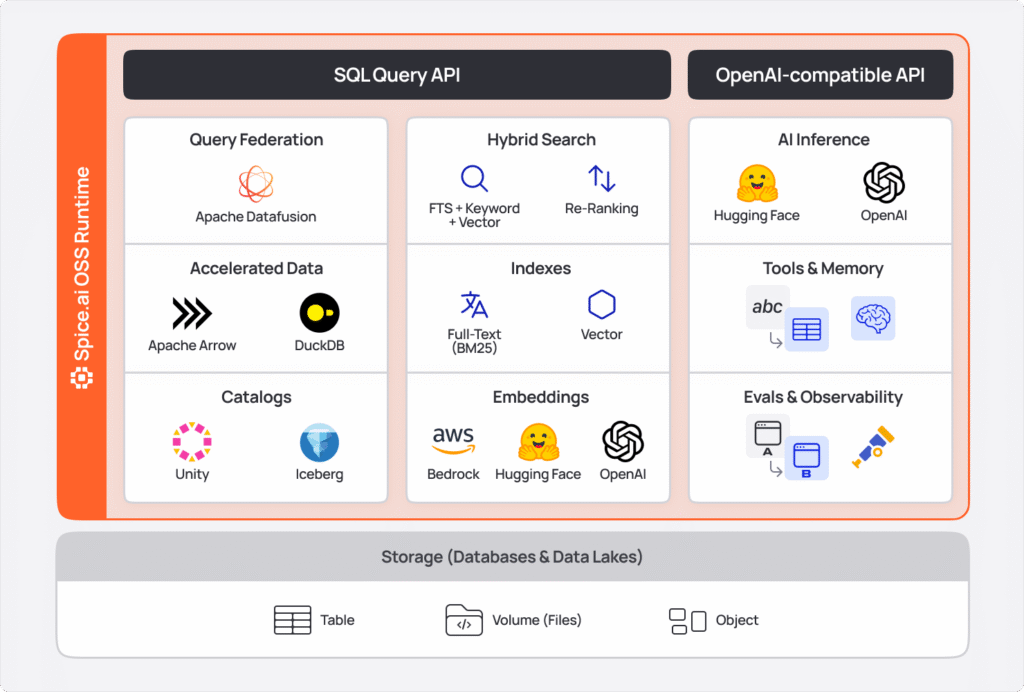
Unlike databases that require migrations & maintenance, Spice takes a declarative configuration approach: datasets, views, models, tools are defined in declarative YAML, and Spice handles the operations of fetching, caching, and serving that data.
This makes Spice ideal when:
- Your application needs fast, unified access to disparate data sources
- You want simplicity and to avoid building and maintaining ETL pipelines
- You want an operational data lake house for applications and agents
- You need sub-second query performance without ETL
What Spice is not:
- Not a replacement for PostgreSQL or MySQL (use those for transactional workloads)
- Not a data warehouse (use Snowflake/Databricks for centralized analytics)
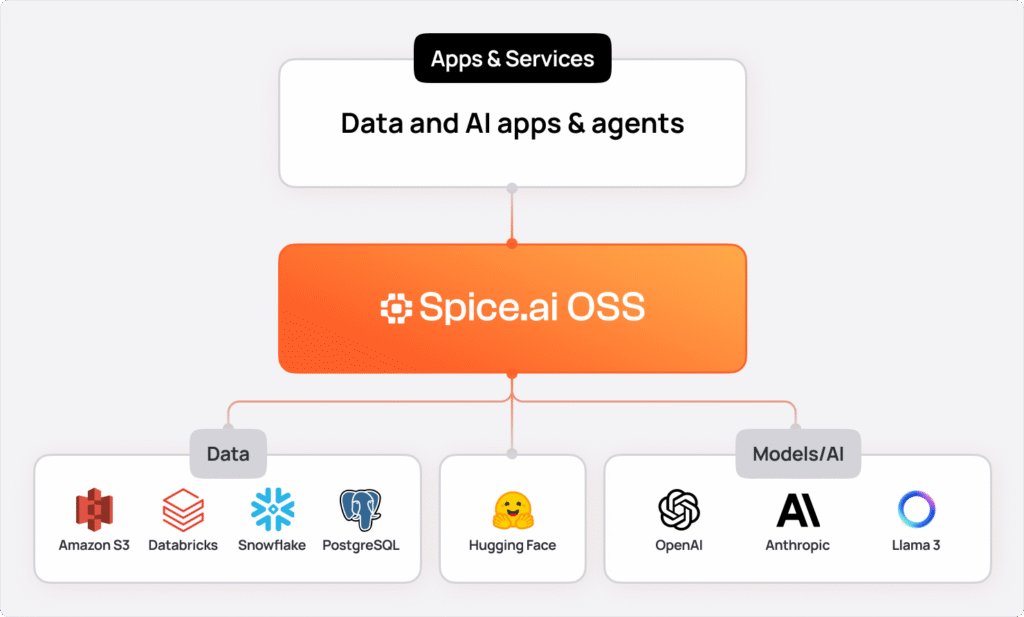
Mental model: Spice as a data and AI substrate
Think of Spice as the operational data & AI layer between your applications and your data infrastructure.
How this guide works
We'll start with a hands-on quickstart to get Spice running, then progressively build your mental model through the core concepts:
- Federation
- Acceleration
- Views
- Caching
- Snapshots
- Models
- Search
- Writes
By the end, you'll understand how these primitives are used together to solve enterprise-scale data challenges.
Quickstart
To install and get Spice started, run:
curl https://install.spiceai.org | /bin/bashOr using Homebrew:
brew install spiceai/spiceai/spiceNext, in any folder, create a spicepod.yaml file with the following content:
version: v1
kind: Spicepod
name: my_spicepod

datasets:
  - from: s3://spiceai-demo-datasets/taxi_trips/2024/
    name: taxi_trips
In the same folder, run:
spice runAnd, finally, in another terminal, run:
> spice sql
Welcome to the Spice.ai SQL REPL! Type 'help' for help.

show tables; -- list available tables
sql> show tables;
+--------------+---------------+--------------+-------------+
| table_catalog | table_schema | table_name  | table_type   |
+--------------+---------------+--------------+-------------+
| spice              | runtime          | task_history  | BASE TABLE |
| spice              | public             | taxi_trips      | BASE TABLE |
+--------------+---------------+--------------+-------------+

Time: 0.010767 seconds. 2 rows.
sql> select count(*) from taxi_trips ;
+----------+
| count(*) |
+----------+
| 2964624  |
+----------+
Understanding what just happened
In that quickstart, you:
- Configured a dataset (taxi_trips) pointing to a remote S3 bucket
- Started the Spice runtime, which connected to that source
- Queried the data using standard SQL - without moving or copying it.
Spice.ai Cloud Platform
You can run the same Spicepod configuration in Spice.ai Cloud, the fully managed version of Spice that extends the open-source runtime with enterprise capabilities: built-in observability, elastic scaling, and team collaboration.
Core Concepts
1. Federation
In the quickstart, you queried taxi_trips stored in a remote S3 bucket using standard SQL without copying or moving that data. That's federation in action - querying data where it lives, not where you've moved it to.
This is foundational to Spice's architecture. Federation in Spice enables you to query data across multiple heterogeneous sources using a single SQL interface, without moving data or building ETL pipelines.
Traditional approaches force you to build ETL pipelines that extract data from these sources, transform it, and load it into a centralized database or warehouse. Every new data source means building and maintaining another pipeline.
Spice connects directly to your existing data sources and provides a unified SQL interface across all of them. You configure datasets declaratively in YAML, and Spice handles the connection, query translation, and result aggregation.
Spice supports query federation across:
- Databases: PostgreSQL, MySQL, Microsoft SQL Server, Oracle, MongoDB, ClickHouse, DynamoDB, ScyllaDB
- Data Warehouses: Snowflake, Databricks, BigQuery
- Data Lakes: S3, Azure Blob Storage, Delta Lake, Apache Iceberg
- Other Sources: GitHub, GraphQL, FTP/SFTP, IMAP, Kafka, HTTP/API, and 30+ more connectors
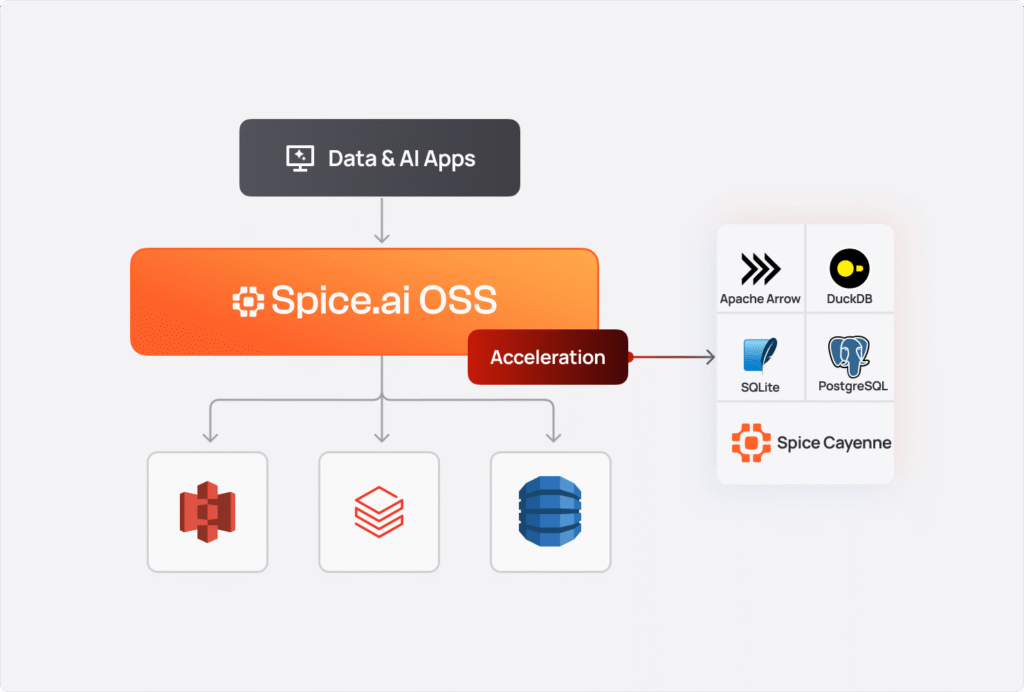
How it works
When you configure multiple datasets from different sources, Spice's query planner (built on Apache DataFusion) optimizes and routes queries appropriately:
datasets:
  # From PostgreSQL
  - from: postgres:customers
    name: customers
    params:
      pg_host: db.example.com
      pg_user: ${secrets:PG_USER}

  # From S3 Parquet files
  - from: s3://bucket/orders/
    name: orders
    params:
      file_format: parquet

  # From Snowflake
  - from: snowflake:analytics.sales
    name: sales
-- Query across all three sources in one statement
SELECT c.name, o.order_total, s.region
FROM customers c
JOIN orders o ON c.id = o.customer_id
JOIN sales s ON o.id = s.order_id
WHERE s.region = 'EMEA';Without additional configuration, each query fetches data directly from the underlying sources. Spice optimizes this as much as possible using filter pushdown and column projection.
📚 Docs: Spice Federation and Data Connectors
2. Acceleration
Federation solves the data movement problem, but alone often isn't enough for production applications. Querying remote S3 buckets for every request introduces latency - even with query pushdown and optimization, round-trips to distributed data sources can take seconds (or tens of seconds) for large datasets.
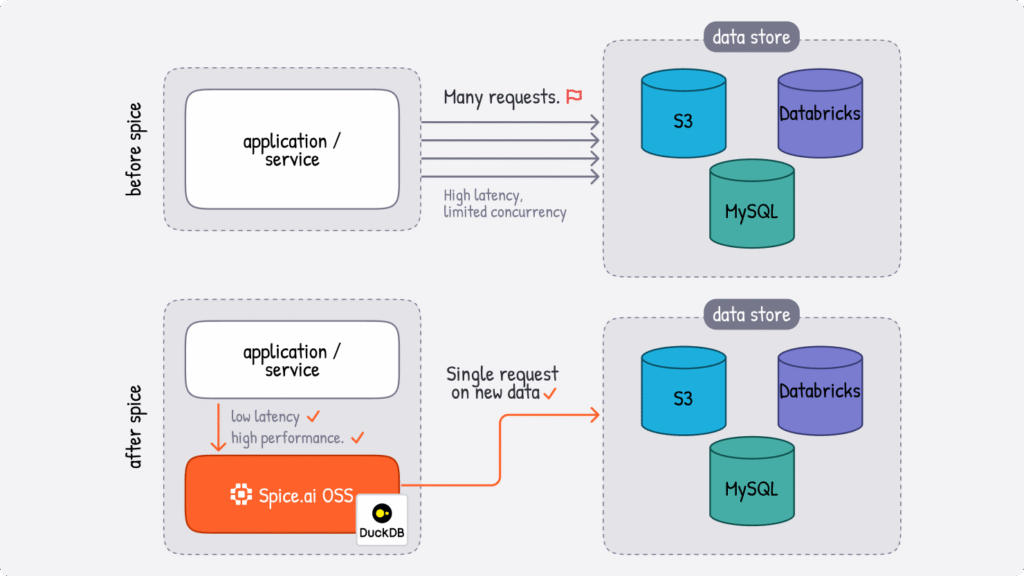
Spice data acceleration materializes working sets of data locally, reducing query latency from seconds to milliseconds. When enabled, Spice syncs data from connected sources and stores it in local stores, like DuckDB or Vortex - giving you the speed of local data with the flexibility of federated access.
You can think of acceleration as an intelligent caching layer that understands your data access patterns. Hot data gets materialized locally for instant access and cold data remains federated. Unlike traditional caches that just store query results or static database materializations, Spice accelerates entire datasets with configurable refresh strategies, with the flexible compute of an embedded database.
Figure 5: A federated dataset sends every query to its source, while an accelerated one answers from a local copy that each full refresh rebuilds from that source and swaps in atomically.
Acceleration Engines
| Engine | Mode | Best For |
| Arrow | In-memory only | Ultra-fast analytical queries, ephemeral workloads |
| DuckDB | Memory or file | General-purpose OLAP, medium datasets, persistent storage |
| SQLite | Memory or file | Row-oriented lookups, OLTP patterns, lightweight deployments |
| Cayenne | File only | High-volume multi-file workloads, terabyte-scale data |
To enable acceleration, add the acceleration block to your dataset configuration:
datasets:
  - from: s3://data-lake/events/
    name: events
    acceleration:
      enabled: true
      engine: cayenne # Choose your engine
      mode: file # 'memory' or 'file'
With this configuration, Spice fetches the events dataset from S3 and stores it in a local Spice Cayenne Vortex files. Queries to events are then served from the local disk instead of making remote calls to S3.
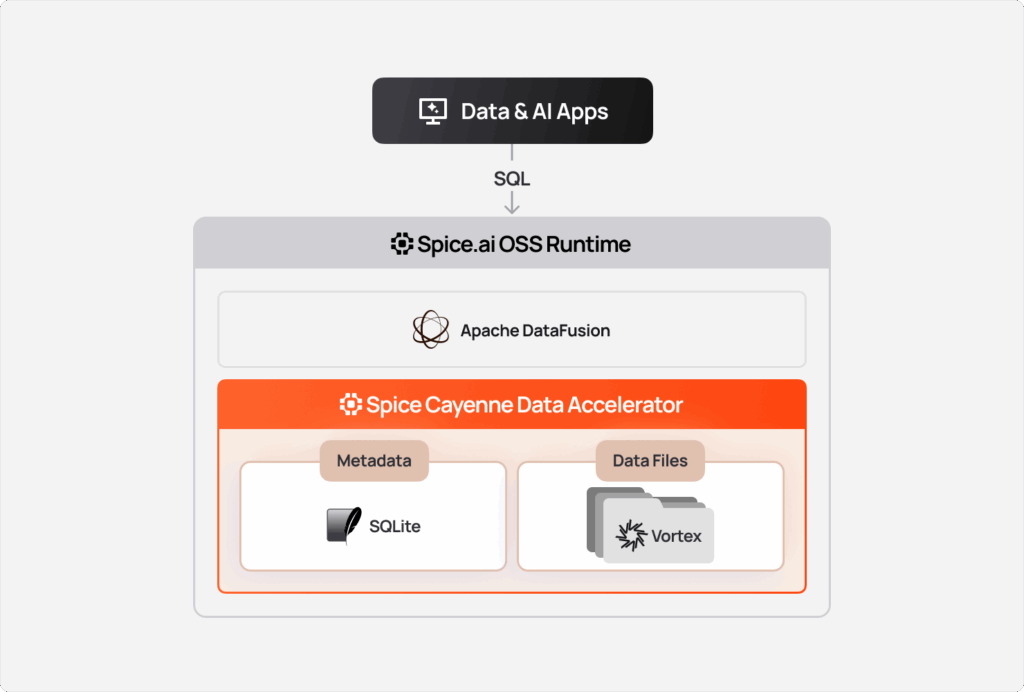
While DuckDB and SQLite are general purpose engines, Spice Cayenne is purpose-built for modern data lake workloads. It's built on Vortex - a next-generation columnar format under the Linux Foundation - designed for the scale and access patterns of object storage.
Learn more: Introducing the Spice Cayenne Data Accelerator
📚 Docs: Data Accelerators
Refresh Modes
Spice offers multiple strategies for keeping accelerated data synchronized with sources:
| Mode | Description | Use Case |
| full | Complete dataset replacement on each refresh | Small, slowly-changing datasets |
| append (batch) | Adds new records based on a time column | Append-only logs, time-series data |
| append (stream) | Continuous streaming without time column | Real-time event streams |
| changes | CDC-based incremental updates via Debezium or DynamoDB | Frequently updated transactional data |
| caching | Request-based row-level caching | API responses, HTTP endpoints |
# Full refresh every 8 hours
acceleration:
  refresh_mode: full
  refresh_check_interval: 8h

# Append mode: check for new records from the last day every 10 minutes
acceleration:
  refresh_mode: append
  time_column: created_at
  refresh_check_interval: 10m
  refresh_data_window: 1d

# Continuous ingestion using Kafka
acceleration:
  refresh_mode: append

# CDC with Debezium or DynamoDB Streams
acceleration:
  refresh_mode: changes
📚 Docs: Refresh Modes
Retention Policies
While refresh modes control how acceleration is populated, retention policies prevent unbounded growth. As data continuously flows into an accelerated dataset-especially in append or streaming modes-storage can grow indefinitely. Retention policies automatically evict stale data using time-based or custom SQL strategies.
Retention is particularly useful for time-series workloads like logs, metrics, and event streams where only recent data is relevant for queries. For example, an application monitoring dashboard might only need the last 7 days of logs for troubleshooting, while a real-time analytics pipeline processing IoT sensor data might retain just 24 hours of readings. By defining retention policies, you ensure accelerated datasets stay bounded and performant without manual intervention.
Spice supports two retention strategies: time-based, which removes records older than a specified period, and custom SQL-based, which executes arbitrary DELETE statements for more complex eviction logic. Once defined, Spice runs retention checks automatically at the configured interval:
acceleration:
  # Common retention parameters
  retention_check_enabled: true
  retention_check_interval: 1h
 # Time-based retention policy
 retention_period: 7d
  # Custom SQL-based Retention
  retention_sql: "DELETE FROM logs WHERE status = 'archived'"
📚 Docs: Retention
Constraints and Indexes
Accelerated datasets support primary key constraints and indexes for optimized query performance and data integrity:
datasets:
  - from: postgres:orders
    name: orders
    acceleration:
      enabled: true
      engine: duckdb
      primary_key: order_id # Creates non-null unique index
      indexes:
        customer_id: enabled # Single column index
        '(created_at, status)': unique # Multi-column unique index
📚 Docs: Constraints & Indexes
3. Views
Views are virtual tables defined by SQL queries - useful for pre-aggregations, transformations, and simplified access patterns:
views:
  - name: daily_revenue
    sql: |
      SELECT
        DATE_TRUNC('day', created_at) as day,
        SUM(amount) as revenue,
        COUNT(*) as transactions
      FROM orders
      GROUP BY 1

  - name: top_customers
    sql: |
      SELECT customer_id, SUM(total) as lifetime_value
      FROM orders
      GROUP BY customer_id
      ORDER BY lifetime_value DESC
      LIMIT 100
📚 Docs: Views
4. Caching
Spice provides in-memory caching for SQL query results, search results, and embeddings - all enabled by default. Caching eliminates redundant computation for repeated queries and improves performance for non-accelerated datasets.
runtime:
  caching:
    sql_results:
      enabled: true
      cache_max_size: 128MiB
      eviction_policy: lru
      item_ttl: 1s
      encoding: none

  search_results:
    enabled: true
    cache_max_size: 128MiB
    eviction_policy: lru
    item_ttl: 1s
    encoding: none

  embeddings_results:
    enabled: true
    cache_max_size: 128MiB
    eviction_policy: lru
    item_ttl: 1s
encoding: none| Option | Description | Default |
cache_max_size | Entry expiration duration | 128 MiB |
item_ttl | Maximum cache storage | 1 second |
eviction_policy | `lru` (least-recently-used) or `tiny_lfu` | lru |
encoding | Compression: `zstd` or `none` | none |
Spice also supports HTTP cache-control headers (no-cache, max-stale, only-if-cached) for fine-grained control over caching behavior per request.
📚 Docs: Results Caching
5. Snapshots
Snapshots allow file-based acceleration engines (DuckDB, SQLite, or Cayenne) to bootstrap from pre-stored snapshots in object storage. This dramatically reduces cold-start latency in distributed deployments.
snapshots:
  enabled: true
  location: s3://large_table_snapshots

datasets:
  - from: postgres:large_table
    name: large_table
    acceleration:
      engine: duckdb
      mode: file
      snapshots: enabled
Snapshot triggers vary by refresh mode:
refresh_complete: Creates snapshots after each refresh (full and batch-append modes)
time_interval: Creates snapshots on a fixed schedule (all refresh modes)
stream_batches: Creates snapshots after every N batches (streaming modes: Kafka, Debezium, DynamoDB Streams)
📚 Docs: Snapshots
6. Models
AI is a first-class capability in the Spice runtime - not a bolt-on integration. Instead of wiring external APIs, you call LLMs directly from SQL queries using the `ai()` function. Embeddings generate automatically during data ingestion, eliminating separate pipeline infrastructure. Text-to-SQL is schema-aware with direct data access, preventing the hallucinations common in external tools that don't understand your table structure.
This SQL-first approach means you can query your federated and accelerated data, pipe results to an LLM for analysis, and get synthesized answers in a single SQL statement.
You can connect to hosted providers (OpenAI, Anthropic, Bedrock) or serve models locally with GPU acceleration. Spice provides an OpenAI-compatible AI Gateway, so existing applications using OpenAI SDKs can swap endpoints without code changes.
Chat Models
Connect to hosted models or serve locally:
models:
  - name: gpt4
    from: openai:gpt-4o
    params:
      openai_api_key: ${secrets:OPENAI_API_KEY}
      tools: auto # Enable tool use

  - name: claude
    from: anthropic:claude-3-5-sonnet
    params:
      anthropic_api_key: ${secrets:ANTHROPIC_KEY}

  - name: local_llama
    from: huggingface:huggingface.co/meta-llama/Llama-3.1-8B
Use via the OpenAI-compatible API or the spice chat CLI:
$ spice chat
Using model: gpt4
chat> How many orders were placed last month?
Based on the orders table, there were 15,234 orders placed last month.
NSQL (Text-to-SQL)
The /v1/nsql endpoint converts natural language to SQL and executes it:
curl -XPOST "http://localhost:8090/v1/nsql" \
  -H "Content-Type: application/json" \
  -d '{"query": "What was the highest tip any passenger gave?"}'
Spice uses tools like table_schema, random_sample, and sample_distinct_columns to help models write accurate, contextual SQL.
Embeddings
Transform text into vectors for similarity search. These embeddings power the vector search capabilities covered in the 'search' section coming up next:
embeddings:
  - name: openai_embed
    from: openai:text-embedding-3-small
    params:
      openai_api_key: ${secrets:OPENAI_API_KEY}

  - name: bedrock_titan
    from: bedrock:amazon.titan-embed-text-v2:0
    params:
      aws_region: us-east-1

  - name: local_minilm
    from: huggingface:sentence-transformers/all-MiniLM-L6-v2
Configure columns for automatic embedding generation:
datasets:
  - from: postgres:documents
    name: documents
    acceleration:
      enabled: true
      columns:
        - name: content
          embeddings:
            - from: openai_embed
              chunking:
                enabled: true
                target_chunk_size: 512
📚 Docs: Models & Embeddings
7. Search
In the previous section, we configured embeddings to generate automatically during data ingestion. Those embeddings enable vector search - one of three search methods Spice provides as native SQL functions.
Spice takes the same integrated approach with search as it does with AI. Search indexes are built on top of accelerated datasets - the same data you're querying and piping to LLMs. Full-text search uses Tantivy with BM25 scoring for keyword matching. Vector search uses the embeddings you've already configured to generate during ingestion. Hybrid search combines both methods with Reciprocal Rank Fusion (RRF) to merge rankings - all via SQL functions like`text_search()`, `vector_search()`, and `rrf()`. Search in Spice powers retrieval-augmented generation (RAG), recommendation systems, and content discovery:
| Method | Best For | How It Works |
| Full-Text Search | Keyword matching, exact phrases | BM25 scoring via Tantivy |
| Vector Search | Semantic similarity, meaning-based retrieval | Embedding distance calculation |
| Hybrid Search | Queries with both keywords and semantic similarity | Hybrid execution and ranking through Reciprocal Rank Fusion (RRF) |
Full-Text Search
Full-text search performs keyword-driven retrieval optimized for text data. Powered by Tantivy with BM25 scoring, it excels at finding exact phrases, specific terms, and keyword combinations. Enable it by indexing the columns you want to search:
datasets:
  - from: postgres:articles
    name: articles
    acceleration:
      enabled: true
      columns:
        - name: title
          full_text_search: enabled
        - name: body
          full_text_search: enabled
SELECT * FROM text_search(articles, 'machine learning', 10);Vector Search
Vector search uses embeddings to find documents based on semantic similarity rather than exact keyword matches. This is particularly useful when users search with different wording than the source content-a query for "how to fix login issues" can match documents about "authentication troubleshooting."
Spice supports both local embedding models (like sentence-transformers from Hugging Face) and remote providers (OpenAI, Anthropic, etc.). Embeddings are configured as top-level components and referenced in dataset columns:
datasets:
  - from: s3://docs/
    name: documents
    vectors:
      enabled: true
      columns:
        - name: body
        embeddings:
         - from: openai_embed
SELECT * FROM vector_search (documents, 'How do I reset my password?', 10)
WHERE category = 'support'
ORDER BY _score DESC;Vector search is also available via the `/v1/search` HTTP API for direct integration with applications.
Hybrid Search with RRF
Neither vector nor full-text search alone produces optimal results for every query. A search for "Python error 403" benefits from both semantic understanding ("error" relates to "exception," "failure") and exact keyword matching ("403," "Python"). Hybrid search combines results from multiple search methods using Reciprocal Rank Fusion (RRF), merging rankings to improve relevance across diverse content types:
SELECT * FROM rrf(
  vector_search(docs, 'query', 10),
  text_search(docs, 'query', 10)
) LIMIT 10;
📚 Docs: Search & Vector Search
8. Writing Data
Spice supports writing to Apache Iceberg tables and Amazon S3 Tables via standard INSERT INTO statements.
Apache Iceberg Writes
catalogs:
  - from: iceberg:https://glue.us-east 1.amazonaws.com/iceberg/v1/catalogs/123456/namespaces
    name: ice
    access: read_write

datasets:
  - from: iceberg:https://catalog.example.com/v1/namespaces/sales/tables/transactions
    name: transactions
    access: read_write
-- Insert from another table
INSERT INTO transactions
SELECT * FROM staging_transactions;
-- Insert with values
INSERT INTO transactions (id, amount, timestamp)
VALUES (1001, 299.99, '2025-01-15');
-- Insert into catalog table
INSERT INTO ice.sales.orders
SELECT * FROM federated_orders;Amazon S3 Tables
Spice offers full read/write capability for Amazon S3 Tables, enabling direct integration with AWS' managed table format for S3:
datasets:
  - from: glue:my_namespace.my_table
    name: my_table
    params:
      glue_region: us-east-1
      glue_catalog_id: 123456789012:s3tablescatalog/my-bucket
access: read_writeNote: Write support requires access: read_write configuration.
📚 Docs: Write-Capable Connectors
Deployment
Spice is designed for deployment flexibility and optionality - from edge devices to multi-node distributed clusters. It ships as a single file ~140MB binary with no external dependencies beyond your configured data sources.
This portability means you can deploy the same Spicepod configuration on a Raspberry Pi at the edge, as a sidecar in your Kubernetes cluster, or as a fully-managed cloud service - without code changes:
| Deployment Model | Description | Best For |
| Standalone | Single instance via Docker or binary | Development, edge devices, simple workloads |
| Sidecar | Co-located with your application pod | Low-latency access, microservices architectures |
| Microservice | Multiple replicas deployed behind a load balancer | Loosely couple architectures, heavy or varying traffic |
| Cluster | Distributed multi-node deployment | Large-scale data, horizontal scaling, fault tolerance |
| Sharded | Horizontal data partitioning across multiple instances | Large scale data, distributed query execution |
| Tiered | Hybrid approach combining sidecar for performance and shared microservice for batch processing | Varying requirements across different application components |
| Cloud | Fully-managed cloud platform | Auto-scaling, built-in observability, zero operational overhead. |
Putting it all together
Spice makes data fast, federated, and AI-ready - through configuration, not code. The flexibility of this architecture means you can start simple and evolve incrementally.
| Concept | Purpose |
| Federation | Query 30+ sources with unified SQL |
| Acceleration | Materialize data locally for sub-second queries |
| Views | Virtual tables from SQL transformations |
| Snapshots | Fast cold-start from object storage |
| Models | Chat, NSQL, and embeddings via OpenAI-compatible API |
| Search | Full-text and vector search integrated in SQL |
| Writes | INSERT INTO for Iceberg and Amazon S3 tables |
What can you build with Spice?
| Use Case | How Spice Helps |
| Operational Data Lakehouse | Serve real-time operational workloads and AI agents directly from Apache Iceberg, Delta Lake, or Parquet with sub-second query latency. Spice federates across object storage and databases, accelerates datasets locally, and integrates hybrid search and LLM inference - eliminating separate systems for operational access. |
| Data lake Accelerator | Accelerate data lake queries from seconds to milliseconds by materializing frequently-accessed datasets in local engines. Maintain the scale and cost efficiency of object storage while delivering operational-grade query performance with configurable refresh policies. |
| Data Mesh | Unified SQL access across distributed data sources with automatic performance optimization |
| Enterprise Search | Combine semantic and full-text search across structured and unstructured data |
| RAG Pipelines | Merge federated data with vector search and LLMs for context-aware AI applications |
| Real-Time Analytics | Stream data from Kafka or DynamoDB with sub-second latency into accelerated tables |
| Agentic AI | Build autonomous agents with tool-augmented LLMs and fast access to operational data |
Whether you're replacing complex ETL pipelines, building AI-powered applications, or deploying intelligent agents at the edge-Spice provides the primitives to deliver fast, context-aware access to data wherever it lives.
📚 Docs: Use Cases
Next steps
Now that you have a mental model for Spice, check out the cookbook recipes for 80+ examples, the GitHub repo, the full docs, and join us on Slack to connect directly with the team and other Spice users.
And, remember these principles:
- Spice is a runtime, not a database: It federates across your existing data infrastructure
- Configuration over code: Declarative YAML replaces custom integration code
- Acceleration is optional but powerful: Start with federation, add acceleration for latency-sensitive use cases
- Composable primitives: Federation + Acceleration + Search + LLM Models work together
- SQL-first: Everything accessible through standard SQL queries
Frequently Asked Questions
What is Spice.ai used for?
Spice.ai is a data infrastructure platform that provides SQL query federation, data acceleration, hybrid search, and LLM inference in a single runtime. Development teams use it to build data-intensive applications and AI agents that need sub-second access to data across distributed sources. Teams get this access without custom ETL pipelines or multiple separate systems.
How is Spice different from a data warehouse like Snowflake or Databricks?
Data warehouses require loading data before querying it and are optimized for batch analytics. Spice federates queries across data sources in place, accelerates hot datasets locally, and serves results at application-grade latency (sub-millisecond). It's designed for production application serving rather than analyst-facing dashboards.
What programming languages work with Spice?
Spice exposes standard HTTP, Arrow Flight, Arrow Flight SQL, ODBC, and JDBC APIs. Any language with an HTTP client or Arrow Flight library can query Spice, including Python, Go, Rust, TypeScript, Java, and .NET. OpenAI-compatible APIs are also available for LLM inference workloads.
Can Spice be deployed at the edge or on-premises?
Yes. Spice is a ~140 MB single binary that can be deployed as a standalone process, Kubernetes sidecar, microservice, or multi-node cluster. It runs on cloud, on-premises, and edge environments. A Kubernetes Operator is available for high-availability cluster deployments.
Is Spice AI open source?
Spice AI has an open-source core licensed under Apache 2.0, available at github.com/spiceai/spiceai. Spice Cloud adds enterprise features including SSO, RBAC, audit logs, SLAs, and managed infrastructure.
For deployment patterns beyond a single node, see distributed query and edge-to-cloud deployments.
Explore more Spice resources
Tutorials, docs, and blog posts to help you go deeper with Spice.
Spice Cloud v1.11: Spice Cayenne Reaches Beta, Apache DataFusion v51, DynamoDB Streams Improvements, & More
Spice Cloud v1.11 focuses on what matters most in production: faster queries, lower memory usage, and predictable performance across acceleration and caching.
Real-Time Control Plane Acceleration with DynamoDB Streams
How to sync DynamoDB data to thousands of nodes with sub-second latency using a two-tier architecture with DynamoDB Streams and Spice acceleration.

How we use Apache DataFusion at Spice AI
Why we chose to build on DataFusion and how we extended it with custom TableProviders, optimizer rules, and UDFs for federated SQL

See Spice in action
Walk through your use case with an engineer and see how Spice handles federation, acceleration, and AI integration for production workloads.
Talk to an engineer (opens in a new tab)


