Faster, Simpler Dashboards with Spice and Power BI
Spice AI

Wyatt Wenzel
DevRel & Ops Leader at Spice AISeptember 15, 2025
TL;DR
Spice AI built a Microsoft Power BI Connector on top of the Flight SQL ADBC driver that makes it easy for Power BI users to query across operational databases, analytical warehouses, and object stores. Spice federates large OLTP and OLAP datasets and accelerates them at the application layer in DuckDB and Arrow to support sub-second dashboards, driving significant performance and ease-of-use improvements for enterprise BI use cases. Under the hood, Spice leverages Arrow Database Connectivity (ADBC) and Flight SQL for Arrow-native performance that eliminates row-to-column conversion overhead.
The Enterprise BI Challenge
Enterprises rely on Power BI to analyze and visualize data, but the data itself often lives across many systems: operational databases like Postgres or MongoDB, historical datasets in S3 or Delta/Iceberg tables, and real-time streams from systems like Kafka. Traditionally, making this data available in Power BI requires complex ETL pipelines, duplicated storage in various warehouses, and ongoing engineering effort to keep everything in sync. This results in dashboards with slow refresh times and fragile, operationally-intensive pipelines.
Spice changes this dynamic by combining query federation and local acceleration into a single, lightweight runtime. Instead of copying data into a warehouse, Spice connects directly to distributed systems, federates queries across them, and accelerates datasets with DuckDB and Apache Arrow at the application layer.
Introducing the Spice.ai Power BI Connector, Built on ADBC
The Spice.ai Power BI Connector sits between Power BI and the systems it needs to query. Data federation removes the need to consolidate sources up front, and Power BI can treat them as if they were a single dataset; analysts can configure Spice once and immediately query across their data estate. For Power BI users, this means dashboards can run on live data from OLTP and OLAP sources without the burden of additional infrastructure management.

Acceleration with DuckDB & Arrow
Federation simplifies connectivity, but acceleration delivers performance; the Spice runtime prefetches working sets of data from these upstream systems and locally accelerates them using DuckDB and Apache Arrow. This eliminates repeated network round-trips, stores data closer to applications, and enables sub-second queries - even for billion-row datasets. Data can be refreshed on a schedule or in real time with CDC, ensuring dashboards always present the latest information.
Further, unlike traditional lakehouses that focus on analytical workloads, Spice accelerates both operational and analytical data. Teams can query transactional sources like Postgres alongside large analytical datasets in S3, all with the same sub-second performance and without overwhelming production databases. For example, Spice can ingest row-based Postgres tables, accelerate them in DuckDB, and serve the results to Power BI in columnar Arrow format for interactive dashboards.

Decreasing Latency with ADBC
Under the hood, the Spice.ai Power BI Connector is built on the Arrow Database Connectivity (ADBC) and Flight SQL. ADBC provides a vendor-agnostic, Arrow-native standard for delivering columnar data directly to applications and dashboards. In contrast to JDBC and ODBC, ADBC avoids row/column conversions and provides a faster, more efficient path for analytical queries.
Use Case Example: Faster Power BI Queries in Spice Compared to RDS
Let's take this out of the abstract and introduce a practical use case to illustrate the value of Spice.
Consider an order management platform that previously relied on an AWS RDS database for recent transactions and S3 for longer-term history. Without Spice, a dashboard showing historical orders would require querying RDS directly, moving potentially millions of rows across the network, and joining that data with S3 data in a warehouse. With Spice, those tables can be federated, accelerated locally, and queried directly by Power BI.

The video illustrates the performance delta between Spice's acceleration model (the dashboard on the right side of the screen) and a more traditional approach of querying RDS directly (the dashboard on the left side of the screen): query time is decreased from 1324 ms to 223 ms with Spice compared to RDS. That's the difference between a clunky analyst experience and an interactive, real-time workflow.

Before (without Spice)
- Data must be moved into a warehouse via ETL jobs.
- Dashboards refresh slowly because data flows through JDBC/ODBC, converting columnar to row back to column again.
- Engineering teams maintain multiple pipelines and troubleshoot schema mismatches.
After (with Spice + ADBC)
- Both Postgres and S3 datasets are defined in a Spicepod (the core configuration unit in Spice, a YAML-based package that defines the datasets, models, and acceleration an application requires).
- Power BI connects to Spice through the ADBC-based connector.
- Federated queries run directly across both sources; results return in Arrow format with no row/column conversions.
- Data stored in Postgres is accelerated in DuckDB.
- Dashboards refresh in sub-seconds. Pipelines are eliminated, and analysts can build new reports faster.
Walkthrough: Installing and Using the Connector
Power BI Desktop
- Download the latest
spice_adbc.mezfile from the releases page - Copy to the Power BI
Custom Connectorsdirectory:C:\Users\[USERNAME]\Documents\Microsoft Power BI Desktop\Custom Connectors
Invoke-WebRequest -Uri "https://github.com/spiceai/powerbi-connector/releases/latest/download/spice_adbc.mez" -OutFile "C:\Users\[USERNAME]\Documents\Microsoft Power BI Desktop\Custom Connectors\spice_adbc.mez"- Enable Uncertified Connectors in Power BI Desktop settings and restart Power BI Desktop.
Adding Spice as a Data Source
- Open Power BI Desktop.
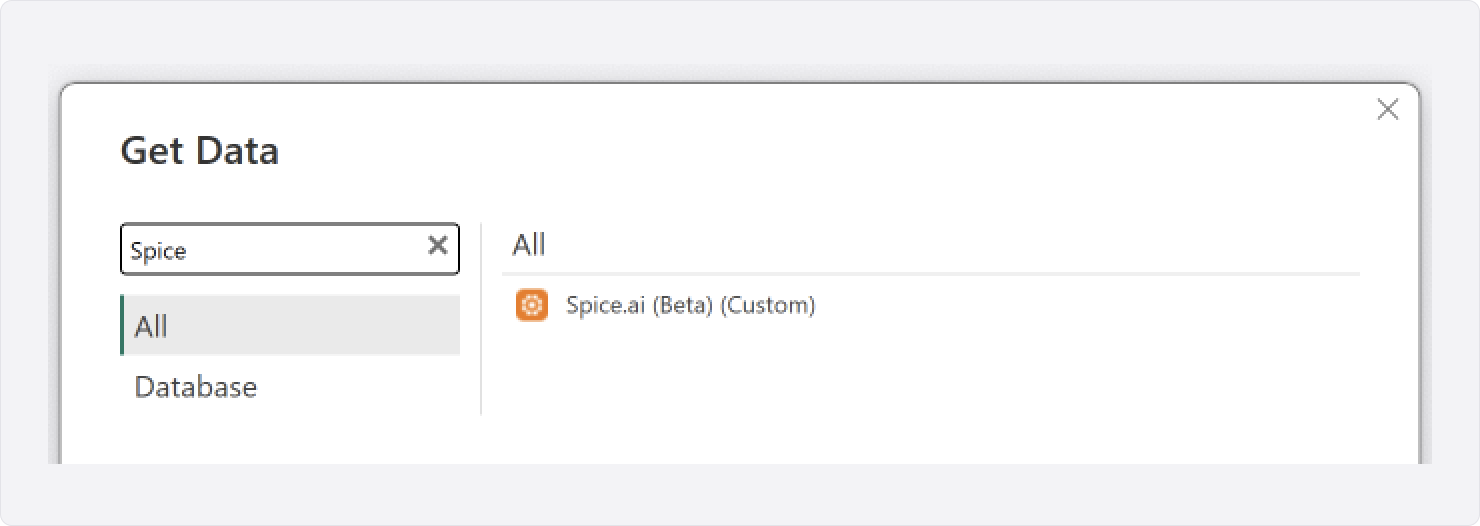
- Click on
Get Data→More.... - In the dialog, select
Spice.aiconnector.
- Click
Connect. - Enter the ADBC (Arrow Flight SQL) Endpoint:
- For Spice Cloud Platform:
grpc+tls://flight.spiceai.io:443
(Use the region-specific address if applicable.) - For on-premises/self-hosted Spice.ai:
- Without TLS (default):
grpc://<server-ip>:50051 - With TLS:
grpc+tls://<server-ip>:50051
- Without TLS (default):
- For Spice Cloud Platform:

- Select the
Data Connectivitymode:- Import: Data is loaded into Power BI, enabling extensive functionality but requiring periodic refreshes and sufficient local memory to accommodate the dataset.
- DirectQuery: Queries are executed directly against Spice in real-time, providing fast performance even on large datasets by leveraging Spice's optimized query engine.
- Click
OK. - Select
Authenticationoption:- Anonymous: Select for unauthenticated on-premises deployments.
API Key: Your Spice.ai API key for authentication (required for Spice Cloud). Follow the guide to obtain it from the Spice Cloud portal.

- Click
Connectto establish the connection.
Working with Spice datasets
After establishing a connection, Spice datasets appear under their respective schemas, with the default schema being spice.public. When writing native queries, use the PostgreSQL dialect, as Spice is built on this standard.

For a list of supported data types, visit the docs here.
Getting started with Spice and Power BI
Spice extends Power BI beyond the traditional limits imposed on it by sub-optimal ETL pipelines.
Spice enables Power BI users to:
- Run federated SQL queries across disparate data sources in one place with zero ETL required.
- Accelerate and materialize large datasets for sub-second dashboards in Power BI.
- Use either Import Mode for full feature access or DirectQuery Mode for real-time results.
- Build on open standards like ADBC and Apache Arrow, not on proprietary SDKs.
To try it out, download the Spice Power BI Connector and follow the documentation. Configure your first dataset, connect Power BI, and experience how federation and acceleration can make your dashboards faster and more reliable.
Resources
- Sign up for Spice Cloud for free, or get started with Spice Open Source
- Install the connector
- Explore the Spice cookbooks and docs
Behind the connector, SQL query federation and acceleration keeps dashboards fast without ETL; see the analytics use case for more. To evaluate Spice with Power BI, get a demo.
Frequently Asked Questions
Do I need to install anything to connect Power BI to Spice?
Yes, you install the Spice connector file once in Power BI Desktop. Download spice_adbc.mez from the GitHub releases page and copy it to the Power BI Custom Connectors folder. Then turn on uncertified connectors in the Power BI Desktop settings and restart Power BI Desktop. After this one-time setup, Power BI queries Spice without ETL pipelines.
Should I use Import mode or DirectQuery mode with the Spice connector?
Use DirectQuery mode when dashboards need real-time results on large datasets. DirectQuery sends each query to Spice, which accelerates data in DuckDB and Apache Arrow. Use Import mode when a report needs Power BI features that require local data. Import mode loads the dataset into Power BI memory and needs periodic refreshes.
What is ADBC and why does it matter for Power BI dashboards?
ADBC (Arrow Database Connectivity) is a vendor-neutral, Arrow-native standard for moving columnar data into applications. JDBC and ODBC convert columnar data to rows and back, which slows analytical queries. ADBC removes those conversions, so query results reach Power BI dashboards faster.
How much faster are Power BI queries with Spice?
In Spice AI's 2025 order-management demo, Power BI query time dropped from 1324 ms querying AWS RDS directly to 223 ms with Spice. Spice prefetches working sets from source systems and accelerates them locally in DuckDB and Apache Arrow. This cuts repeated network round-trips, so queries return in under a second even on billion-row datasets.
Can Power BI query PostgreSQL and S3 in the same dashboard through Spice?
Yes, Spice federates queries across operational databases, warehouses, and object stores like S3. Power BI queries them as one dataset through the connector, without copying data into a warehouse first. Query federation and acceleration removes the need to consolidate sources before analysis.
How does Power BI data stay fresh when Spice accelerates it?
Spice refreshes accelerated datasets on a schedule or in real time through change data capture (CDC). Dashboards then present current data without a manual refresh pipeline. This keeps operational analytics current without adding load to production databases.
What SQL dialect do native queries use with the Spice connector?
Native queries use the PostgreSQL dialect because Spice builds on the PostgreSQL standard. After you connect, Spice datasets appear under their schemas, and the default schema is spice.public.
How does authentication work with the Spice Power BI connector?
Spice Cloud connections require an API key, which you create in the Spice Cloud portal. Unauthenticated on-premises deployments can select the Anonymous option instead.
See Spice in action
Walk through your use case with an engineer and see how Spice handles federation, acceleration, and AI integration for production workloads.
Talk to an engineer (opens in a new tab)


