Sales BI (Apache Superset)
Works with v1.0+
Use Apache Superset (opens in a new tab) to query and visualize datasets loaded in Spice.
Apache Superset is a modern, enterprise-ready business intelligence web application. It is fast, lightweight, intuitive, and loaded with options that make it easy for users of all skill sets to explore and visualize their data, from simple pie charts to highly detailed deck.gl geospatial charts.
– Apache Superset documentation (opens in a new tab)
https://github.com/spiceai/samples/assets/879445/ccc92377-0023-4073-ade1-09bb001ba886 (opens in a new tab)
This recipe will show how to configure a BI dashboard (Apache Superset) to use Spice as the data source for sales data. The sales data is stored in a parquet file on Amazon S3.
Spice.ai can be used to accelerate data from connected data sources by keeping an automatically updated copy of the data in an optimized format. This data can be used to power a BI dashboard that refreshes quickly.
Pre-requisites
This recipe requires Docker (opens in a new tab) and Docker Compose (opens in a new tab) to be installed.
Start Apache Superset with Flight SQL & DataFusion SQL Dialect support
Superset requires a Python DB API 2 (opens in a new tab) database driver and a SQLAlchemy (opens in a new tab) dialect to be installed for each connected datastore. Spice implements a Flight SQL server that understands the DataFusion SQL Dialect. The flightsql-dbapi (opens in a new tab) library for Python provides the required DB API 2 driver and SQLAlchemy dialect.
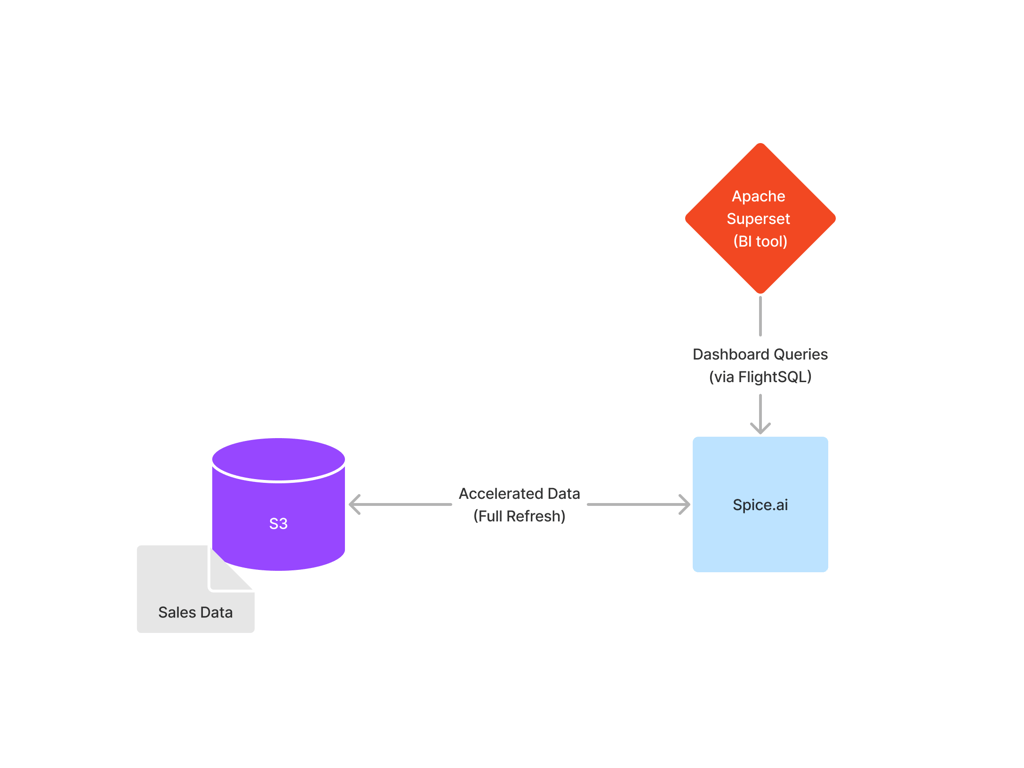
This recipe consists of a Docker Compose file with the following components:
- A Spice runtime accelerating the data from the parquet file in S3.
- An Apache Superset instance to visualize the data, connected to the Spice instance.
Clone the spiceai/cookbook repository and navigate to the sales-bi directory:
git clone https://github.com/spiceai/cookbook.git
cd cookbook/sales-bi
git clone https://github.com/spiceai/cookbook.git
cd cookbook/sales-bi
Run the following command to start the components in the Docker Compose file:
make
This will start the Spice runtime and Apache Superset. The Spice runtime will load two datasets based on the parquet file in S3 - one is accelerated and one is not:
version: v1
kind: Spicepod
name: sales-bi

datasets:
  - from: s3://spiceai-demo-datasets/cleaned_sales_data.parquet
    name: cleaned_sales_data_accelerated
    acceleration:
      enabled: true
      refresh_check_interval: 10s
      refresh_mode: full

  - from: s3://spiceai-demo-datasets/cleaned_sales_data.parquet
    name: cleaned_sales_data
version: v1
kind: Spicepod
name: sales-bi

datasets:
  - from: s3://spiceai-demo-datasets/cleaned_sales_data.parquet
    name: cleaned_sales_data_accelerated
    acceleration:
      enabled: true
      refresh_check_interval: 10s
      refresh_mode: full

  - from: s3://spiceai-demo-datasets/cleaned_sales_data.parquet
    name: cleaned_sales_data
Queries against cleaned_sales_data will always request data from the parquet file in S3, while queries against cleaned_sales_data_accelerated will be run against the locally accelerated copy of the parquet file.
The output of the make command should look like:
✔ Container superset-sales-bi-demo  Started                                                                                                                                           0.0s
 ✔ Container spiceai-sales-bi-demo   Started                                                                                                                                           0.0s
Connection to localhost port 8088 [tcp/radan-http] succeeded!
Initializing Superset...

Superset is running at http://localhost:8088, login with admin/admin
✔ Container superset-sales-bi-demo  Started                                                                                                                                           0.0s
 ✔ Container spiceai-sales-bi-demo   Started                                                                                                                                           0.0s
Connection to localhost port 8088 [tcp/radan-http] succeeded!
Initializing Superset...

Superset is running at http://localhost:8088, login with admin/admin
Navigate to http://localhost:8088 (opens in a new tab) to access the Apache Superset dashboard. The login credentials are admin/admin.
Once logged in, navigate to the Sales Dashboard (Federated) to view the sales data that is querying against the non-accelerated data.
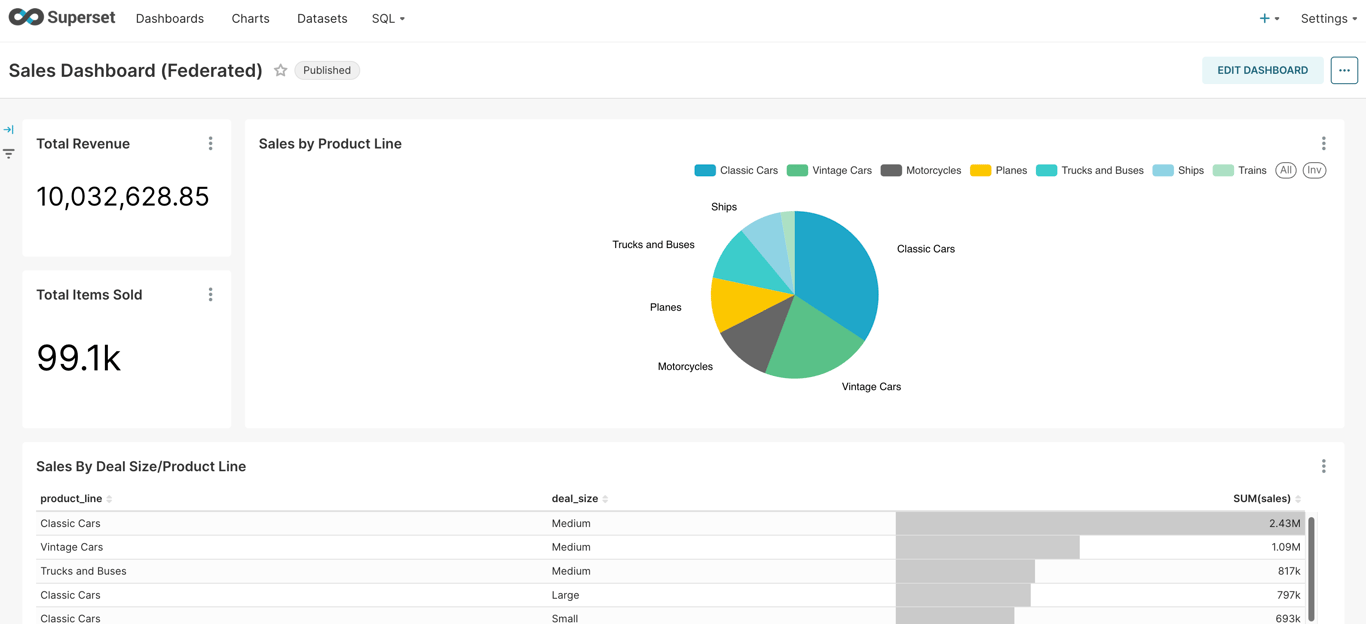
Click on a product line to view the sales data for that product line, i.e. for Vintage Cars:
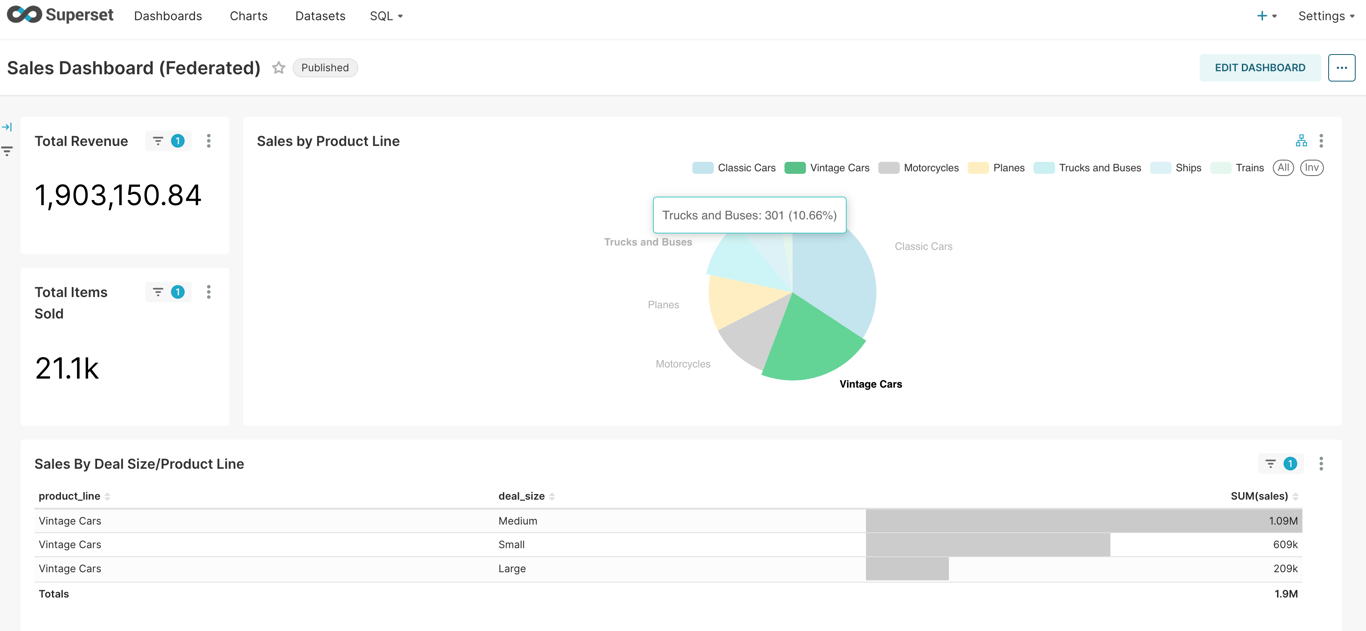
Notice that the dashboard takes a few seconds to load the data. This is because the data is being queried from the parquet file in S3.
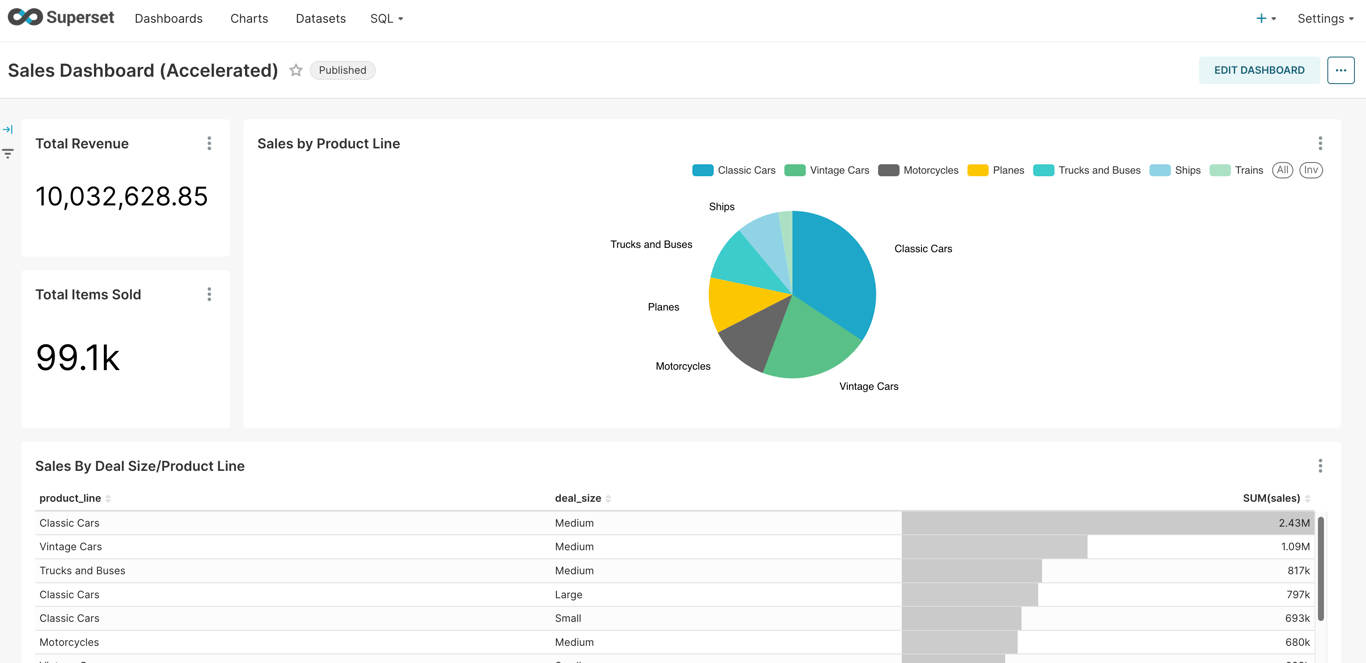
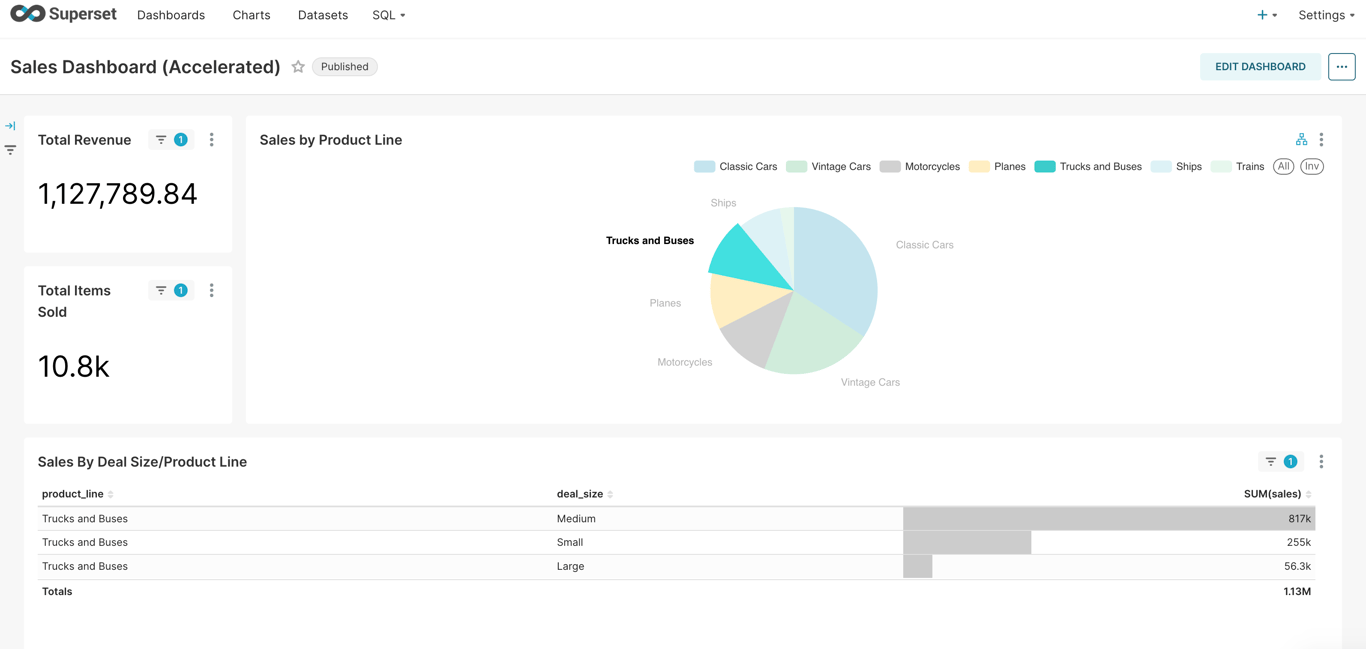
Navigate to the Sales Dashboard (Accelerated) to view the sales data that is querying against the accelerated data. Notice that the dashboard feels much more responsive.
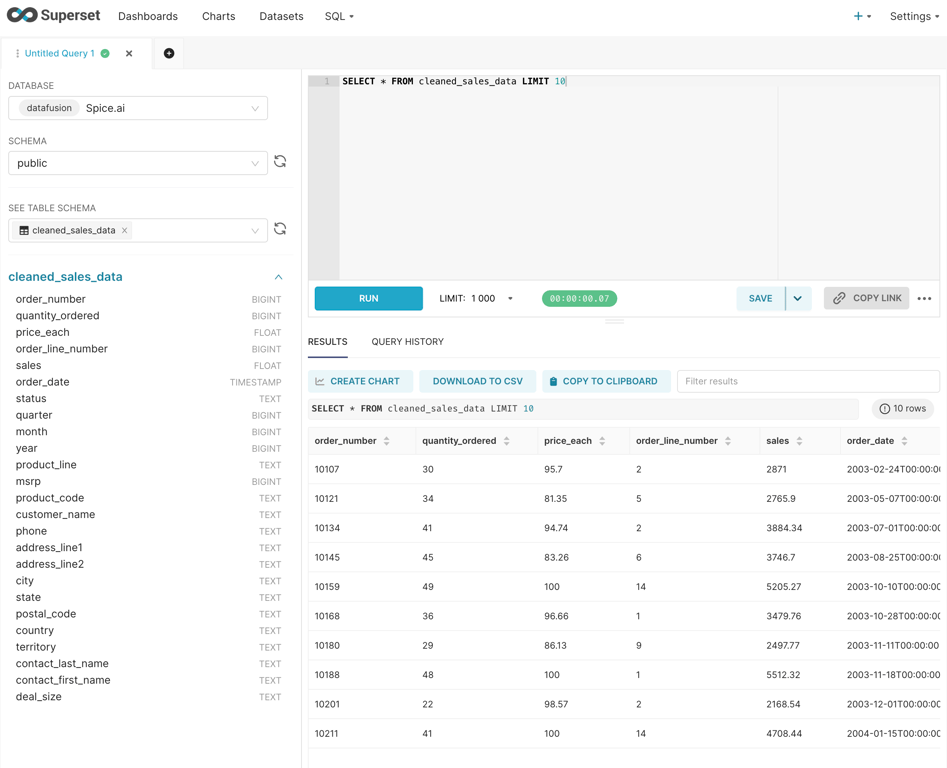
In the top navigation bar, hover over the SQL menu and click on SQL Lab to view a query editor. Explore the data from the Spice.ai runtime by running SQL queries, i.e. SELECT * FROM cleaned_sales_data LIMIT 10 or SELECT * FROM cleaned_sales_data_accelerated LIMIT 10:
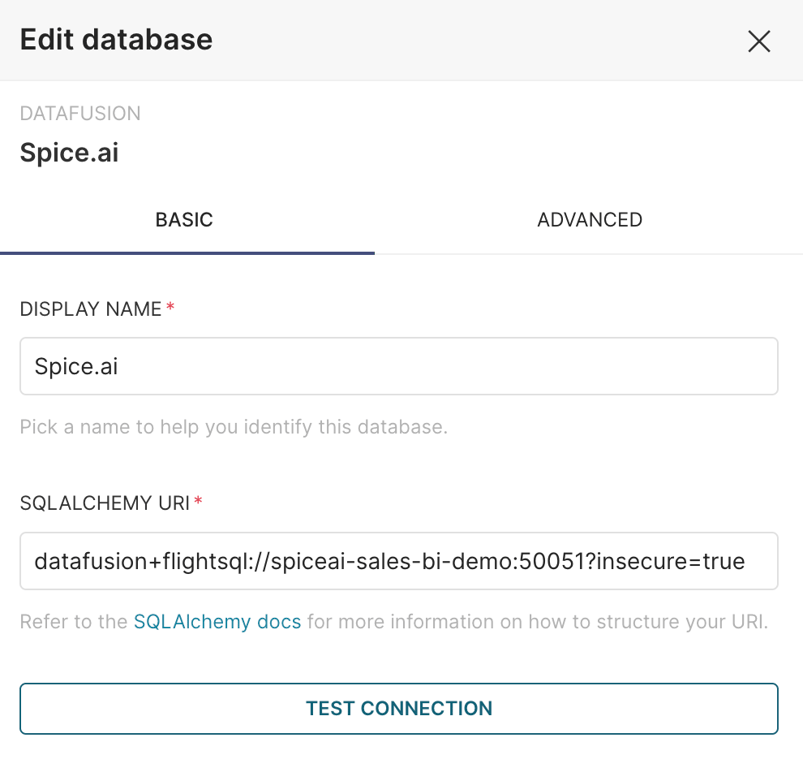
View the connection details for the Spice.ai runtime, hover over the Settings menu and click on Database Connections. Hover over the Spice.ai entry and click the pencil icon. The connection details for the Spice.ai runtime are shown:
Spice SQL REPL
In addition to Apache Superset, run queries using the Spice SQL REPL to explore the data in the Spice.ai runtime.
docker exec -it spiceai-sales-bi-demo spiced --repl
Welcome to the Spice.ai SQL REPL! Type `help` or `?` for commands.

Examples:
  show tables;              -- list available tables
  describe <table_name>;    -- show column types
  nql <question>            -- natural language to SQL (requires a model)

sql> show tables;
+---------------+--------------+--------------------------------+------------+
| table_catalog | table_schema |           table_name           | table_type |
|    varchar    |    varchar   |             varchar            |   varchar  |
+---------------+--------------+--------------------------------+------------+
| spice         | public       | cleaned_sales_data_accelerated | BASE TABLE |
| spice         | public       | cleaned_sales_data             | BASE TABLE |
| spice         | runtime      | task_history                   | BASE TABLE |
+---------------+--------------+--------------------------------+------------+

Time: 0.001464792 seconds. 3 rows.

sql> select * from cleaned_sales_data limit 1;
+--------------+------------------+------------+-------------------+---------+---------------------+---------+---------+-------+-------+--------------+-------+--------------+-------------------+------------+-------------------------+---------------+---------+---------+-------------+---------+-----------+-------------------+--------------------+-----------+
| order_number | quantity_ordered | price_each | order_line_number |  sales  |      order_date     |  status | quarter | month |  year | product_line |  msrp | product_code |   customer_name   |    phone   |      address_line1      | address_line2 |   city  |  state  | postal_code | country | territory | contact_last_name | contact_first_name | deal_size |
|     int64    |       int64      |   float64  |       int64       | float64 |    timestamp[us]    | varchar |  int64  | int64 | int64 |    varchar   | int64 |    varchar   |      varchar      |   varchar  |         varchar         |    varchar    | varchar | varchar |   varchar   | varchar |  varchar  |      varchar      |       varchar      |  varchar  |
+--------------+------------------+------------+-------------------+---------+---------------------+---------+---------+-------+-------+--------------+-------+--------------+-------------------+------------+-------------------------+---------------+---------+---------+-------------+---------+-----------+-------------------+--------------------+-----------+
| 10107        | 30               | 95.7       | 2                 | 2871.0  | 2003-02-24T00:00:00 | Shipped | 1       | 2     | 2003  | Motorcycles  | 95    | S10_1678     | Land of Toys Inc. | 2125557818 | 897 Long Airport Avenue |               | NYC     | NY      | 10022       | USA     |           | Yu                | Kwai               | Small     |
+--------------+------------------+------------+-------------------+---------+---------------------+---------+---------+-------+-------+--------------+-------+--------------+-------------------+------------+-------------------------+---------------+---------+---------+-------------+---------+-----------+-------------------+--------------------+-----------+

Time: 0.682375333 seconds. 1 rows.

sql> select order_date, sales from cleaned_sales_data limit 3;
+---------------------+---------+
|      order_date     |  sales  |
|    timestamp[us]    | float64 |
+---------------------+---------+
| 2003-02-24T00:00:00 | 2871.0  |
| 2003-05-07T00:00:00 | 2765.9  |
| 2003-07-01T00:00:00 | 3884.34 |
+---------------------+---------+

Time: 0.172093208 seconds. 3 rows.

sql> select order_date, sales from cleaned_sales_data_accelerated limit 3;
+---------------------+---------+
|      order_date     |  sales  |
|    timestamp[us]    | float64 |
+---------------------+---------+
| 2003-02-24T00:00:00 | 2871.0  |
| 2003-05-07T00:00:00 | 2765.9  |
| 2003-07-01T00:00:00 | 3884.34 |
+---------------------+---------+

Time: 0.003672709 seconds. 3 rows.
Welcome to the Spice.ai SQL REPL! Type `help` or `?` for commands.

Examples:
  show tables;              -- list available tables
  describe <table_name>;    -- show column types
  nql <question>            -- natural language to SQL (requires a model)

sql> show tables;
+---------------+--------------+--------------------------------+------------+
| table_catalog | table_schema |           table_name           | table_type |
|    varchar    |    varchar   |             varchar            |   varchar  |
+---------------+--------------+--------------------------------+------------+
| spice         | public       | cleaned_sales_data_accelerated | BASE TABLE |
| spice         | public       | cleaned_sales_data             | BASE TABLE |
| spice         | runtime      | task_history                   | BASE TABLE |
+---------------+--------------+--------------------------------+------------+

Time: 0.001464792 seconds. 3 rows.

sql> select * from cleaned_sales_data limit 1;
+--------------+------------------+------------+-------------------+---------+---------------------+---------+---------+-------+-------+--------------+-------+--------------+-------------------+------------+-------------------------+---------------+---------+---------+-------------+---------+-----------+-------------------+--------------------+-----------+
| order_number | quantity_ordered | price_each | order_line_number |  sales  |      order_date     |  status | quarter | month |  year | product_line |  msrp | product_code |   customer_name   |    phone   |      address_line1      | address_line2 |   city  |  state  | postal_code | country | territory | contact_last_name | contact_first_name | deal_size |
|     int64    |       int64      |   float64  |       int64       | float64 |    timestamp[us]    | varchar |  int64  | int64 | int64 |    varchar   | int64 |    varchar   |      varchar      |   varchar  |         varchar         |    varchar    | varchar | varchar |   varchar   | varchar |  varchar  |      varchar      |       varchar      |  varchar  |
+--------------+------------------+------------+-------------------+---------+---------------------+---------+---------+-------+-------+--------------+-------+--------------+-------------------+------------+-------------------------+---------------+---------+---------+-------------+---------+-----------+-------------------+--------------------+-----------+
| 10107        | 30               | 95.7       | 2                 | 2871.0  | 2003-02-24T00:00:00 | Shipped | 1       | 2     | 2003  | Motorcycles  | 95    | S10_1678     | Land of Toys Inc. | 2125557818 | 897 Long Airport Avenue |               | NYC     | NY      | 10022       | USA     |           | Yu                | Kwai               | Small     |
+--------------+------------------+------------+-------------------+---------+---------------------+---------+---------+-------+-------+--------------+-------+--------------+-------------------+------------+-------------------------+---------------+---------+---------+-------------+---------+-----------+-------------------+--------------------+-----------+

Time: 0.682375333 seconds. 1 rows.

sql> select order_date, sales from cleaned_sales_data limit 3;
+---------------------+---------+
|      order_date     |  sales  |
|    timestamp[us]    | float64 |
+---------------------+---------+
| 2003-02-24T00:00:00 | 2871.0  |
| 2003-05-07T00:00:00 | 2765.9  |
| 2003-07-01T00:00:00 | 3884.34 |
+---------------------+---------+

Time: 0.172093208 seconds. 3 rows.

sql> select order_date, sales from cleaned_sales_data_accelerated limit 3;
+---------------------+---------+
|      order_date     |  sales  |
|    timestamp[us]    | float64 |
+---------------------+---------+
| 2003-02-24T00:00:00 | 2871.0  |
| 2003-05-07T00:00:00 | 2765.9  |
| 2003-07-01T00:00:00 | 3884.34 |
+---------------------+---------+

Time: 0.003672709 seconds. 3 rows.
Clean up
To stop and remove the Docker containers/volumes that were created, run:
make clean


![dependabot[bot]](https://avatars.githubusercontent.com/in/29110?v=4)


